214683 280 Revision A
Checking Reel Height Sensor Voltages (New Holland)
NOTE:
Changes may have been made to the combine controls or display since this document was published. Refer to the
combine operator’s manual for updates.
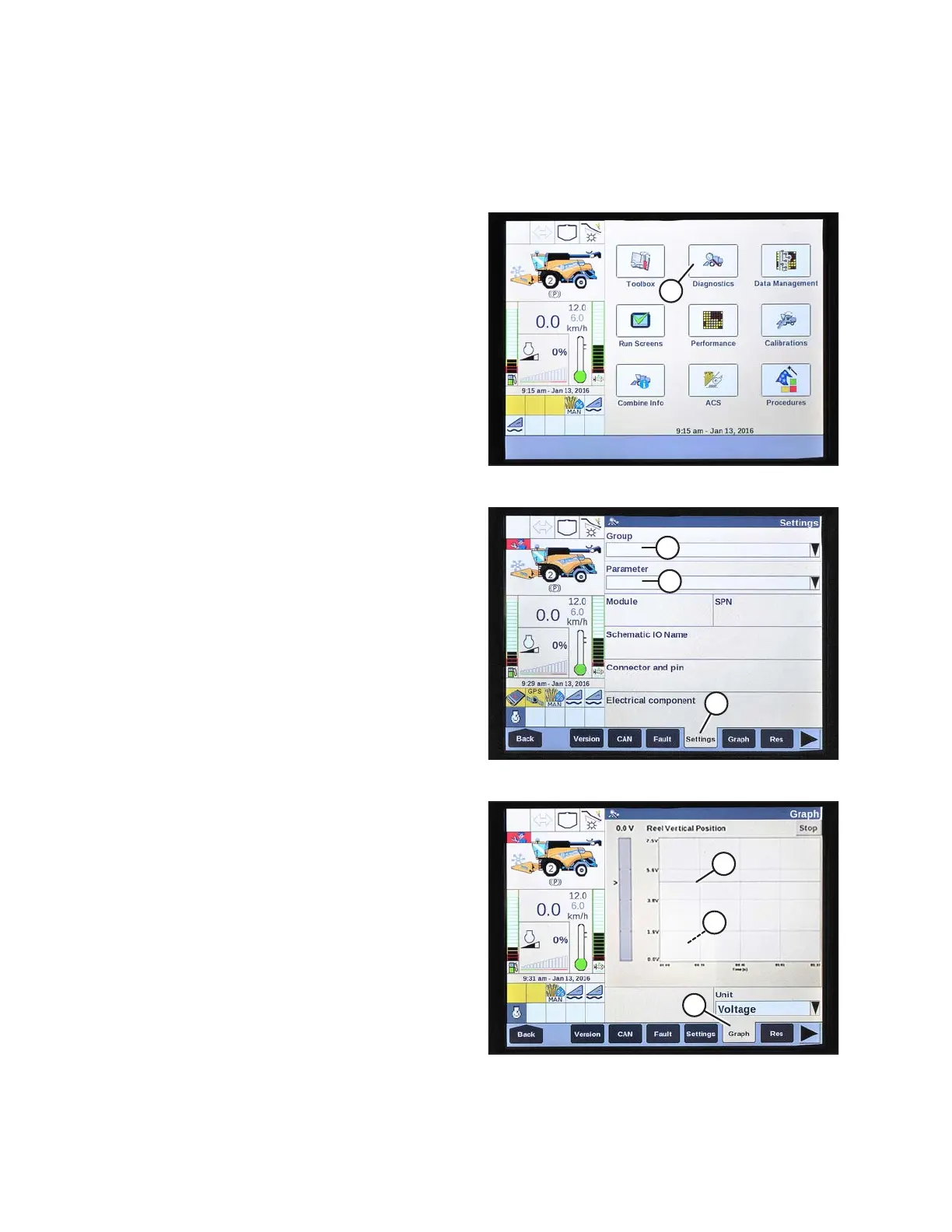
Figure 3.496: New Holland Combine Display
1. On the main page of the combine display, select
DIAGNOSTICS (A). The DIAGNOSTICS page opens.
Figure 3.497: New Holland Combine Display
2. Select SETTINGS tab (A). The SETTINGS page opens.
3. From the GROUP menu (B), select HEADER.
4. From the PARAMETER menu (C), select REEL
VERTICAL POSITION.
Figure 3.498: New Holland Combine Display
5. Select GRAPH tab (A). The REEL VERTICAL
POSITION graph displays.
6. Lower the reel to view the high voltage (B). The voltage
should be 4.1–4.5 V.
7. Raise the reel to view the low voltage (C). The voltage
should be 0.5–0.9 V.
8. If either voltage is out of range, refer to Checking and
Adjusting Reel Height Sensor, page 96.
OPERATION









 To Next Page