214683 435 Revision A
Adjusting Auger Finger Timing
To adjust auger finger timing, follow these steps:
NOTE:
Left side of auger shown.
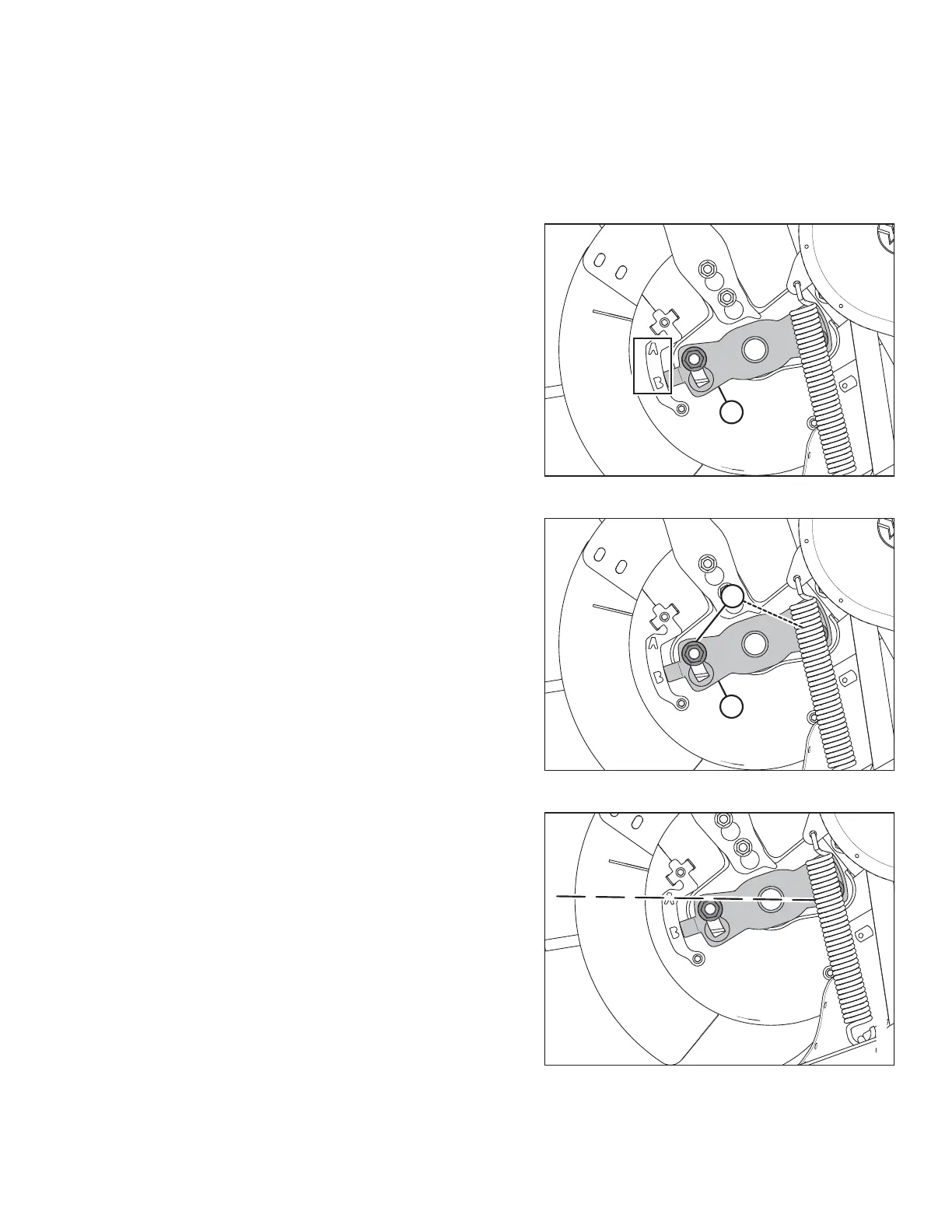
Figure 5.80: Auger Tine Timing Indicator
1. Raise the reel to maximum height. Engage reel
safety props. Refer to Engaging Reel Safety Props,
page 31.
2. Shut down the combine and remove the key from
the ignition.
3. Locate indicator (A) that specifies when the fingers in
the drum extend. There are two settings for the
indicator: A and B.
Figure 5.81: Auger Tine Timing Indicator
4. Loosen nuts (A) and adjust finger timing indicator (B) to
desired position.
IMPORTANT:
It is extremely important that both sides are set at the
same position; if not, the drum will be damaged beyond
repair.
Figure 5.82: Auger Setting A
NOTE:
If the finger timing indicator is pointing at setting A,it
indicates that at that point the auger fingers will be fully
extended. This allows the crop to be engaged and
released earlier before entering the feeder house. This
setting is best used for canola or bushy crops.
MAINTENANCE AND SERVICING









 To Next Page