PROFXV3+ MULTI-CHANNEL ANALOG MIXERS WITH ENHANCED FX, USB RECORDING MODES, AND BLUETOOTH®
40
FX Presets
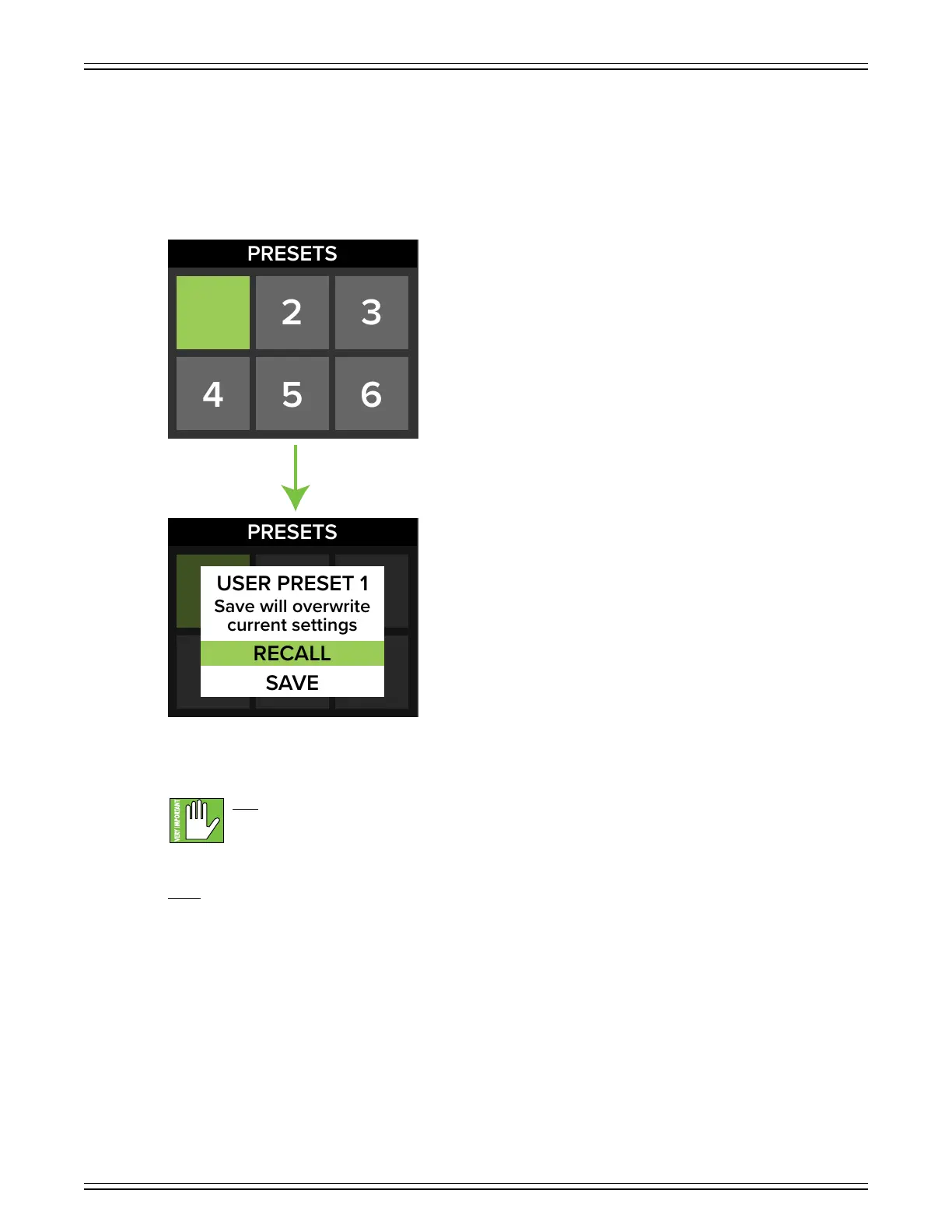
The presets section allows you to save up to six settings to memory that may be recalled at a later time.
No more having to reset parameters upon every power-up!
As was done previously, simply rotate the Studio Command Control Knob until ‘Presets’ is highlighted (first screenshot below).
Next, rotate the knob to switch between the six presets followed by pushing the knob in to select it (second screenshot below).
As one might suspect by now, rotating the knob switches between ‘Recall’ and ‘Save’ and pushing the knob in chooses
the currently highlighted selection.
Save – Select this to save the current settings to the corresponding preset.
Please be aware that the new settings will replace the currently saved settings.
Recall – Select this to recall the settings of the corresponding preset.
1
1



 To Next Page