(E) 35
LT20A / LT30 Series
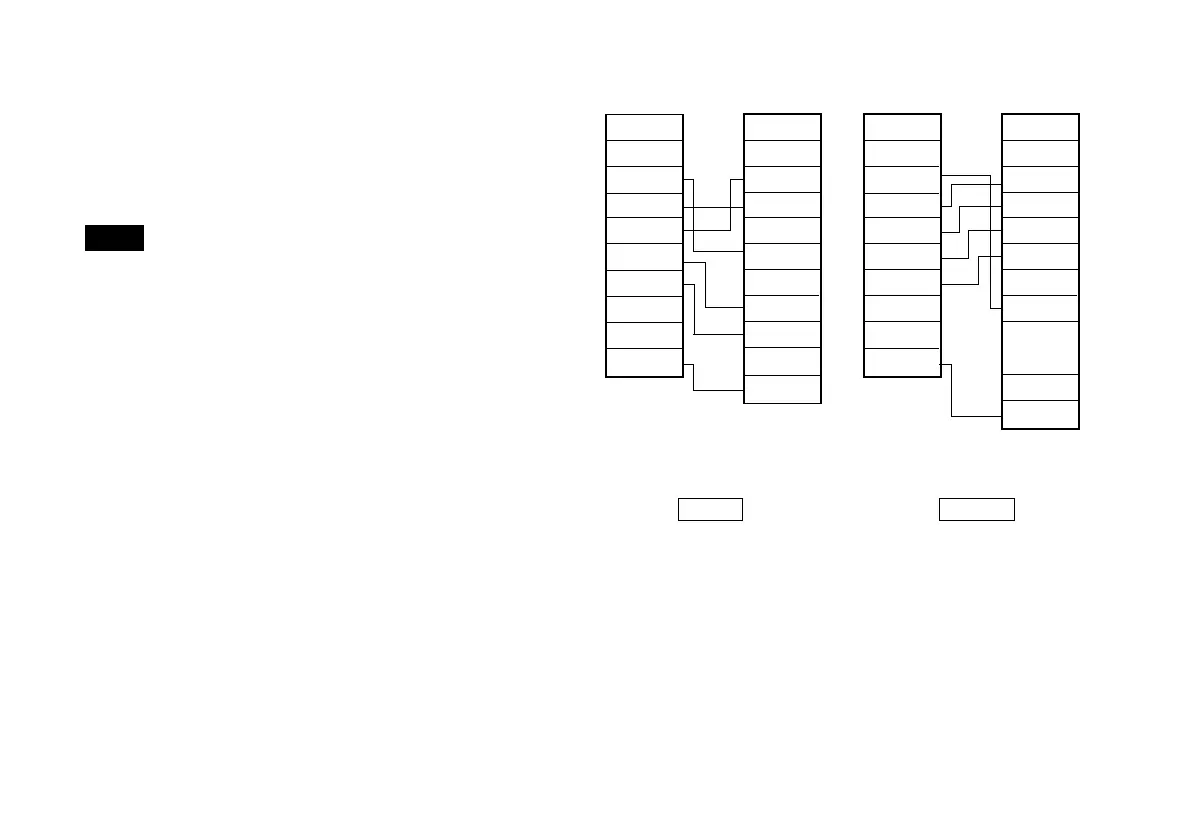
9-2. Connecting a personal computer
Use a DZ252 or DZ253A RS-232C cable (sold seperately)
for connecting personal computers.
(See “9-6. Commands”.)
Note
The shielded cables of the DZ252 and DZ253A connectors
are connected to FG of the counter unit.
The DZ252 and DZ253A connectors for the personal
computer side are 9 and 25-pin Dsub connectors,
respectively. Please check the form of the personal
computer’s RS-232C connector before purchasing the
cable for connection. For further information please consult
your dealer.
Pin No.
1
2
3
4
5
6
7
8
Case
Pin No.
1
2
3
4
5
6
7
8
9
Case
Pin No.
1
2
3
4
5
6
7
8
Case
Pin No.
1
2
3
4
5
6
7
to
25
Case
9pin Dsub
Female
25pin Dsub Male
8pin mini DIN8pin mini DIN
DZ252 DZ253A
Personal
computer side
Personal
computer side
Shield
cable
Shield
cable
LT20A/
LT30 side
LT20A/
LT30 side
Connection



 To Next Page