Quattro DC Parameters
37
Menu Navigation
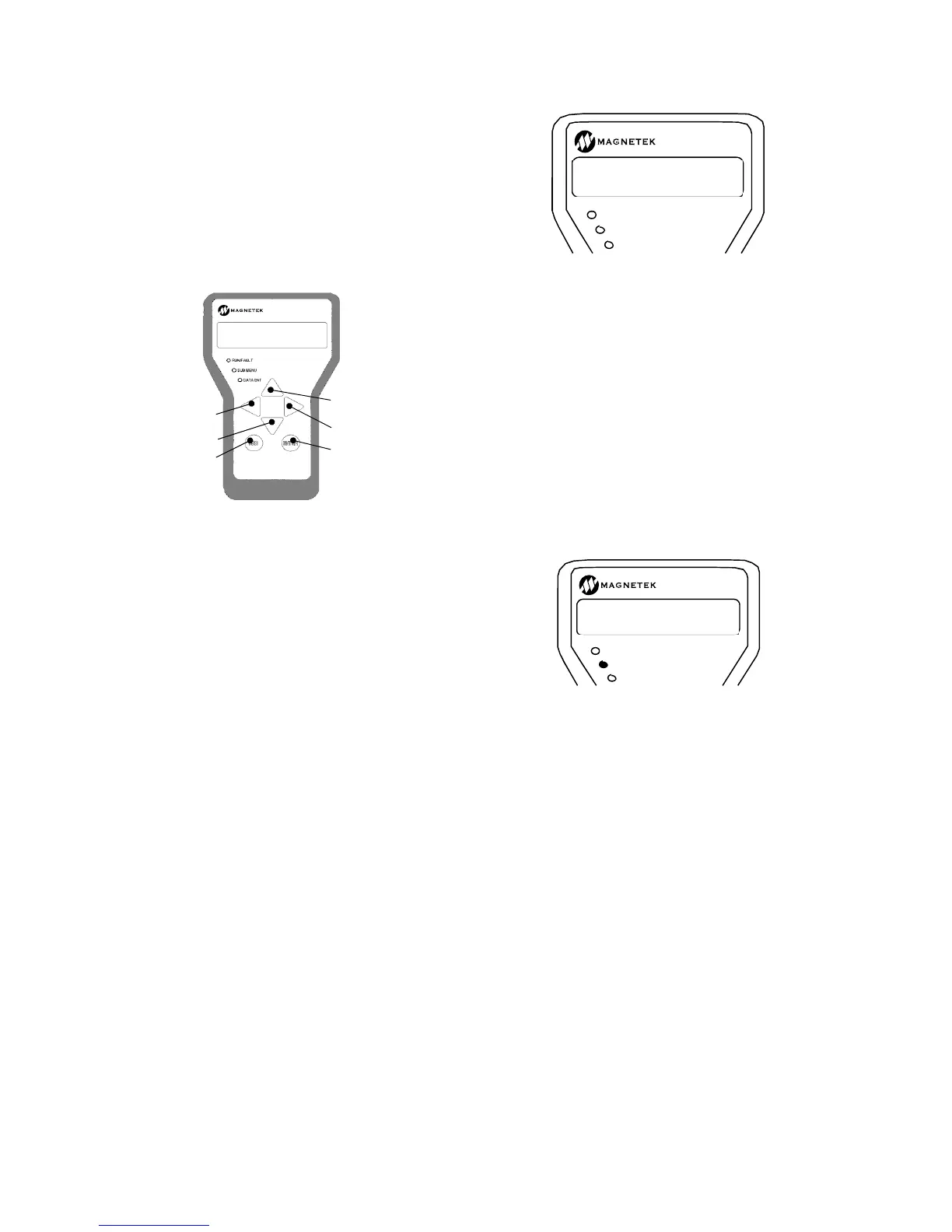
The digital operator keys operate on three
levels, the menu level, the sub-menu level and
the entry level. At the menu level, they
function to navigate between menus or sub-
menus. At the sub-menu level, they navigate
between sub-menus or menu items. At the
entry level, they are used to adjust values or
select options. Six (6) keys are used for this
navigation; they are shown below:
Digital Operator Keys
How these keys operate is dependent on the
“level” (i.e. menu, sub-menu or entry level.) In
general, the “ENTER” and “ESCAPE” keys
control the level. That is the ENTER key is
used to move to a lower level and the
ESCAPE key is used to move to a higher level.
The arrow keys control movement. The up and
down arrow keys control vertical position and
the left and right arrow keys control horizontal
position.
Navigation at the Menu Level
At the menu level, the up and down arrow keys
cause the display to show the sub-menus.
The side arrow keys cause the display to
select which menu is active. When the end of
a menu is reached (either up, down, left or
right), pressing the same key will cause a wrap
around.
Each menu will remember the last accessed
sub-menu. The left and right arrow keys will
navigate between these last active sub-menus.
This remembrance of last active sub-menu is
volatile and will be lost at power down.
When any sub-menu is displayed, pressing the
“ENTER” key will place the operator in the sub-
menu level.
Navigation at the Sub-menu Level
When in the sub-menu level, the SUB-MENU
LED on the digital operator is lit. At the sub-
menu level, the positioning keys work slightly
different than they did at the menu level. The
up and down arrow keys now select separate
items in the sub-menu.
At any time pressing the “ESCAPE” key will
return to the menu level. Upon exiting a sub-
menu via the “ESCAPE” key, the last item
number is “remembered”. The next time this
sub-menu is entered, it is entered at the
“remembered” item number.
This feature can be used to obtain quick
access to two monitor values. Two menus one
labeled Display 1 D0 and one labeled Display
2 D0 have the same display items. One item
can be selected one under the Display 1 menu
and another under the Display 2 menu. The
left and right arrow keys can then be used to
move back and forth between these two
display items. Remember, that the
“remembering” of sub-menus and sub-menu
items is volatile and is lost at power-down.
RUN/FAULT
SUB MENU
DATA ENT
CONTRACT CAR SPD
A1 0400.0 f
m
RUN/FAULT
SUB MENU
DATA ENT
ADJUST A0
DRIVE A1
ENTER ke
Left Arrow
Up Arrow key
Right Arrow



 To Next Page