Quattro DC User Switches C1 Submenu
76
1 Threshold:
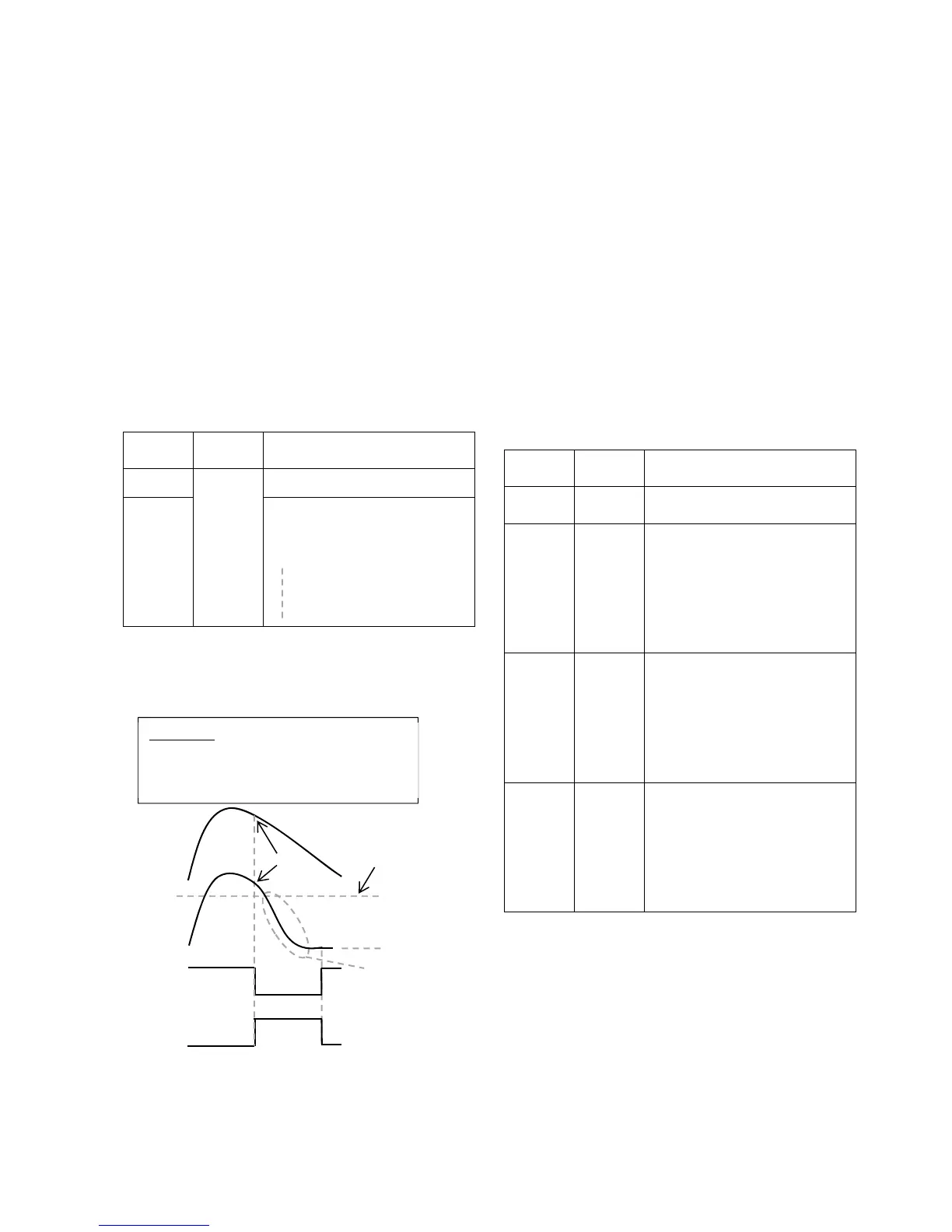
The drive uses only 1 speed check point to
determine whether or not it should go into
NTSD mode. When Logic Input 1 (C2) is logic
low, the drive will compare the speed feedback
to NTSD Threshold 1. If the absolute value of
speed feedback is greater than NTSD
Threshold 1 (A1), the drive will slow down
using S-Curve 4. Then it will clamp the drive
speed command so that the absolute value of
speed command is less than or equal to NTSD
Target Speed (A1). The drive will get out of
NTSD mode and back into normal operation
when: the NTSD input is re-asserted as logic
high again and the absolute value of speed
feedback is less than or equal to the NTSD
Target Spd (A1).
NTSD
Input 1
NTSD
Input 2
Result
1
Not
Used
Normal Operation
0
if
| speed feedback | > NTSD
Threshold 1
decel using S-Curve 4, and
clamp the drive speed
command to
| speed command | ≤ NTSD
Target Speed
Table 9: 1 Threshold NTSD Mode funtion
table
Figure 18: 1 Threshold NTSD Mode
2 Thresholds:
The drive uses 2 speed check points to
determine whether or not it should go into
NTSD mode. When either NTSD Input 1 (C2)
or NTSD Input 2 (C2) is logic low, the drive will
compare the speed feedback to NTSD
Threshold 1 (A1) or NTSD Threshold 2 (A1). If
the absolute value of speed feedback is
greater than the selected threshold, the drive
will slow down using S-Curve 4. Then it will
clamp the drive speed command so that the
absolute value of speed command is less than
or equal to NTSD Target Speed (A1). The
drive will get out of NTSD mode and back into
normal operation when: both NTSD inputs are
re-asserted as logic high again and the
absolute value of speed feedback is less than
or equal to the NTSD Target Spd (A1).
NTSD
Input 1
NTSD
Input 2
Result
1 1 Normal Operation
1 0
if
| speed feedback | > NTSD
Threshold 2
decel using S-Curve 4, and
clamp the drive speed
command to
| speed command | ≤ NTSD
Target Speed
0 1
if
| speed feedback | > NTSD
Threshold 1
decel using S-Curve 4, and
clamp the drive speed
command to
| speed command | ≤ NTSD
Target Speed
0 0
if
| speed feedback | > NTSD
Threshold 1
decel using S-Curve 4, and
clamp the drive speed
command to
| speed command | ≤ NTSD
Target Speed
Table 10: 2 Thresholds NTSD Mode
function table
NTSD
Threshold 1
A1
Decel rate 4 (A2)
Decel jerk in/out 4 (A2)
NTSD Active
(C3)
NTSD Input 1
(C2)
80fpm
NTSD Target
Spd (A1)
Elevator
Speed
Controller
Speed
Command
70fpm
Example:
NTSD 1 Spd Fdbk (D1) = 80 fpm
NTSD Threshold 1 (A1) = 70 fpm
NTSD Target Spd (A1) = 10 fpm



 To Next Page