Quattro DC User Switches C1 Submenu
75
Ramp Stop Select
This parameter allows the selection of the
Torque Ramp Down Stop function. This
function is used to gradually remove the torque
command after the elevator has stopped and
the mechanical brake has been set. This
prevents a shock and possible ‘bump’ felt in
the elevator from the torque signal going to
zero too quickly.
A function unique to elevators involves the
interaction between the motor torque and the
mechanical brake that holds the elevator.
Under full load conditions at the end of a run, if
the brake is set and the motor torque is
removed quickly, some brake slippage may
occur. Therefore, the option of gradually
reducing the motor torque is provided by the
Torque Ramp Down Stop function.
Upon being enabled by the Ramped Stop
Select Parameter (RAMPED STOP SEL(C1)),
the torque command is linearly ramped to zero
from the value that was present when the
‘Ramp Down Enable’ was selected.
The Ramp Down Enable has the following
three possible sources:
An input logic bit (EXTERNAL TB)
The run logic – initiated by the removal of
the run command
The serial channel
The Ramp Down Enable Source parameter
(RAMP DOWN EN SRC(C1)) is used to select
one of the above options.
A method of providing the Ramp Down Enable
would be with a logic signal (EXTERNAL TB)
that is dedicated to that function. The Ramp
Down Enable would be asserted while the Run
command is still present and remain there until
the ramp is completed, after which the Run
command would be removed.
The RUN LOGIC option to trigger the Ramp
Down Enable from the Run command is
provided. In this case, removal of the Run
command enables the Ramp Down Stop
Function.
The time it takes for the Drive to perform its
ramped stop is determined by the Ramped
Stop Time Parameter. The Ramped Stop
Time parameter (RAMPED STOP TIME(A1))
selects the amount of time it would take for the
drive to ramp from the rated torque to zero
torque.
NTSD MODE
(Normal Terminal Stopping Device Mode)
This parameter allows the drive to perform
preprogrammed NTS slowdown. The drive will
ignore most speed command (drive will follow
any speed command slower than the NTSD
Target Speed to ensure proper floor leveling) it
is being told to run at, slow down using the
SCurve 4 parameters, and clamp the drive
speed command at NTSD Target Spd (A1) if it
measures an elevator speed faster than what
is set in NTSD Threshold 1 (A1), NTSD
Threshold 2 (A1), and/or NTSD Threshold 3
(A1) to when the logic input NTSD Input 1 (C2)
and/or NTSD Input 2 (C2) isn’t being triggered.
There are 4 methods that can be selected:
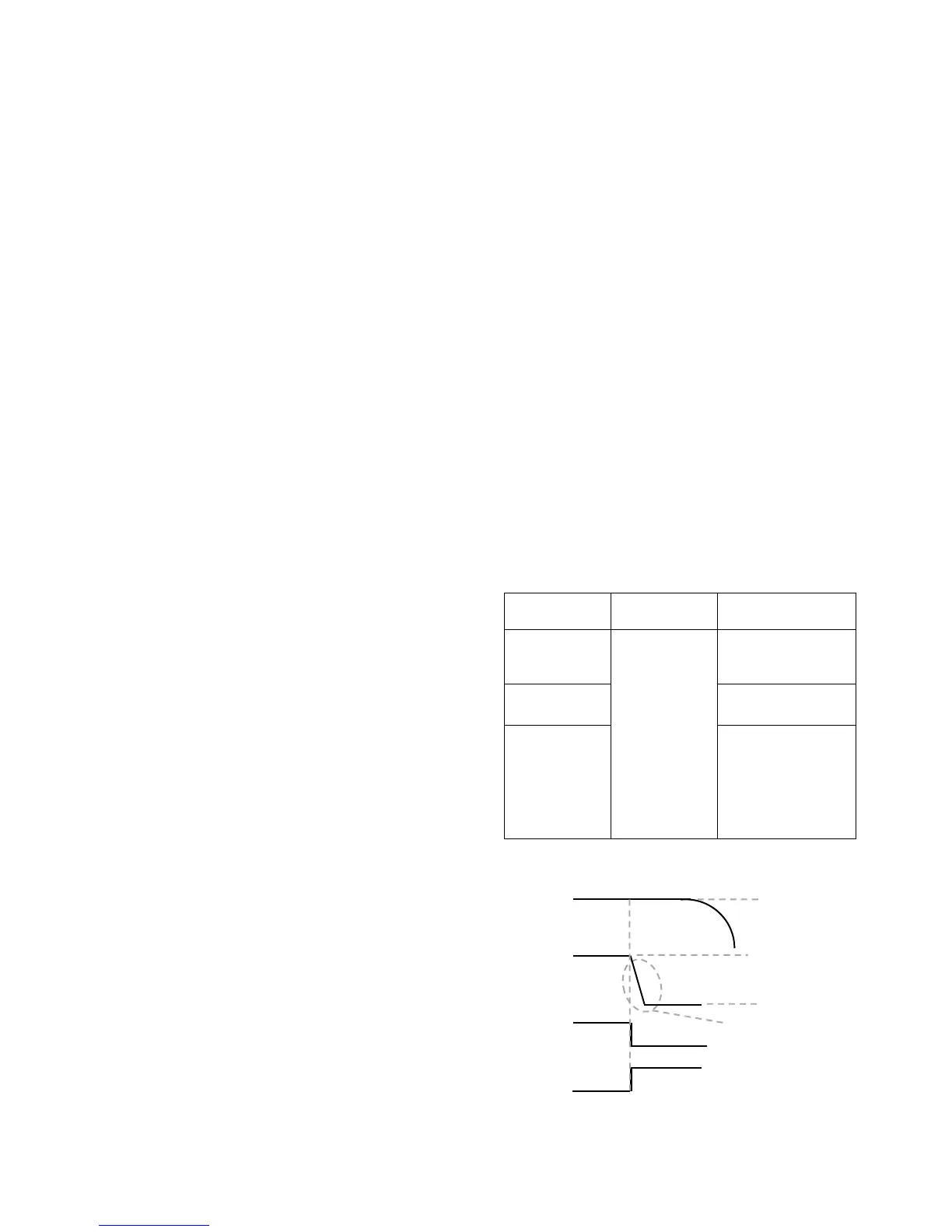
External: This should be selected if the drive
NTSD function will not be used or if it is
desired for the drive to go into NTSD mode as
soon as NTSD Input 1 (C2) is triggered logic
low. The drive will immediately slow down
using SCurve 4 to the NTSD Target Spd (A1)
and clamp the speed there. The drive will get
out of NTSD mode and back into normal
operation when: the NTSD input is re-asserted
as logic high again.
NTSD Input
1
NTSD Input
2
Result
Not Used
Not Used
Internal NTSD
function of drive
is not used
1
Normal
Operation
0
Use S-Curve 4 to
decel and run at
NTSD Target
Speed, OR run at a
slower supplied
drive speed
command
Table 9: External NTSD Mode function table
Figure 17: External NTSD Mode
Decel rate 4 (A2)
Decel jerk in/out 4
NTSD Active
(C3)
NTSD Input 1
(C2)
70fp
70fp
NTSD Target
Spd (A1)
Elevator
S
eed
Controlle
r



 To Next Page