48
Control unit MGCplus
Description of menus and parameters
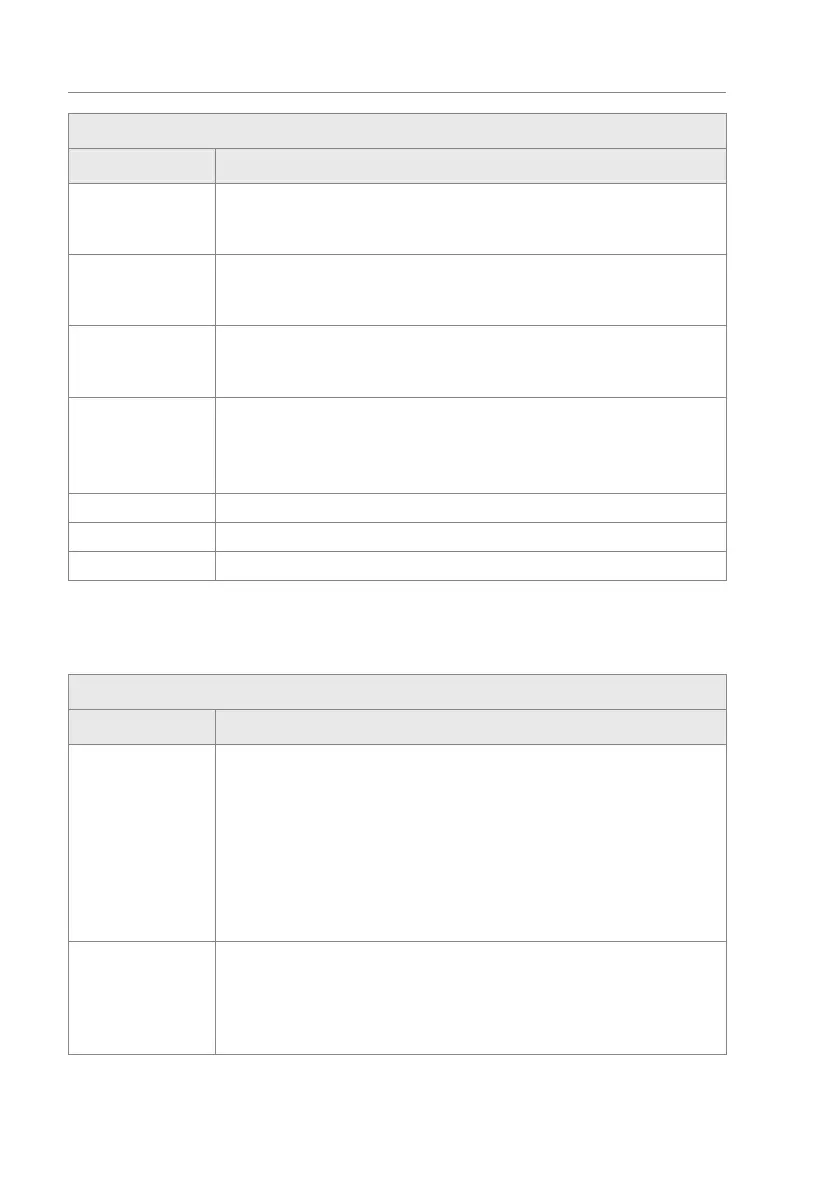
Operational view > Main menu > Settings > Safety > Low energy
Parameter Description
New value S Adjust the value "S" to the installed blocking element. The adjustment re-
quires a service password.
Additionally, the current setting for the value "S" is displayed.
New value T Adjust the value "T" to the installed blocking element. The adjustment re-
quires a service password.
Additionally, the current setting for the value "T" is displayed.
New value C Adjust the value "C" to the installed blocking element. The adjustment re-
quires a service password.
Additionally, the current setting for the value "T" is displayed.
Adopt new values Save all changed values in the "Low energy" menu.
Options
› No action
› Adopt values
Status Shows whether the new values are correct or incorrect.
Readback 1 Shows the current settings for the values "S" and "T" for Wing 1.
Readback 2 Shows the current settings for the values "S" and "T" for Wing 2.
Table 22: Low energy
6.2.4.3 Intrusion
Operational view > Main menu > Settings > Safety > Intrusion
Parameter Description
Do not close Select the behaviour of the wings in case of an unauthorised access attempt
of the "Intrusion" type. If you select the "Activated [ X ]" option, the wings
will not be closed in the event of an unauthorised access attempt of the "In-
trusion" type.
Options
› Inactive [ ]:
› Activated [ X ]
Factory setting
› Activated [ ]:
Disable safety Enable and disable the test of the safety light barriers (safety PE beams) for
an unauthorised access attempt of the "Intrusion" type. ä Page 45, "Disa-
ble safety".
Factory setting
› Inactive [ ]:


 To Next Page