TSC 900 TRANSFER SWITCH CONTROLLER
PM 151 REV 1 15/10/08 Thomson Power Systems
5.4. SYSTEM TIME/DATE ADJUSTMENT
To adjust the TSC 900 controller’s internal time clock, follow the detailed procedure below.
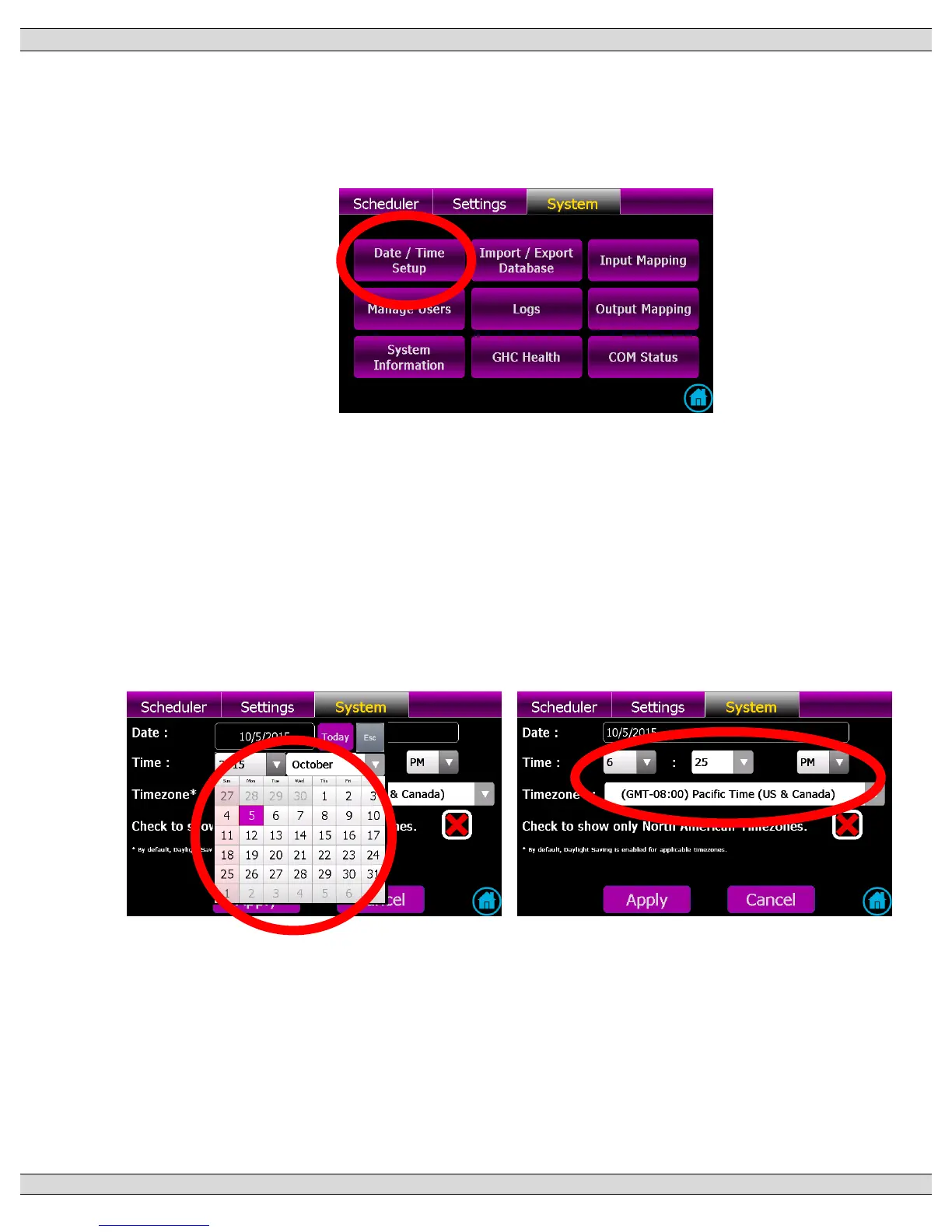
Navigate to SYSTEM screen and press TIME/DATE SETUP button as shown below.
Select Date field and a calendar will automatically pop-up to allow selection of day, month
and year as shown below.
Select Time field and a numeric keypad will automatically pop-up to allow entry of specific
time as shown below. Use back-space key to erase current time, then use keypad to enter
time in HR:SEC format. Note: time to be entered using a 24 hr Clock (e.g. 3:15PM =
15:15). Note: By default, daylight savings is enabled for applicable time zones.
Select applicable Time zone per dropdown list.
Once correct time/date & time zone is entered, then use the Apply button to accept the
change.


 To Next Page