TSC 900 TRANSFER SWITCH CONTROLLER
PM 151 REV 1 15/10/08 Thomson Power Systems
5.6.1. ADDING NEW EXERCISE SCHEDULE EVENT
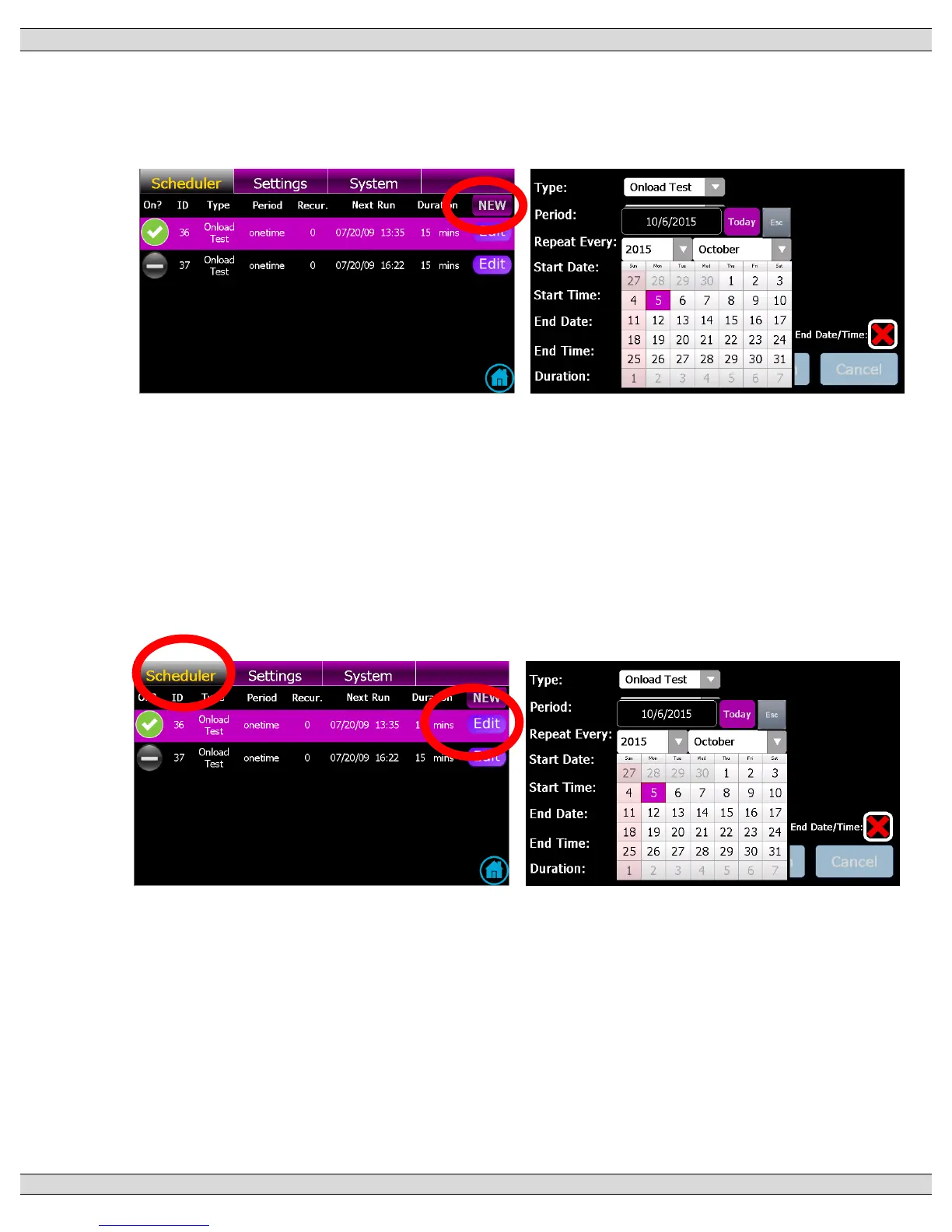
From the GHC Home Page, Navigate to the GHC “Scheduler” Page and select
NEW as shown below;
Once in the Scheduler Editor page, select desired Exercise type (on load or off
load), then select desired Exercise schedule (i.e. period, reoccurrence, start time,
stop time, end date, end time and exercise duration).
5.6.2. EDITING EXISTING EXERCISE SCHEDULE EVENT
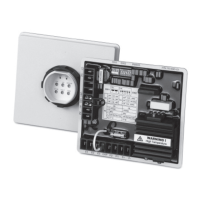
From the GHC Home Page, Navigate to the GHC “Scheduler” Page, select desired
schedule (row) to be edited, then select EDIT button on the selected item as shown
below;
Once in the Scheduler Editor page, select desired Exercise type (on load or off
load), then select desired Exercise schedule (i.e. period, reoccurrence, start time,
stop time, end date, end time and exercise duration).


 To Next Page