16
LAN
INOUT
SDI
COMPUTER IN 2
REMOTE
CONTROLHDBaseTHDMI 1DVI-DHDMI 2
CONTROLVH
B/Cb/Pb
G/YR/Cr/PrCOMPUTER IN 1
12V OUTPUT
(OPTION)
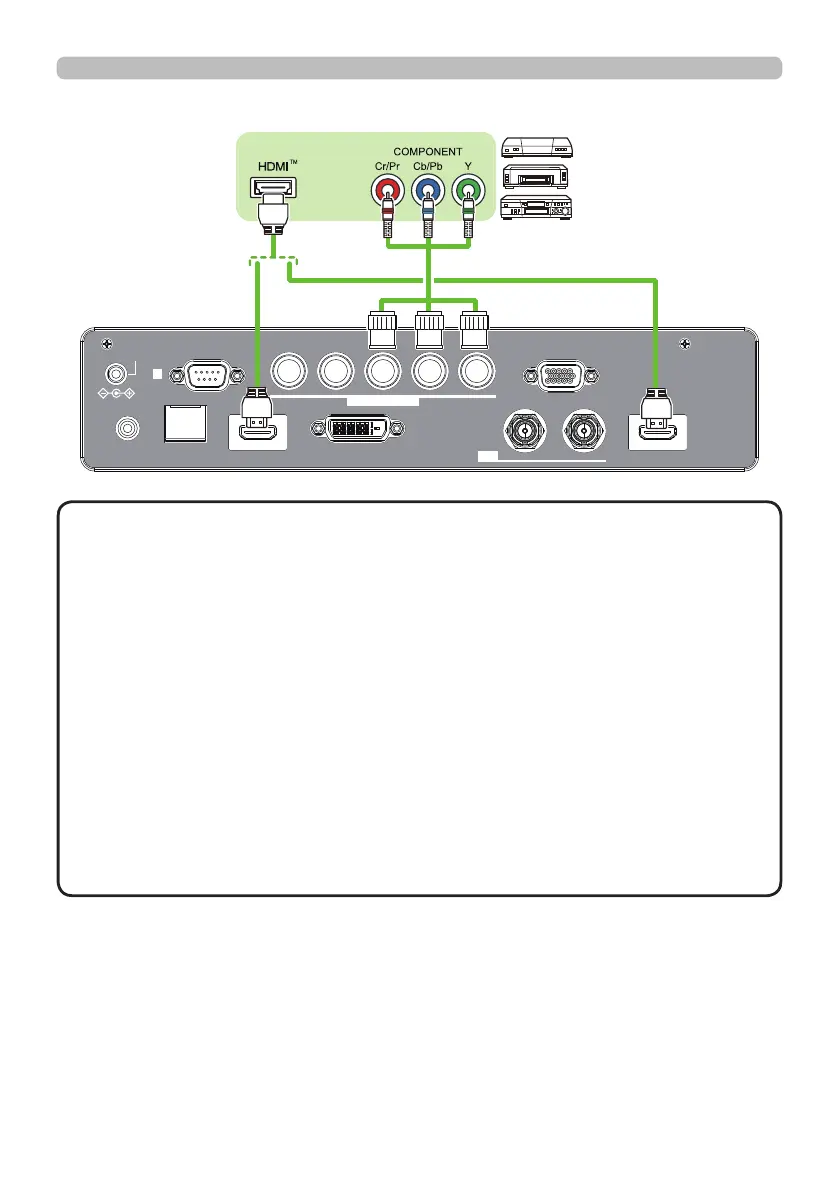
Setting up
Connecting with your devices (continued)
VCR/DVD/
Blu-ray Disc
TM
player
(continued on next page)
• The HDMI ports of this model are compatible with HDCP (High-band-
width Digital Content Protection) and therefore capable of displaying video
signals from HDCP compatible DVD players or the like.
- The HDMI ports support the following signals:
For Video signals, refer to
User’s Manual (detailed) Technical
.
- This projector can be connected with another equipment that has HDMI
TM
connector, but with some equipment the projector may not work properly,
something like no video.
- Be sure to use an HDMI
TM
cable that has the HDMI
TM
logo.
- Use a Category 2-certi ed HDMI
TM
cable to input 1080p@50/60 signal to the
projector.
• The HDMI
TM
cables might come off easily due to the lack of a mechanical lock
on the cables and connectors.
・ The resolution of the signal input to the projector and signal output from the
projector may be restricted by the maximum resolution of the connected device
such as projector or monitor.
NOTE















 To Next Page