68
Rewinder RW500
Operating and display elements, operating modes
Operating and display elements
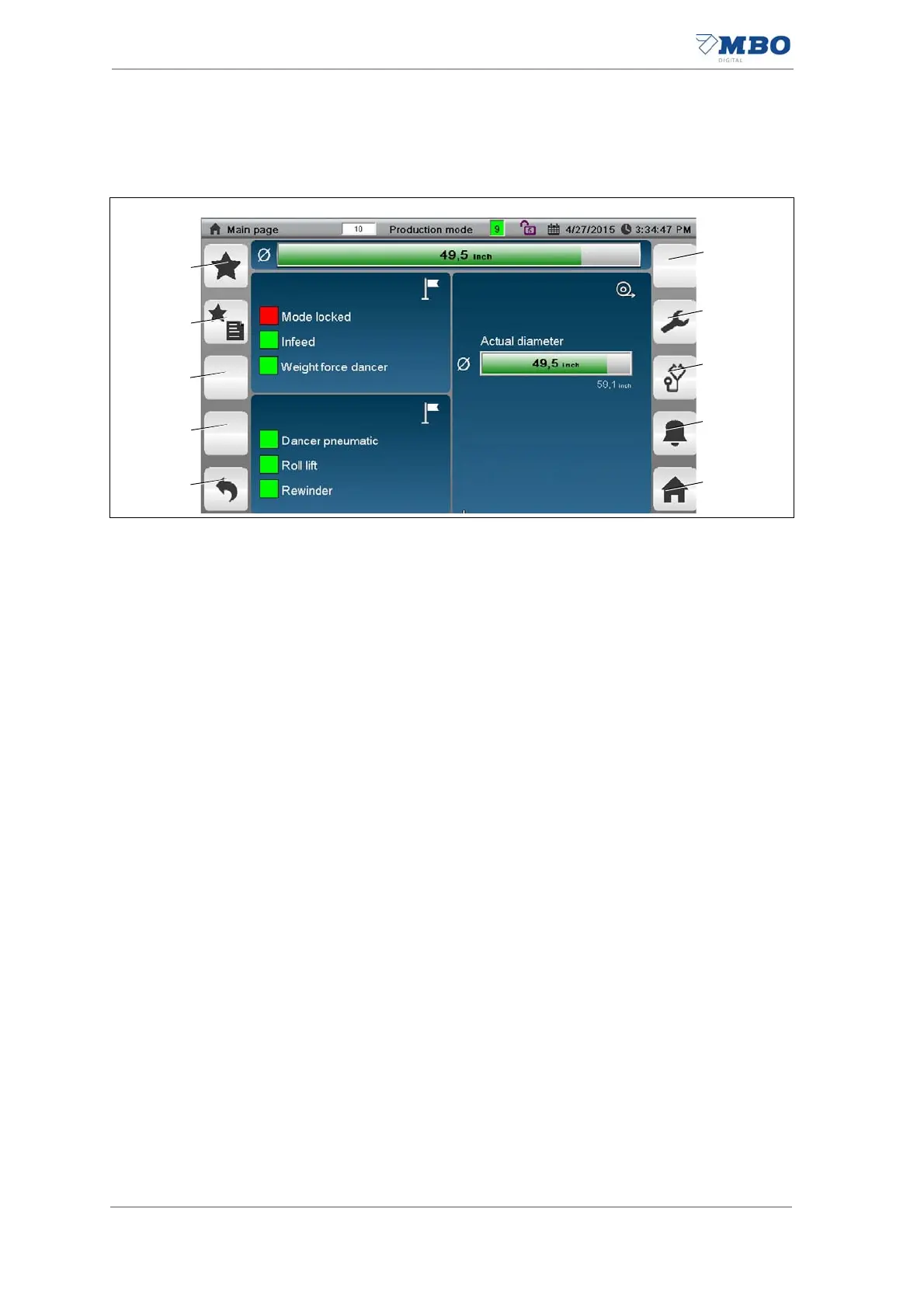
5.1.6.2 Function keys
1 Not assigned.
2 <Service> button (password-protected.
Pressing the button displays the <Service> page.
Password-protected.
3 <Diagnosis> button.
Pressing the button displays the <Diagnostics> page.
4 <Alarms> button.
Pressing the button displays the <Alarms> page.
See chapter "5.1.10 Selecting favorite pages".
5 <Main page> button.
Pressing the button displays the <Main page>.
See chapter "5.1.9.1 <Start page / main page> page".
6 <Page back> button.
Pages back to the previous pages.
7 Not assigned.
8 Not assigned.
9 <Display favorite pages> button.
Pressing the button displays the <Favorite> page.
See chapter "5.1.10 Selecting favorite pages".
10 <Select favorite pages> button.
Pressing this button saves this page as a <Favorite>.
See chapter "5.1.10 Selecting favorite pages"
Illustration 30: Function keys


 To Next Page