EasyManua.ls Logo

McQuay MicroTech - User Manual

McQuay MicroTech
24 pages
Print Icon
To Next Page IconTo Next Page
Loading...
Installation & Maintenance Data
IM 474-3
Group:
Controls
Part Number:
573897Y
Date:
June 1996
© 1996 McQuay International
MicroTech
®
Open Protocol Master Panel























































































MicroTech
Open
Protocol
Master

Other manuals for McQuay MicroTech

Question and Answer IconNeed help?

Do you have a question about the McQuay MicroTech and is the answer not in the manual?

Summary

Introduction to the OPM Panel

Applying the OPM Panel

Details how the OPM Panel is used for integrating MicroTech controllers into a BAS.

When to Use an OPM Panel

Explains scenarios requiring an OPM Panel for single-point connections to multiple controllers.

When Not to Use an OPM Panel

Outlines situations where an OPM Panel is not required or recommended.

Loop Water Controller Integration

Discusses the Loop Water Controller's role and recommended connection to the BAS.

Alternatives to the OPM Panel

MicroTech Network Controller Substitutes

Lists alternative MicroTech network controllers that can substitute for the OPM Panel.

Loop Water Controller (LWC) Considerations

Details the Loop Water Controller's role and connection recommendations.

General Description of the OPM

Component Data and Layout

Provides an overview of the OPM Panel's components and their physical layout.

Microprocessor Control Board (MCB)

Details the main control board, its components like hex switches and ports.

Microprocessor Status LEDs

Explains the function and meaning of the MCB's status LEDs for diagnostics.

Software Identification

Describes how the OPM software version is identified and displayed.

Installation Procedures

Panel Location and Mounting Guidelines

Provides guidance on selecting a suitable location and mounting the OPM Panel.

Field Wiring Requirements

Covers essential field wiring guidelines, including compliance and wiring penetration.

Power Connection Details

Details the 115 Vac power supply requirements and connection points.

Network Communications Setup

Explains the RS-485 network communication setup and architecture.

Network Cable Specification

Specifies the minimum requirements for network communications cables.

Network Wiring Instructions

Provides step-by-step instructions for connecting the network communications cable.

PC Connection for Commissioning

Outlines the requirements and methods for connecting a PC for network commissioning.

Direct PC Connection Method

Details the procedure and cable kit for direct PC-to-controller connection.

PC Cable Specification

Specifies cable requirements for connecting a PC to MicroTech controllers.

Network Commissioning Procedures

Required Tools for Commissioning

Lists the necessary tools for commissioning a MicroTech network.

Network Address Configuration

Explains the importance of unique network addresses for controller communication.

Address Schedule Preparation

Guides on creating an address schedule for network controllers.

Multi-OPM Network Addressing Strategy

Addresses network addressing strategies for projects with multiple OPM panels.

OPM Controller Setup Procedures

Covers connecting the PC, establishing communications, and setting OPM parameters.

Level-2 Trunk Connection Procedures

Details procedures for checking cables, connecting the OPM, and connecting level-2 controllers.

Service Information and Troubleshooting

Wiring Diagram Reference

Presents the schematic diagram of the OPM Panel wiring for reference.

General Test Procedures

Outlines general test procedures for verifying controller functionality.

LED Diagnostics for MCB

Explains how to use MCB LEDs for diagnosing controller status.

Troubleshooting Power Problems

Provides steps to diagnose and resolve power-related issues with the MCB.

Troubleshooting Communications Problems

Lists common issues and checks for diagnosing network communication failures.

MCB Replacement Procedure

Details the process and considerations for replacing the Microprocessor Control Board.

Parts List

Provides a list of replacement parts with their corresponding part numbers.

Summary

Introduction to the OPM Panel

Applying the OPM Panel

Details how the OPM Panel is used for integrating MicroTech controllers into a BAS.

When to Use an OPM Panel

Explains scenarios requiring an OPM Panel for single-point connections to multiple controllers.

When Not to Use an OPM Panel

Outlines situations where an OPM Panel is not required or recommended.

Loop Water Controller Integration

Discusses the Loop Water Controller's role and recommended connection to the BAS.

Alternatives to the OPM Panel

MicroTech Network Controller Substitutes

Lists alternative MicroTech network controllers that can substitute for the OPM Panel.

Loop Water Controller (LWC) Considerations

Details the Loop Water Controller's role and connection recommendations.

General Description of the OPM

Component Data and Layout

Provides an overview of the OPM Panel's components and their physical layout.

Microprocessor Control Board (MCB)

Details the main control board, its components like hex switches and ports.

Microprocessor Status LEDs

Explains the function and meaning of the MCB's status LEDs for diagnostics.

Software Identification

Describes how the OPM software version is identified and displayed.

Installation Procedures

Panel Location and Mounting Guidelines

Provides guidance on selecting a suitable location and mounting the OPM Panel.

Field Wiring Requirements

Covers essential field wiring guidelines, including compliance and wiring penetration.

Power Connection Details

Details the 115 Vac power supply requirements and connection points.

Network Communications Setup

Explains the RS-485 network communication setup and architecture.

Network Cable Specification

Specifies the minimum requirements for network communications cables.

Network Wiring Instructions

Provides step-by-step instructions for connecting the network communications cable.

PC Connection for Commissioning

Outlines the requirements and methods for connecting a PC for network commissioning.

Direct PC Connection Method

Details the procedure and cable kit for direct PC-to-controller connection.

PC Cable Specification

Specifies cable requirements for connecting a PC to MicroTech controllers.

Network Commissioning Procedures

Required Tools for Commissioning

Lists the necessary tools for commissioning a MicroTech network.

Network Address Configuration

Explains the importance of unique network addresses for controller communication.

Address Schedule Preparation

Guides on creating an address schedule for network controllers.

Multi-OPM Network Addressing Strategy

Addresses network addressing strategies for projects with multiple OPM panels.

OPM Controller Setup Procedures

Covers connecting the PC, establishing communications, and setting OPM parameters.

Level-2 Trunk Connection Procedures

Details procedures for checking cables, connecting the OPM, and connecting level-2 controllers.

Service Information and Troubleshooting

Wiring Diagram Reference

Presents the schematic diagram of the OPM Panel wiring for reference.

General Test Procedures

Outlines general test procedures for verifying controller functionality.

LED Diagnostics for MCB

Explains how to use MCB LEDs for diagnosing controller status.

Troubleshooting Power Problems

Provides steps to diagnose and resolve power-related issues with the MCB.

Troubleshooting Communications Problems

Lists common issues and checks for diagnosing network communication failures.

MCB Replacement Procedure

Details the process and considerations for replacing the Microprocessor Control Board.

Parts List

Provides a list of replacement parts with their corresponding part numbers.

Overview

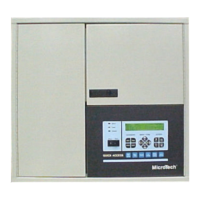
The MicroTech Open Protocol Master (OPM) Panel is a microprocessor-based controller designed to integrate two or more MicroTech unit or auxiliary controllers into a third-party Building Automation System (BAS). It serves as a single-point connection for communication between the BAS and the MicroTech network.

Function Description:

The OPM Panel acts as a passive communications link, facilitating the monitoring of status and the modification of limited control parameters in McQuay International HVAC equipment by a BAS. It does not perform supervisory control; all such control (e.g., scheduling, overrides, chiller sequencing) is handled by the BAS. The OPM Panel is particularly useful when multiple MicroTech controllers need to be interfaced with a BAS via a single connection, such as combining a centrifugal chiller, an applied rooftop unit, and several unit ventilators into one network.

The OPM Panel allows the BAS to perform several supervisory functions for MicroTech unit and auxiliary controllers, including:
  • Setting the operating mode.
  • Monitoring most controller inputs, outputs, setpoints, parameters, and alarms.
  • Setting most controller setpoints and parameters.
  • Clearing alarms.

Important Technical Specifications:

  • Controller Type: Microprocessor-based controller.
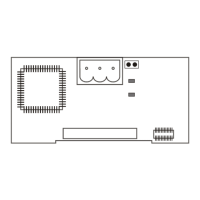
  • Main Component: Microprocessor Control Board (MCB) with hex switches, communication ports, LEDs, and a 1.5-amp fuse.
  • Power Supply: 115 Vac, sized to carry at least 5 amps.
  • Internal Protection: 0.5-amp circuit breaker (CB1).
  • Enclosure: NEMA 1.
  • Communication Ports:
    • Port A: For communications with the BAS using either RS-232C or RS-485. Also used for PC connection during commissioning and troubleshooting (default 9600 baud). Remote connection via modem is not supported.
    • Port B: For MicroTech network communications using RS-485 (9600 baud).
  • Network Architecture: The OPM Panel typically functions as the level-1 controller in an Open Protocol network, with unit controllers as level-2. Series-100 (old style) centrifugal chillers may have a level-2 display processor and a level-3 unit controller.
  • Network Cable Specification: Twisted, shielded pair with drain wire, 300 V, 60°C, 20 AWG, polyethylene insulated, with a PVC outer jacket (Belden 8762 or equivalent). Maximum allowable length of a communications trunk is 5000 feet.
  • PC Connection Cable Specification: Twisted, shielded pair with drain wire, 300 V, 60°C, 20 AWG, polyethylene insulated, with a PVC outer jacket (Belden 8762 or equivalent). Maximum allowable length for direct connection between PC and controller is 50 feet.
  • Environmental Specifications:
    • Operating Temperature: 32–100°F (0–37°C).
    • Storage Temperature: -40–140°F (-40–60°C).
    • Relative Humidity: 0–95%, noncondensing for both operating and storage.
  • Physical Dimensions: Approximately 14-3/4 inches (375 mm) high, 14-1/2 inches (368 mm) wide, and 4 inches (102 mm) deep. Weighs approximately 30 pounds (14 kg).
  • Software ID: OPM01B (OPM Panel, Version 01, Revision B).

Usage Features:

  • Indoor Use Only: The OPM Panel is designed for indoor installations.
  • Easy Mounting: Four 1/4-inch (6 mm) mounting slots are provided for wall mounting with screws or bolts.
  • Door Friction Adjustment: Special door hinges with a friction adjustment screw prevent the door from swinging unexpectedly.
  • Network Addressing: Each controller in the MicroTech network requires a unique network address, consisting of L2 and L3 hexadecimal digits. The OPM Panel (level-1 controller) always has a hex switch setting of 00 (address 00.00). Level-2 controllers start at 01 and continue consecutively.
  • Commissioning: Requires a PC equipped with Open Protocol Monitor software for setup and network diagnostics. The PC connects to Port A of the OPM Panel.
  • Safety Features: Equipped with a push-button circuit breaker (CB1) for overcurrent protection and as an on-off switch. High and low voltage sections are separated by a sheet metal barrier.

Maintenance Features:

  • LED Diagnostics: Green and red LEDs on the MCB provide status information for troubleshooting.
    • Red LED On (longer than 5 seconds): Indicates self-test failure or power supply problem.
    • Red LED Off, Green LED Flashing: Normal operation.
    • All LEDs Off: Defective component or power distribution problem.
  • Power Problem Troubleshooting: Procedures involve checking CB1, MCB power connector voltages (9-12 Vac between terminals), and the MCB input fuse (F1).
  • Communications Problem Troubleshooting: Involves checking Port B voltages, network wiring integrity, and network addressing. The "Network Commissioning" section provides detailed start-up procedures for these checks.
  • MCB Replacement: If the MCB is defective, a replacement board can be ordered. The correct controller software must be loaded onto the replacement MCB, either at the factory or on-site using Open Protocol Monitor software.
  • Documentation: The manual includes a wiring diagram and a parts list for easy reference during service.

Safety Warnings:

  • Electric Shock Hazard: Equipment must be properly grounded. Connections and service must be performed by knowledgeable personnel. All protective deadfront panels must be reinstalled and secured after wiring.
  • Static Sensitive Components: Discharge static electrical charge by touching bare metal inside the control panel before service. Do not unplug cables, circuit board terminal blocks, or power plugs while power is applied.
  • Wiring Compliance: Wiring must comply with the National Electrical Code and all local codes. Warranty is void if wiring instructions are not followed.
  • Conduit Separation: Do not install communication cables in the same conduit with power wiring.

McQuay MicroTech Specifications

General IconGeneral
BrandMcQuay
ModelMicroTech
CategoryModem
LanguageEnglish

Related product manuals