Flashing
1.
2.
3.
4.
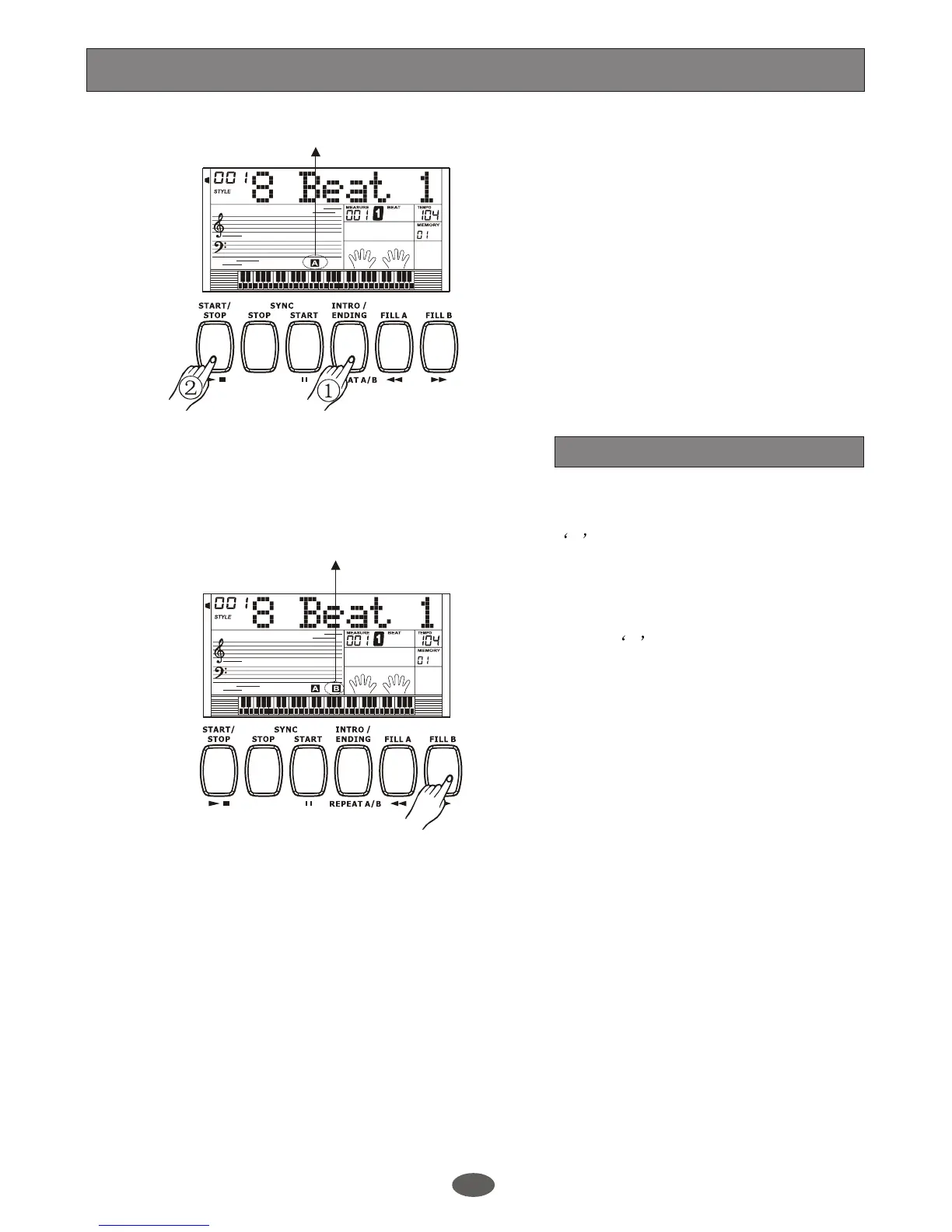
In NORMAL mode, press [FILL B] button
to insert 1 measure fill and LCD flashes
' B '. After one measure is over, VARIATION
style will be started.
11
5.
6.
Fill in A/Fill in B
In NORMAL mode, press [FILL A] button
to insert 1 measure fill and LCD flashes
A .After one measure is over, NORMAL
style will be returned.
In VARIATION mode, press [FILL B]
button to insert 1 measure fill and LCD
flashes B , After one measure is over,
VARIATION style will be returned.
In VARIATION mode, press [FILL A] button
to insert 1 measure fill and LCD flashes
' A ' . After one measure is over, NORMAL
style will be started.
Play the Main(A/B) section
Choose the disired style and press the
[START/STOP] button.
Stop playing the style
The accompaniment can be stopped at
any time by pressing the [START/STOP]
button.
Flashing
A.B.C.
DUAL
EDIT
LOWER
SYNC STOP
SUSTAIN
MELODY 2
MELODY 3
ACCOMP
MELODY 1
MELODY 4
MELODY 5
Style Control
A.B.C.
DUAL
EDIT
LOWER
SYNC STOP
SUSTAIN
MELODY 2
MELODY 3
ACCOMP
MELODY 1
MELODY 4
MELODY 5


 To Next Page