Dotted note
Play the keyboard to input the note value. For example, to get dotted semibreve, press [ ] and [ ] key
together to input the time value.
Tercet note
Play the keyboard to input the note value. For example, to get the first note of the tercet quarter note,
press [ ] and [ ] together.
Slur
Play the keyboard to input the note value. Then press [ ] to input the time value;
To get the slur, press [ ] and [ ] together.
Rest
To get a quaver rest, press [ ] and [ ] key together.
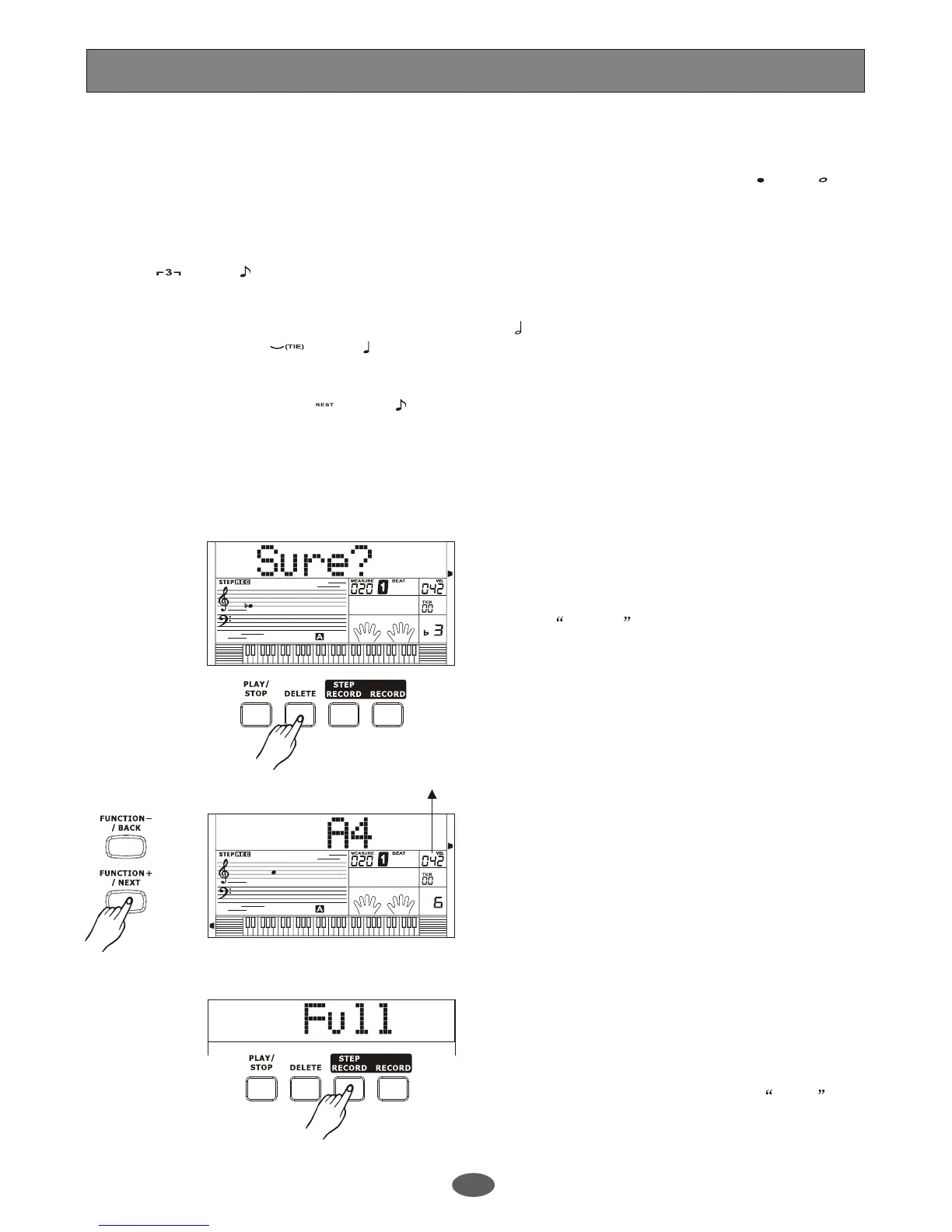
f. In recording, you can delete the latest
chord, note or time value.
Press [DELETE] button. LCD displays
SURE? . Press [+/YES] to confirm and
delete the latest chord, note or time value.
Press [-/NO] button to escape.
When playing the keyboard to input the note value,[+/YES]/[-/NO] button or the DIAL can be used to
adjust the velocity.
¡ö Example
Note:
1.
2.
3.
4.
g. In recording, you can also edit the previous
chord, note or velocity.
Press button or
button to the position
you want to edit. The edit flag will be
lightened on LCD. You can play the
keyboard to edit the note. Use
button to adjust the velocity. The
recorded note will show on LCD, you can
replace it by playing a new note.
Press button to the
latest note, it will quit the edit mode auto-
matically, and darken the edit flag on LCD.
[FUNCTION-/BACK]
[FUNCTION+/NEXT]
[+/YES]/
[-/NO]
[FUNCTION+/NEXT]
h. Press [STEP RECORD] again to quit the
step record. In recording, it will quit step
record mode automatically when the track
is full. The LCD will display FULL .
Touch value
A.B.C.
DUAL
EDIT
LOWER
SYNC STOP
SUSTAIN
MELODY 2
MELODY 3
ACCOMP
MELODY 1
MELODY 4
MELODY 5
A.B.C.
DUAL
EDIT
LOWER
SYNC STOP
SUSTAIN
MELODY 2
MELODY 3
ACCOMP
MELODY 1
MELODY 4
MELODY 5
Record
25


 To Next Page