While you are recording or playbacking a
recorded song, press [M1] - [M4] button,
no FILL IN can be inserted.
O.T.S.
1.
2.
4.
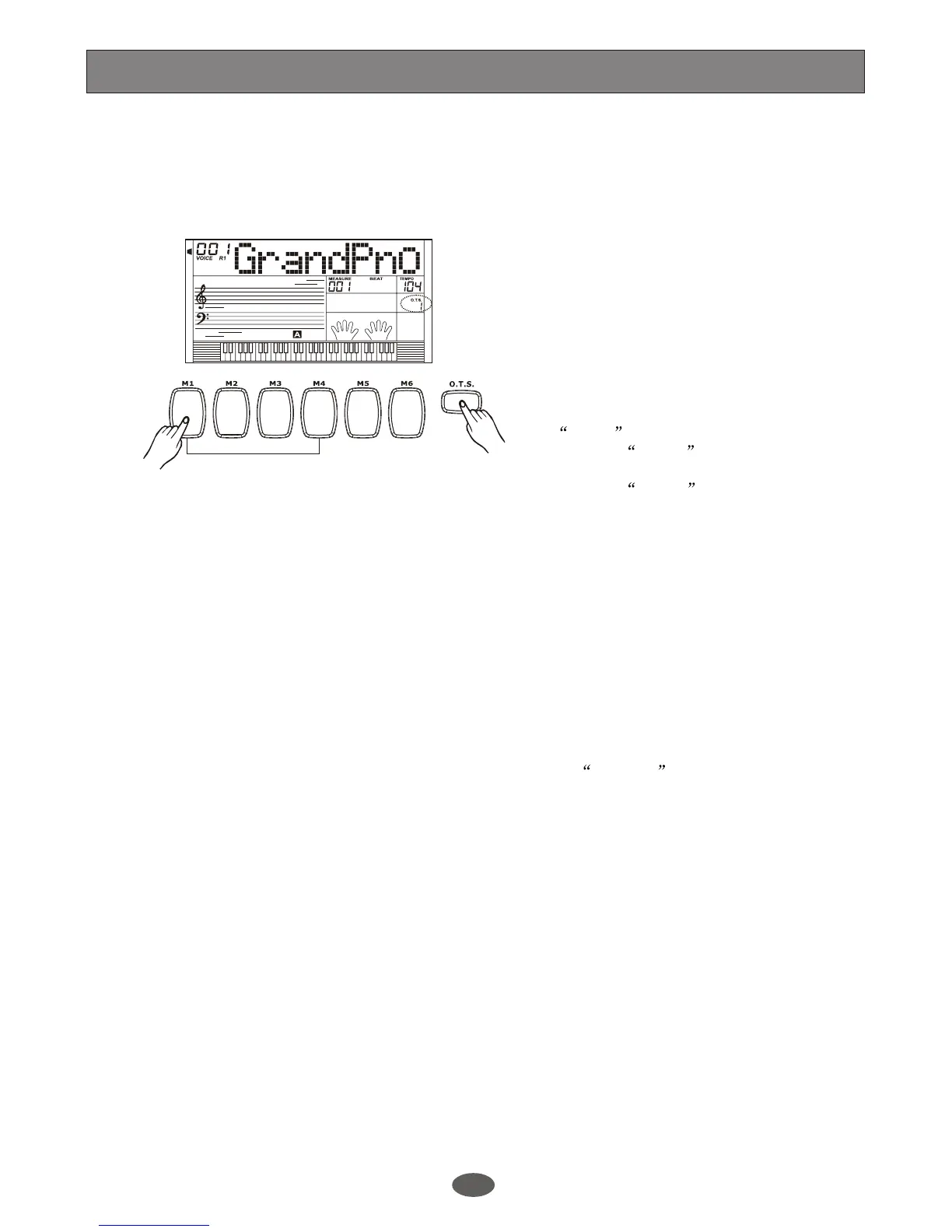
In this function, it can load 4 types of
parameters (M1~M4) that is suitable for the
current style.
Press [O.T.S.] button to turn on this mode
and lighten the O.T.S flag on LCD. Press
[M1] - [M4] button, it will load corresponding
type of parameter according to the current
style. M1 and M2 store the parameters for
the normal style, while M3 and M4 store the
parameters for the variation style. The
keyboard will turn on the A.B.C mode
automatically while the O.T.S is on.
when the style is playing, Press [O.T.S.] to
turn on the O.T.S mode, it will insert a
Fill in section automatically.
To insert FILL A press [M1] or [M2]
button.
To insert FILL B , press [M3] or [M4]
button.
To turn off O.T.S mode, press [O.T.S.]
Button.
.
The parameters stored in the O.T.S
including VOICE R1, VOICE R2, VOICE
LOWER, OCTAVE (R1/R2/L), VOLUME
and CHORUS TYPE/LEVEL, REVERB
TYPE/LEVEL.
Note:
3.
34
A.B.C.
DUAL
EDIT
LOWER
SYNC STOP
SUSTAIN
MELODY 2
MELODY 3
ACCOMP
MELODY 1
MELODY 4
MELODY 5
21


 To Next Page