Step record
If you are not familiar with playing song , you can choose STEP RECORD to record the song.
Note:
In STEP RECORD, the new data will not cover the old one unless you delete it. You can continue to
record the song till the capacity of the track is full.
STEP RECORD has two mode of recording:
One is STAFF mode; the other is DOREMI mode.
Note can be recorded successfully in case you input the time value after playing keys on keyboard.
HOW TO USE STEP RECORD TO
RECORD THE USER SONG?
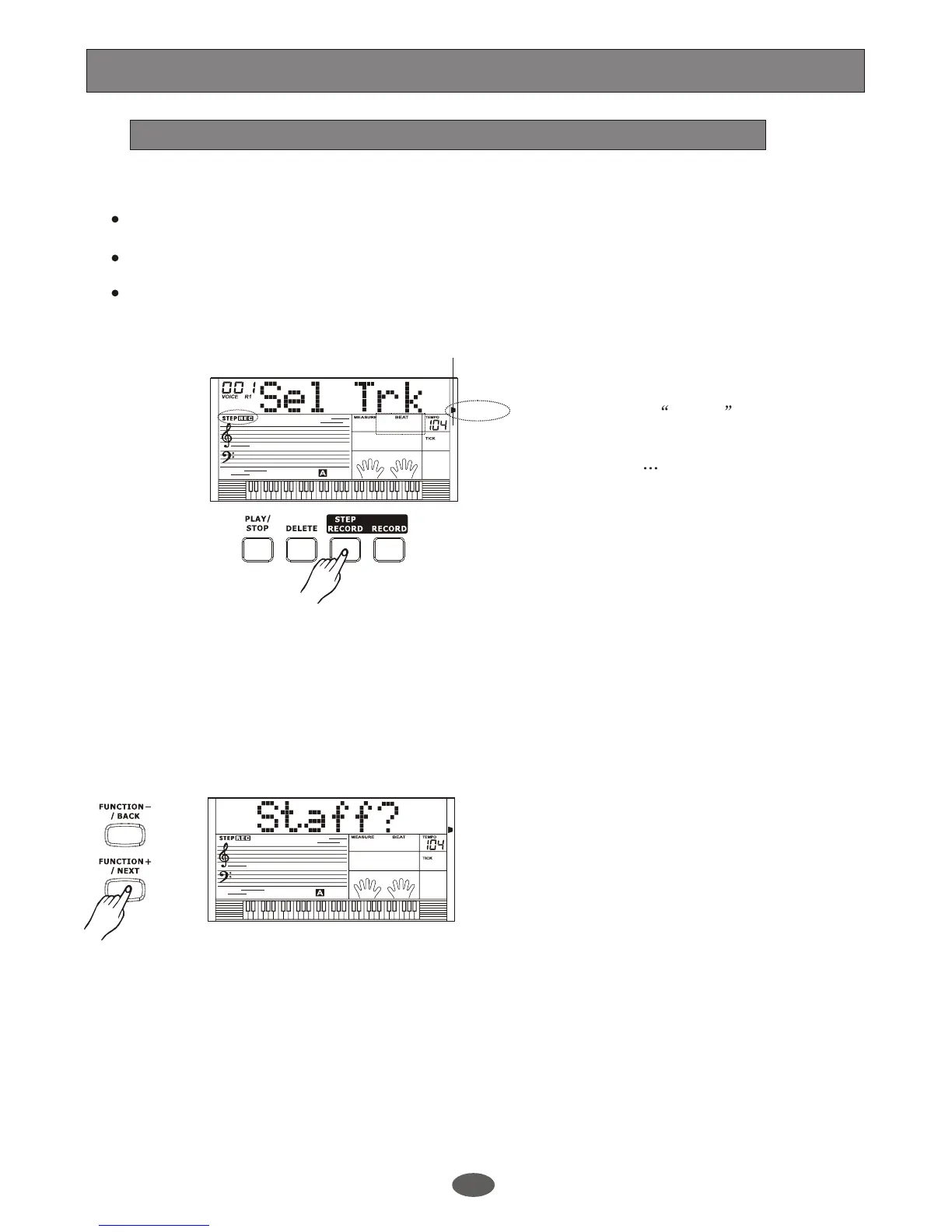
Press [STEP RECORD] button to enter the
step record mode. The STEP REC flag is
lightened and Sel Trk is also displayed
on the LCD. It will select a track to record
automatically (the order is MELODY 1,
MELODY 2 MELODY5 and ACCOMP.
The default one is MELODY 1).
When recording MELODY track, you can
use [+/YES] /[-/NO] button to select STAFF
or DOREMI mode. Press [FUNCTION+
/NEXT] button to next step.
Note:
Melody Track:
There are "Staff " and "DOREMI" modes for
you to choose.
Press [+/YES] / [-/NO] button or the DIAL
to choose the mode.
Display
A.B.C.
DUAL
EDIT
LOWER
SYNC STOP
SUSTAIN
MELODY 2
MELODY 3
ACCOMP
MELODY 1
MELODY 4
MELODY 5
A.B.C.
DUAL
EDIT
LOWER
SYNC STOP
SUSTAIN
MELODY 2
MELODY 3
ACCOMP
MELODY 1
MELODY 4
MELODY 5
Record
23
Staff:
it's for user who is good at reading score
with staff notation.
Press [FUNCTION+/ NEXT] button to next
step and follow step below to continue the
recording
DOREMI:
it's for user who is familiar reading score
with simplified notation. You can transpose
key C to any keys. For example, to start
the song with E major, press key E on
keyboard and LCD show 1=E. The pitch of
key C will transpose to E. You can start to
play and record the song easily. Then,
please follow step below to continue the
recording.


 To Next Page