26
Delete commands
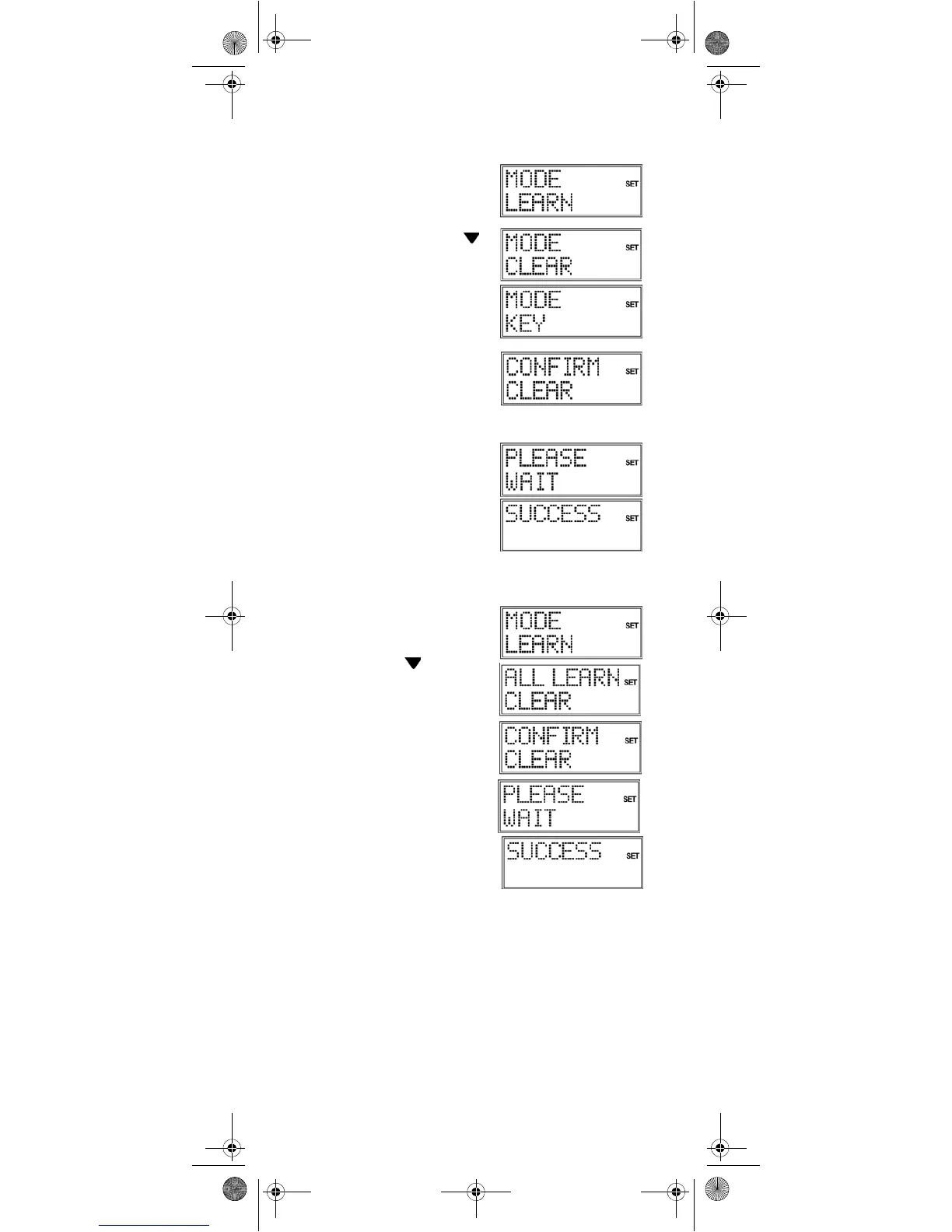
Deleting commands for only one mode key
Open the learn mode as described
in the previous section, steps 2 to 4.
Proceed as follows:
5. Use the arrows to select
the delete mode and press OK.
6. Now select the mode key
whose commands are to be
deleted.
7. Confirm the additional
CONFIRM CLEAR prompt by
pressing OK. If this message
does not appear then the mode
key does not have any
commands associated with it.
8.
PLEASE WAIT appears again in
the display, followed by the
confirmation message
SUCCESS.
The remote control returns to
normal operation.
Deleting commands for all mode keys
Open the learn mode as described
in the section above, steps 2 to 4.
Proceed as follows:
5. Use the arrows (press twice)
to select the
ALL LEARN
CLEAR
mode.
6. Press OK" The
CONFIRM
CLEAR
prompt appears.
7. Confirm once again with OK.
PLEASE WAIT appears again in
the display, followed by the
confirmation message
SUCCESS.
The remote control returns to
normal operation.
Univ-FB_MD 81302_UK.fm Seite 26 Montag, 7. August 2006 11:08 11


 To Next Page