PCF Pro User Manual
DOC01851 Page 41 of 74
Testing Operation of the Safety Devices
To check operation of the carrier lift:
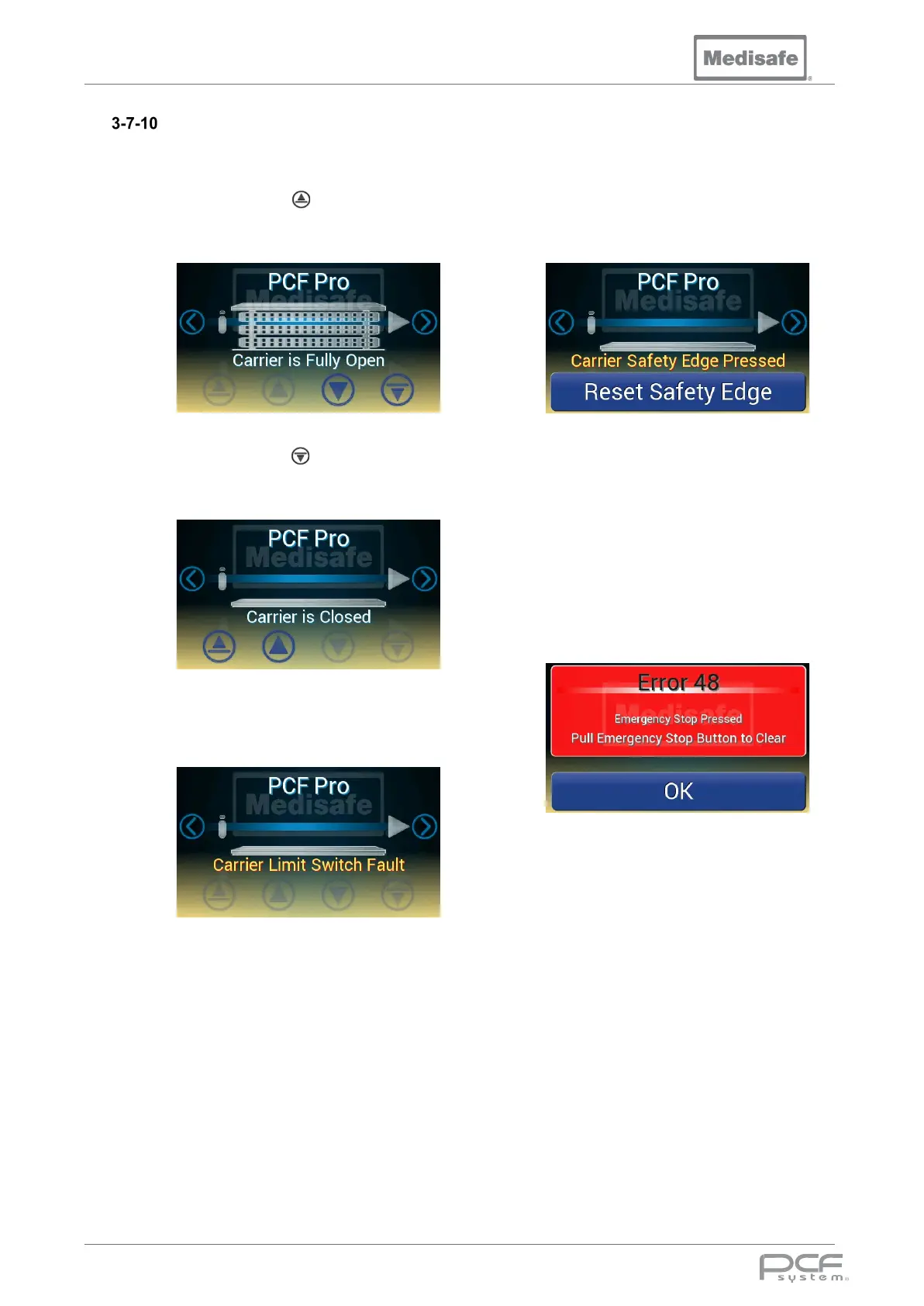
1. Press and hold to fully open the
carrier lift and confirm the display
shows:
2. Press and hold to fully close the
carrier lift and confirm the display
shows:
3. If the carrier lift system encounters a
problem it will be shown on the
display:
4. If a carrier limit fault message is
shown please contact Medisafe to
resolve the fault.
To check operation of the safety edge:
1. While moving the carrier press the
safety edge and confirm the carrier lift
stops and the display shows:
2. Press Reset Safety Edge on the
display and confirm the carrier lift can
be moved again.
To check operation of the emergency stop:
1. While moving the carrier lift press the
emergency stop and confirm the
carrier lift stops and the display shows:
2. Pull out the emergency stop button
then press OK on the display, and
confirm the carrier lift can be moved
again.


 To Next Page