PCF Pro User Manual
DOC01851 Page 54 of 74
Downloading the Cycle Log
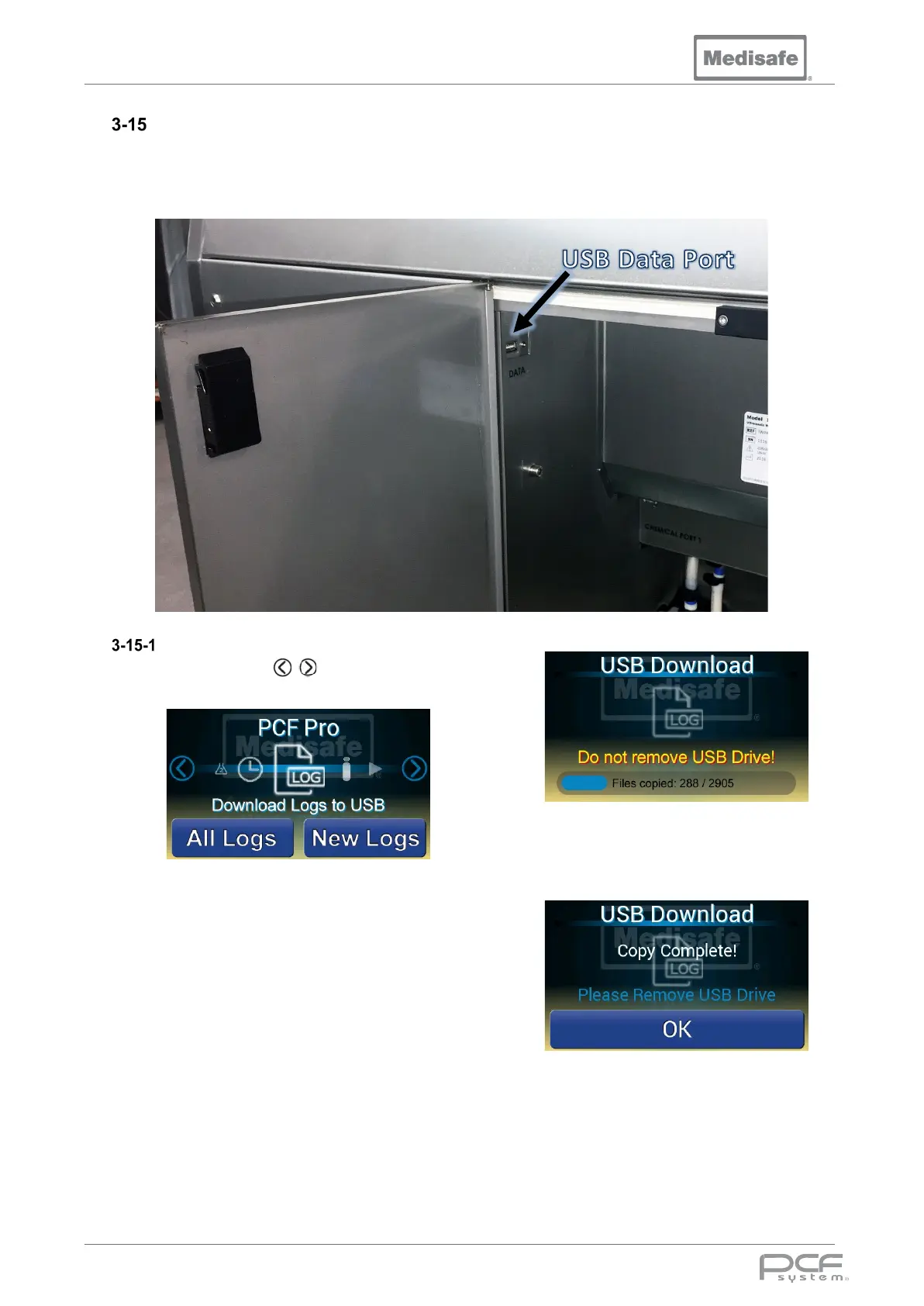
The PCF Pro contains on board memory, which holds a record of every cycle run on the machine.
This Log can be downloaded to a USB flash drive via the USB Data port located in the chemical
cabinet on the right hand side of the machine.
Download Logs
1. Use the scroll arrows to cycle
through to the log icon.
2. Insert the USB flash drive into the USB
data port.
Note: the flash drive must be
formatted as FAT32.
3. Press All Logs to download all cycle
logs, or New Logs to download the
cycle logs since the last download.
4. Wait for the logs to be downloaded to
the USB drive. Do not remove the
USB Drive while downloading, as this
could corrupt its contents.
5. Once the log files have been
downloaded remove the USB drive
and press OK.
6. A file for each cycle will be stored in
the USB drive directory:
MEDISAFE\<machine serial number>\<cycle
range>\<cycle number>.txt


 To Next Page