TECHNOPOOL3 TECHNOPOOL3 MENU
Dosing systems for swimming pools ENGLISH
ADSP7000716 rev. 1.0 25/01/2017 12/64
3.2 Installer menu
The installer menu is used to program Technopool pH-Rx system.
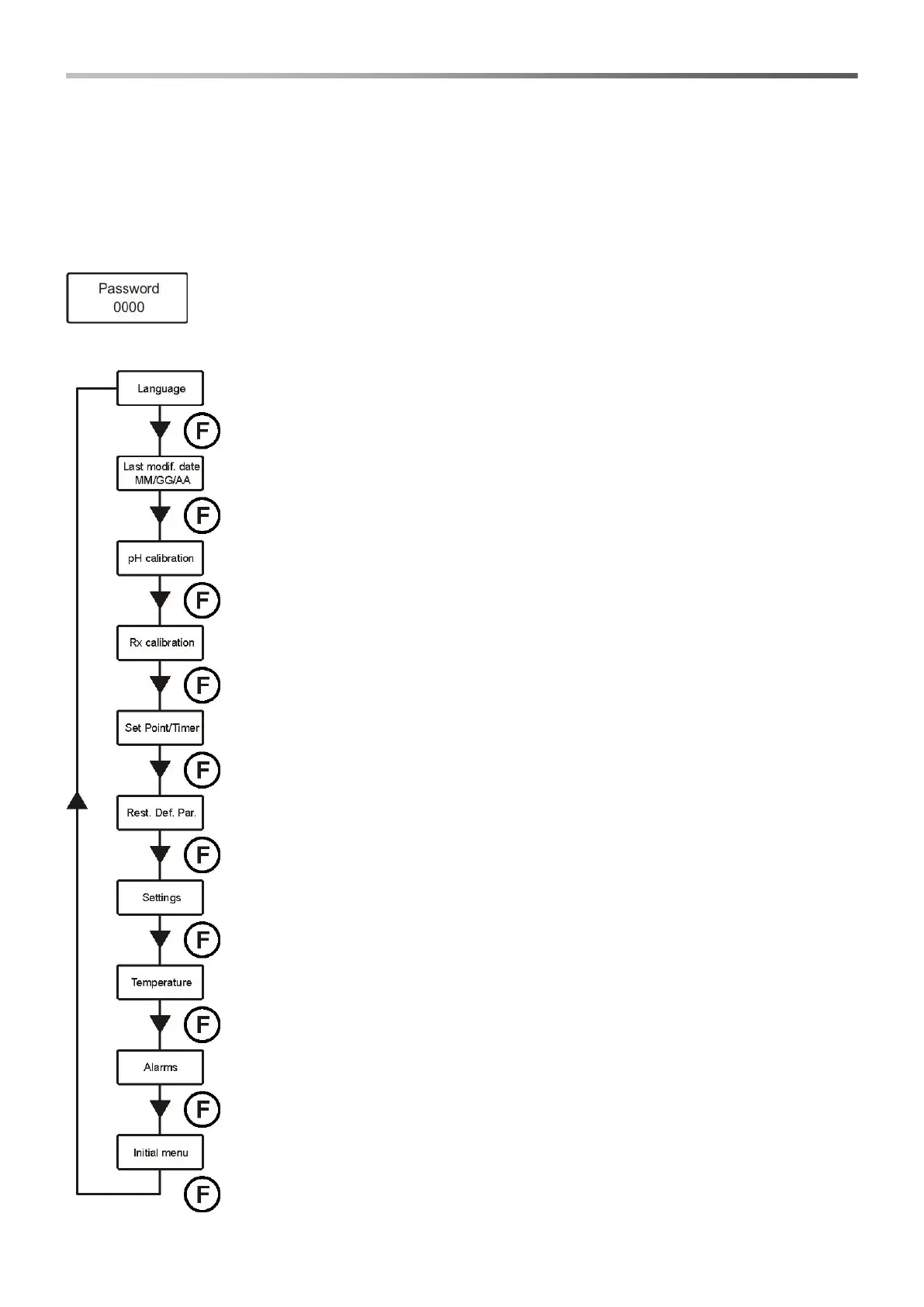
To access this menu, press key Enter for 3 seconds; password request will be displayed:
3.2.1 Password insertion
Press keys ▼▲ to set the value; to pass to the next digit press key Enter; to confirm press
Enter for 3 seconds.
The default password is 0000.
Once the password is confirmed, the installer menu will be displayed.
Language
Set the language of the system.
Date of the latest modif.
Indicates the date of the latest modification carried out by the system.
pH calibration
Activates the procedure for the calibration of the pH electrode.
Rx calibration
Activates the procedure for the calibration of the redox electrode.
Set Point/Timer
Programs the operations of the peristaltic pumps and control relays of the solenoid valve.
Def. Par. Rest.
Restores default parameters.
Settings
Set the system.
Temperature
Set the system temperature management.
Alarms
Management of all the system alarms is configured.
Initial menu
Return to the user menu.


 To Next Page