TECHNOPOOL3 GUARANTEE CERTIFICATE
Dosing systems for swimming pools ENGLISH
ADSP7000716 rev. 1.0 25/01/2017 20/64
6 Alarms
The system is equipped with the following alarms:
Level alarm, with 3 seconds of hysteresis; this alarm interrupts the operation of the relative pump.
Flow alarm, with 3 seconds of hysteresis; this alarm interrupts the dosing of the system.
Dosing enabling alarm, with 3 seconds of hysteresis; this alarm interrupts the dosing of the system.
pH measure alarm: The system is equipped with a pH reading alarm. If the value of the pH is lower than 5
and higher than 9, the system stops the pumps. If the value of pH is lower than 5 or higher than 9, it is
recommended to control the probe and the quality of the water.
Dosing Alarm: product dose with no effect (with no variation in the pH or Rx reading). The dosing alarms
can only be removed by restarting the system (use the ON/OFF switch) or automatically, when the
measure nears the setpoint.
6.1 Setting the alarms
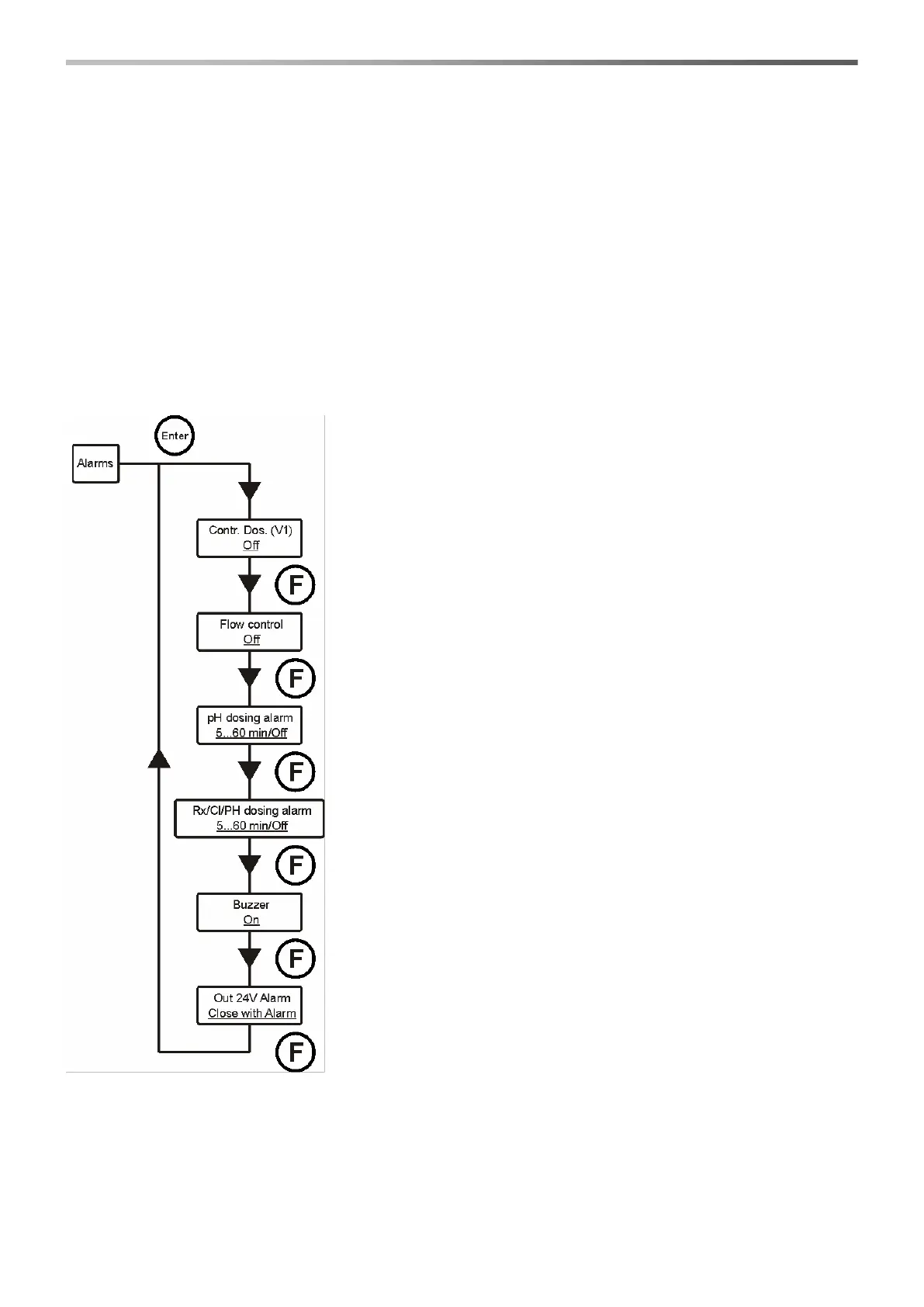
Select Alarms in the installer menu.
Contr. Dos. (V1). Enables or disables the dosing, when signal V1 occurs
(signal of the active recirculation pump).
Press keys ▼▲ to select the two options and Enter to confirm.
Flow control. Enables or disables the dosing, when water flow occurs.
Press keys ▼▲ to select the two options and Enter to confirm.
pH dosing alarm. This is a dosing alarm and if the pH pump doses the
product and there is no variation in pH (0.05 pH) during the set time, the
system signals the alarm and stops dosing.
The alarm is automatically disabled when the setpoint is neared (when the
difference between the pH measure and the setpoint is less than 0.2 pH).
Use the ▼▲ keys to set the desired value or disable the alarm (Off) and
then confirm with the Enter key.
The time values that can be set are 5÷60 minutes.
Rx dosing alarm. This is a dosing alarm and if the Rx pump doses the
product and there is no variation in Rx (5 mV) during the set time, the
system signals the alarm and stops dosing.
The alarm is automatically disabled when the setpoint is neared (when the
difference between the pH measure and the setpoint is less than 20 mV).
Use the ▼▲ keys to set the desired value or disable the alarm (Off) and
then confirm with the Enter key.
The time values that can be set are 5÷60 minutes.
Buzzer. Activates or deactivates the alarm acoustic signal.
Press keys ▼▲ to select the two options and Enter to confirm.
Out 24V Alarm. Sets the operation mode of Out 24V output, which can be
set either open or closed, when alarms occur.
Press keys ▼▲ to select the two options and Enter to confirm.
6.2 Alarm signal
Alarms are always signalled by the LCD display with the wording Alr.
Moreover, the two LEDs light on to indicate that the pH or redox pump has an alarm situation in progress.


 To Next Page