43
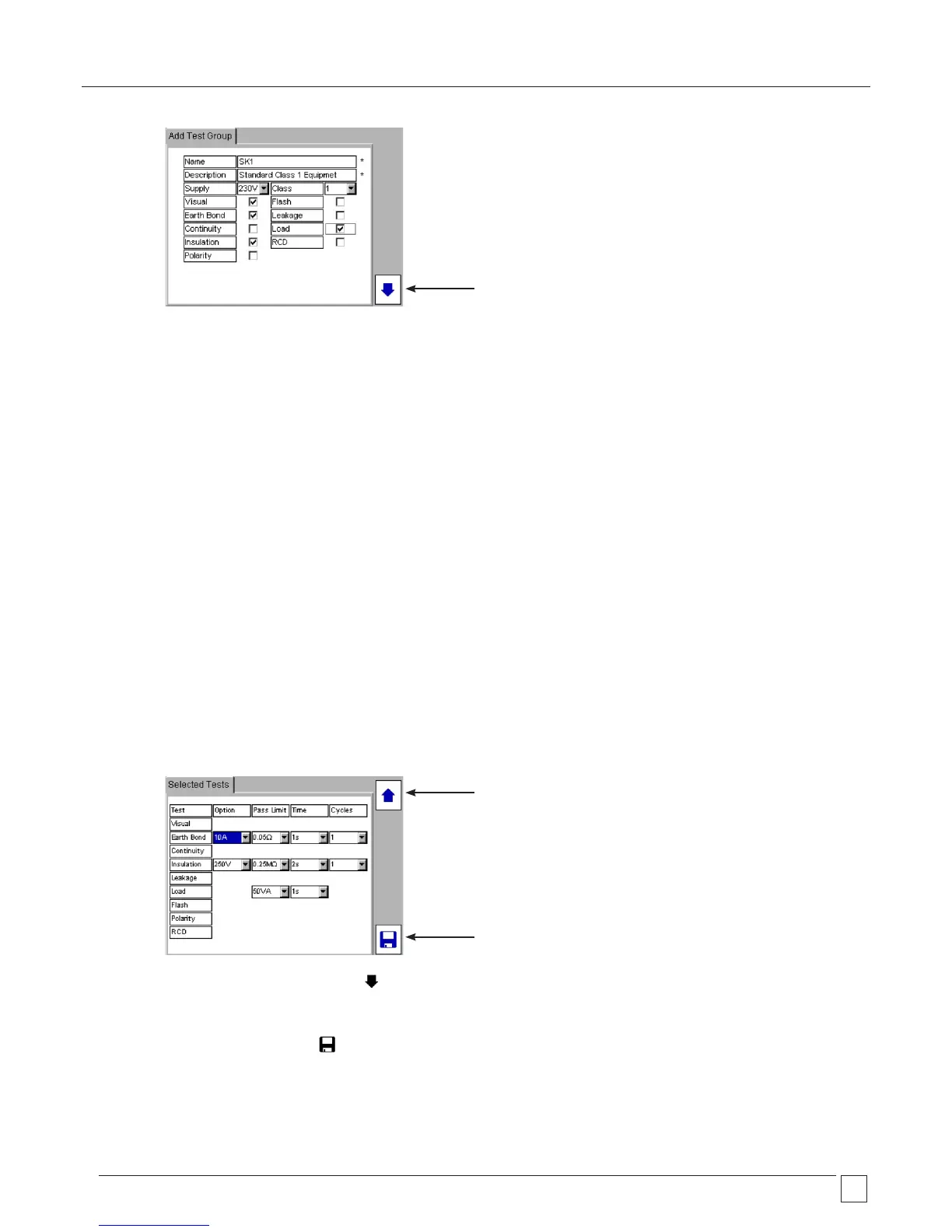
Definitions to fields:
NAME: Test group name - This can be up to 10 characters
- For compatibility with PAT4 see section 11
DESCRIPTION1: Text string - Keyboard or Barcode entry
SUPPLY: Asset operating voltage.
VISUAL: Check box
EARTH BOND Check box – configuration options available on second page
CONTINUITY Check box – configuration options available on second page
INSULATION Check box – configuration options available on second page
POLARITY Check box – configuration options available on second page
CLASS Drop down box. This is required so the instrument knows which test connectors are to be used.
Options - Class 1
- Class 2
- EXT
FLASH Check box – configuration options available on second page
LEAKAGE Check box – configuration options available on second page
LOAD Check box – configuration options available on second page
RCD Check box – configuration options available on second page
These fields require mandatory data. They cannot be left blank.
5) When complete, press the NEXT PAGE Hotkey. The test options for each of the selected tests will appear as below:
6) Now the test limits, test times and repetition settings can de adjusted for each test if required. Use the UP/DOWN arrow keys to
navigate the screen. All options are drop down boxes. Press OK to access each drop down list.
7) On completion press the SAVE Hotkey.
8) The test group can now be allocated to one of the test group HOT KEYS.
Save test group
Next page
Previous page










 To Next Page