33
5. Adding assets to memory
Assets can be saved to memory after they are tested, as above, or before any testing starts.
Copying a previously added asset using the COPY ASSET Hotkey or COPY ASSET AND INCREMENT ASSET ID Hotkey in Section
5.2.
Alternatively: Asset data can be loaded from PowerSuite via a USB stick, Section 7.2.
5.1 Adding assets to memory before testing
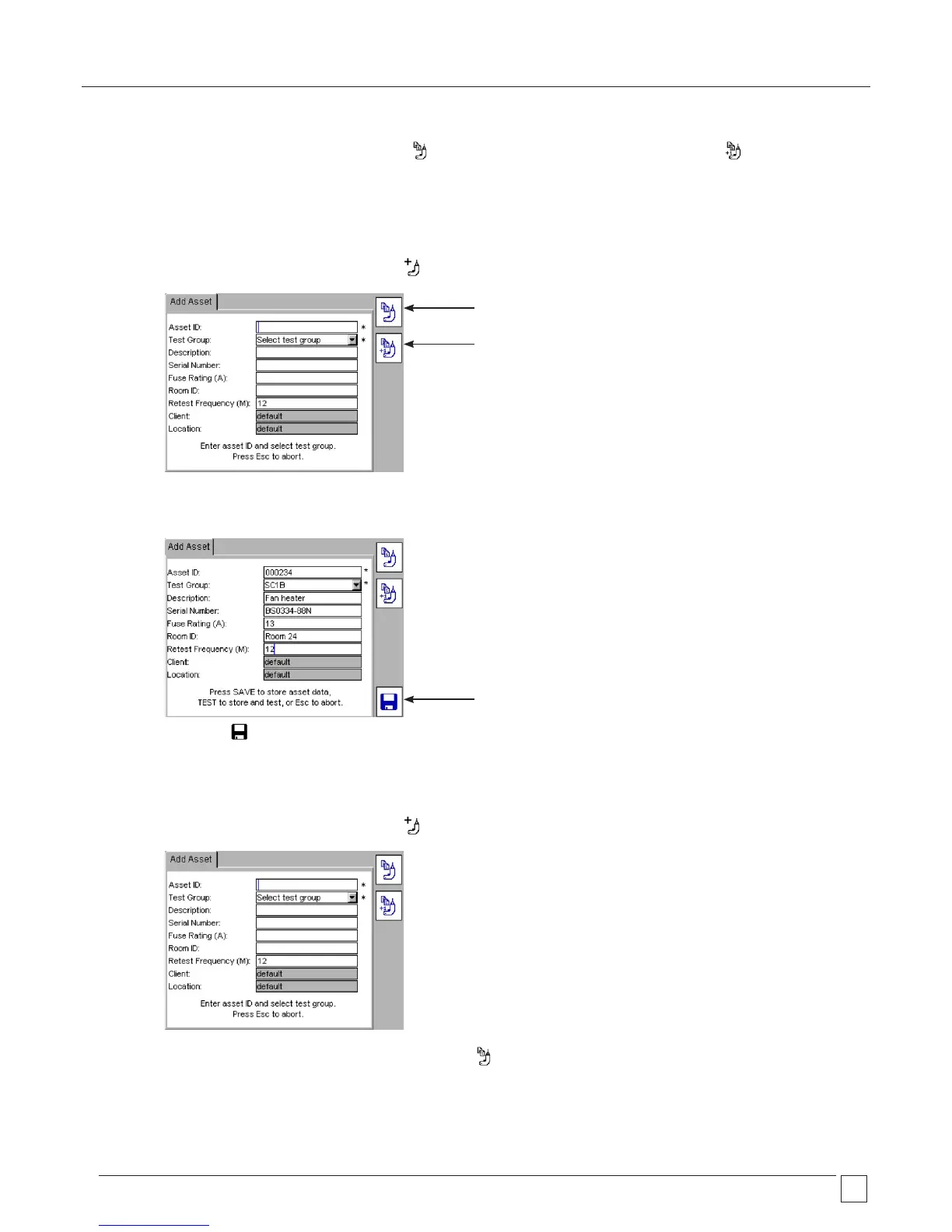
1) From the HOME screen, press the ADD ASSET Hotkey. The following empty asset screen will appear:
2) Enter an ASSET ID, using the keyboard, or barcode scanner.
3) Select a TEST GROUP from the drop down list.
4) Completion of the remaining asset fields is optional.
5) Press the SAVE Hotkey. The asset data will be saved to memory. The screen should display the SAVED message and return
to the HOME screen.
5.2 Copying the previously added asset
1) From the HOME screen, press the ADD ASSET Hotkey. The following empty asset screen will appear:
COPY last ASSET ASSET
COPY last ASSET and
Increment Asset ID
SAVE results to memory
2) To recall the last asset to the screen press the COPY ASSET Hotkey. This will recall the last asset added to the database of
the current Client. The Asset ID can then be edited as required.










 To Next Page