42
8. Test groups
Overview of test groups
Test groups are used to simplify the testing of an asset. A test group is a collection of tests that when run, perform all the tests allocated
to that test group.
The PAT400’s are shipped with a range of test groups for the majority of electrical equipment that will require testing, as detailed
below.
Additional test groups can be added up to a limit of 100. Existing test groups can be edited or deleted as required.
8.1 Creating a test group
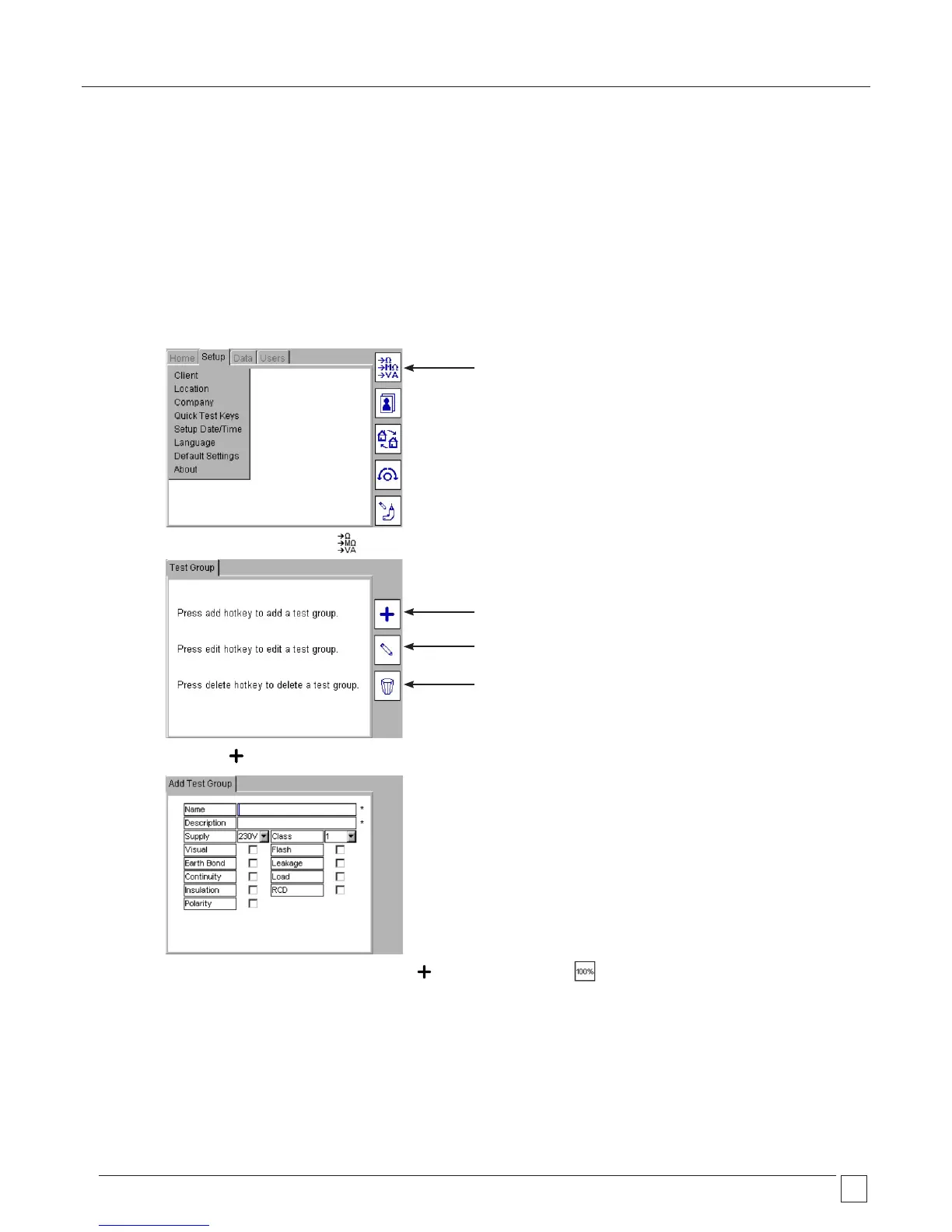
1) From the HOME screen, use the RIGHT ARROW key to select the SETUP tab.
2) Press the TEST GROUP MANAGER Hotkey
3) Press the ADD Hotkey to add a new test group. The Add Test Group screen will appear.
Note: If the number of test groups reaches 100, the ADD Hotkey will change to a HIcon.
4) Complete the fields as required.
An example of a typical standard Class I test may look like:
TEST GROUP MANAGER
Add a TEST GROUP
Edit a TEST GROUP
Delete a TEST GROUP










 To Next Page