30
4. Using the memory
4.1 Important overview
All records are stored under a “client”. The PAT400 can store up to 100 (50 on firmware releases prior to 2.20) clients. Each client can
have up to 2 000 (50 on firmware releases prior to 2.20) Locations.
There is a maximum of 25 000 total locations per database.
The client and locations are configured in SETUP, refer to Section 10.
The PAT400s are shipped with the client and first location set to “default”. All results will be stored under this “default” client and
location unless changed in SETUP.
These can be left as default, but it is recommended these are changed to the name of the client and location of the test site. See Section
10.
Assets are stored with a minimum of an “Asset ID”, and a “Test Group”.
A client CANNOT have duplicate Asset IDs, even if they are in several locations. However the same Asset ID can be used for different
clients.
Test results are stored and referenced to an Asset ID. The internal memory will store up to 10 000 test results.
Entering an asset ID that already exists in the current client will generate a “duplicate asset ID” warning. Change the asset ID then press
save.
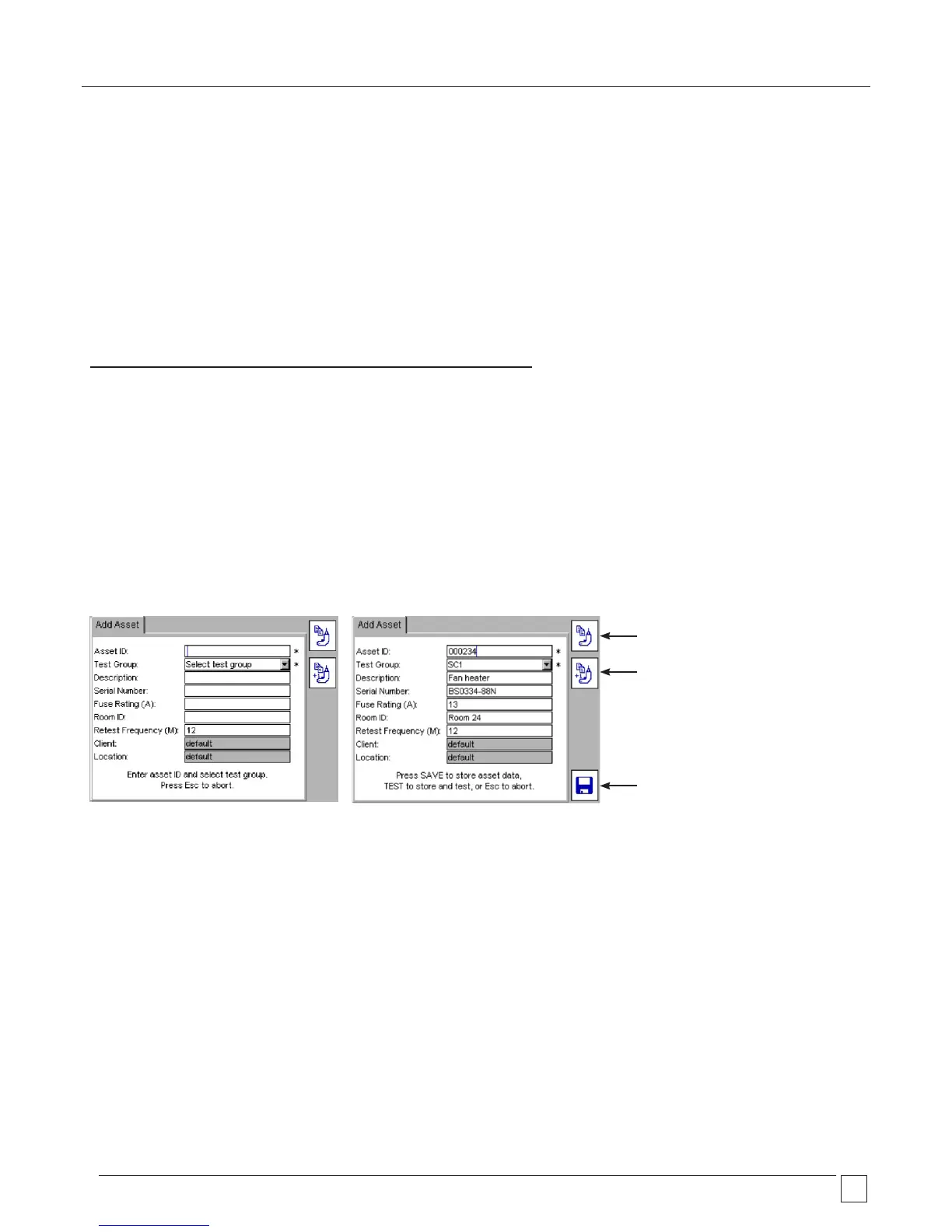
Assets can be saved to memory before or after testing. The add asset screen is shown below:
Default Add Asset screen Add Asset screen with asset data to be saved
COPY last ASSET ASSET
COPY last ASSET and
Increment Asset ID
SAVE results to memory










 To Next Page