66
11.3.4 Adding additional accounts
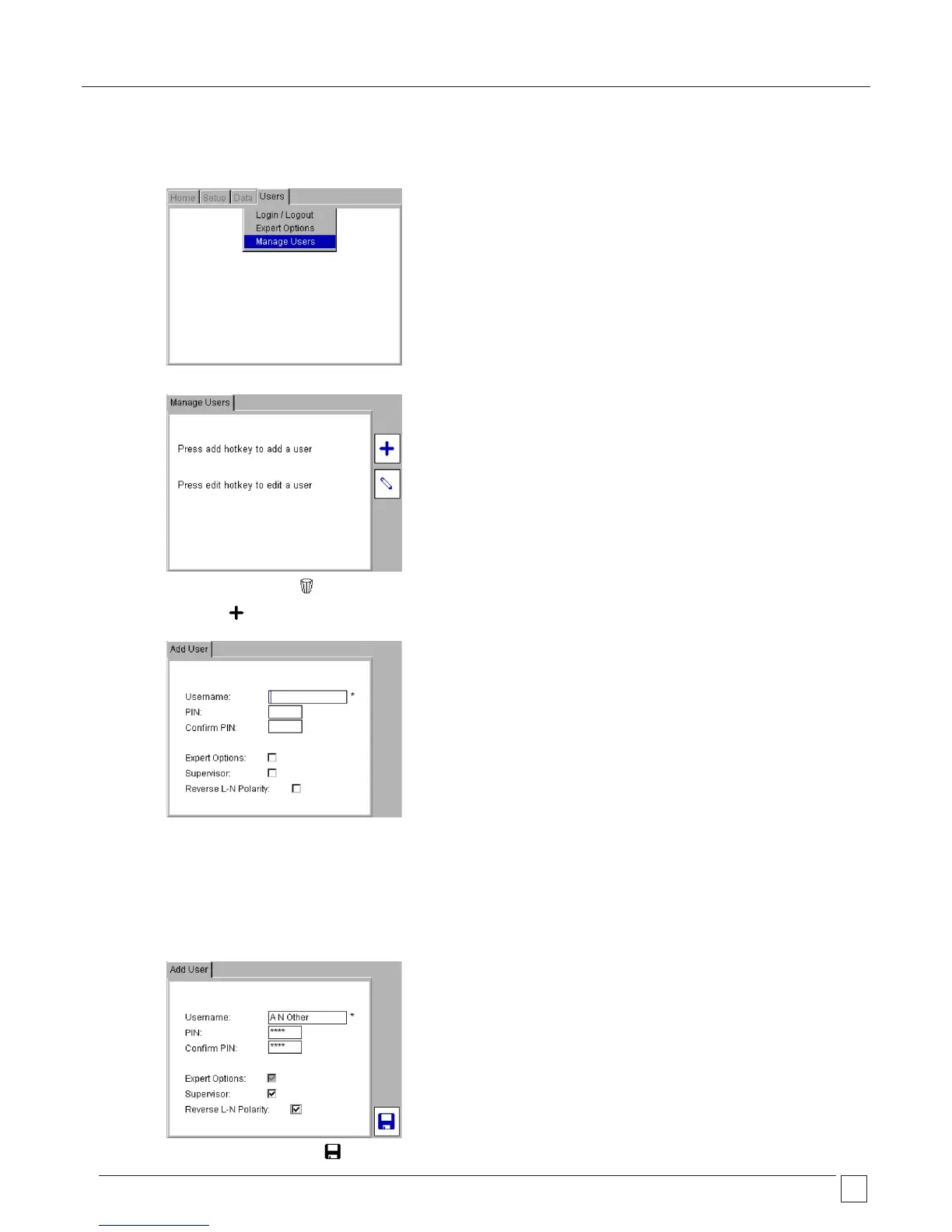
1) From the HOME screen use the RIGHT arrow key to select the USERS tab.
2) Using the arrow keys, navigate to “Manage Users” option in the USERS Tab and Press OK.
Note: An additional Delete hotkey may be present if there is already more than one account.
3) Press the ADD Hotkey to bring up the Add User screen.
4) Enter a user name. Names must be between 3 and 30 characters, A-Z and 0-9 (upper or lower case).
5) Press the DOWN arrow. Enter a PIN if required. The PIN must be 4 digits using only numbers 0-9.
6) Press the DOWN arrow. Enter the same PIN in the Confirm PIN field.
7) Press the DOWN arrow to Expert Options. Press OK to enable this option if required.
8) Press the Down arrow to Supervisor. Press OK if this account is to have Supervisor status.
9) Press the DOWN arrow to Reverse L-N Polarity. Press OK to enable this feature.
(Note: this feature is not available on all PAT400’s)
10) When complete press the SAVE Hotkey to save the change.










 To Next Page