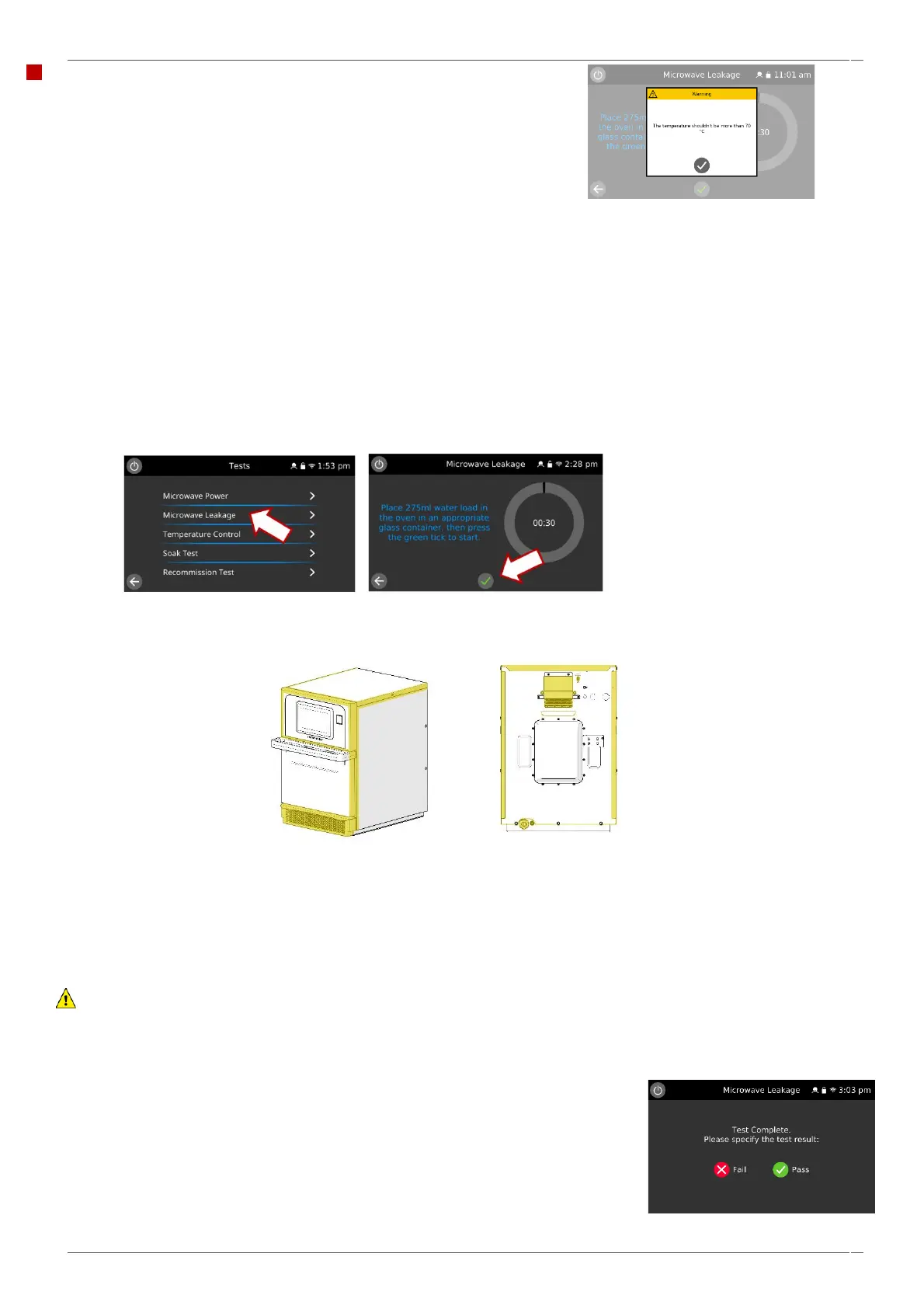
Microwave leakage test.
Check that the following requirements have been met:
▪ The appliance is cool.
▪ This test will not operate at a cavity temperature of 70
o
C or above.
Follow these instructions when measuring:
▪ Make sure that the survey meter you are using has been calibrated and is suitable for measuring frequencies of 2,460
MHz.
▪ Do not exceed meter full scale deflection. The leakage meter should initially be set to the highest scale, then adjusted
down as necessary to ensure that low readings are measured on the most sensitive range.
▪ To prevent false readings, hold the probe on the grip provided and move at 2.5 cm/second.
▪ Always hold the probe at right angles to the oven and point of measurement, ensuring the probe sensor is reading
50 mm from the test area.
▪ The leakage should not exceed 0.5 mW/cm².
1. Add 275 ml of cold water into a 600 ml microwave safe container.
2. Place the 600 ml container in the centre of the cavity and close the door.
3. Enter Service Settings / Tests and select ‘Microwave leakage’ from the appliance tests (microwave power 100% for
30 seconds, convection fan at 10%).
4. Set the leakage meter to the appropriate scale/range.
5. Move the survey meter probe across all casework joins and vent areas including those marked in yellow, shown
opposite.
6. When the microwave leakage test stops after 30 seconds, change the water, and re-select the test to continue.
7. Select the return arrow on the display to stop the test at any time.
8. Readings must be below 0.5mW/cm², ideally zero, readings above this level will cause issues on the oven.
CAUTION:
If a level greater than 5mW/cm² is observed, don't use the appliance until repaired by law.
9. Note any leakage that is observed in terms of the level and position on the appliance. Keep this information with the
service documentation.
10. On completion of the test, specify the result by selecting ‘Pass’ or ‘Fail’.
Note: Opening the door during the test will stop the test. Reselect the test to run again.



 To Next Page