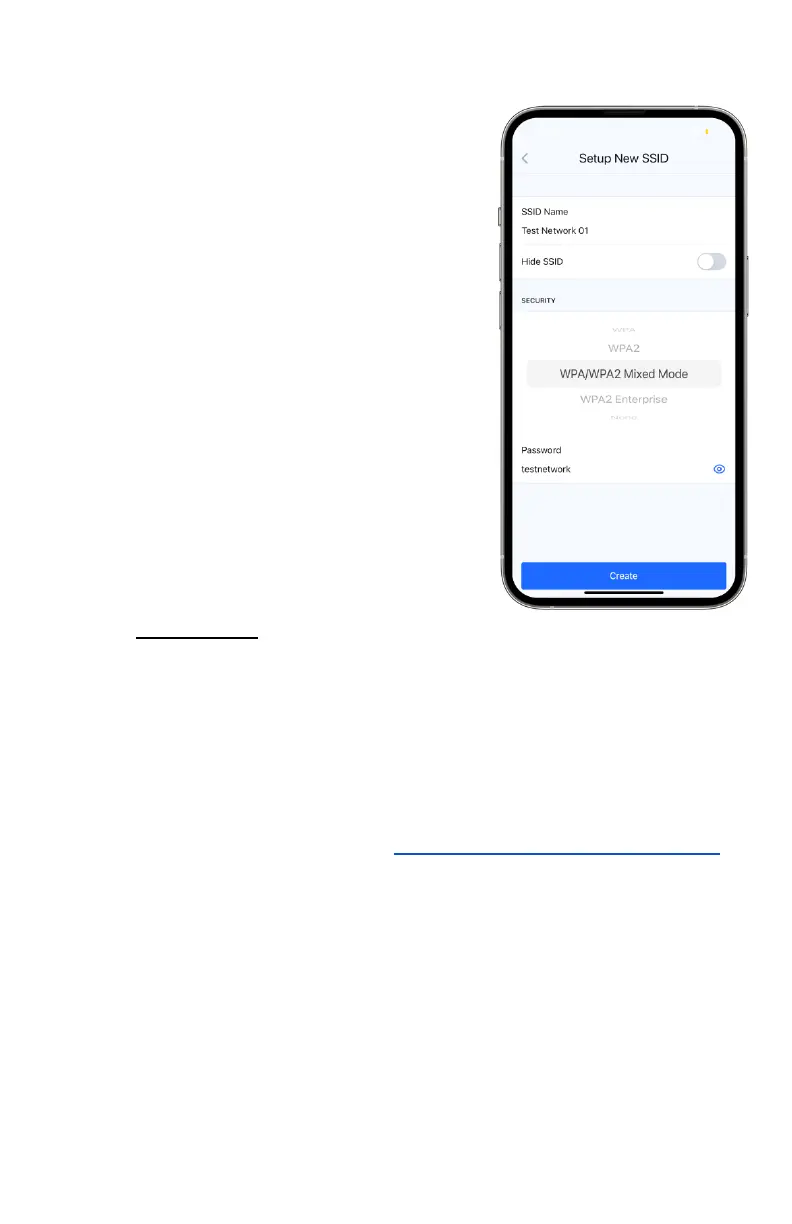
1. Select the SSID name. This does not have to be the same as
the network name on the app and will be broadcasted to
any users of the network.
2. By default, hiding the SSID is
toggled off and must stay in that
state for the network to be found
by WiFi-enabled devices such as
phones or laptops.
3. Select a security type and
password of 8 or more characters.
The type recommended by
default is a standard WPA/WPA2
Mixed Mode.
viii. Once completed, you may add
other nodes to your network and
create your mesh network, granted
that one of the nodes has internet
access. Their statuses may be
viewed in the network’s page on
the Dashboard tab and colors
correlate to their modes.
ix. To connect to your newly established network, you must
turn your device’s WiFi on and search for the SSID in its
settings. Enter the password, if applicable, and your device
should now have internet access if the network is
functioning correctly. If you are having issues finding your
SSID, please see Issue #9 of section 11.c - Common Issues.



 To Next Page