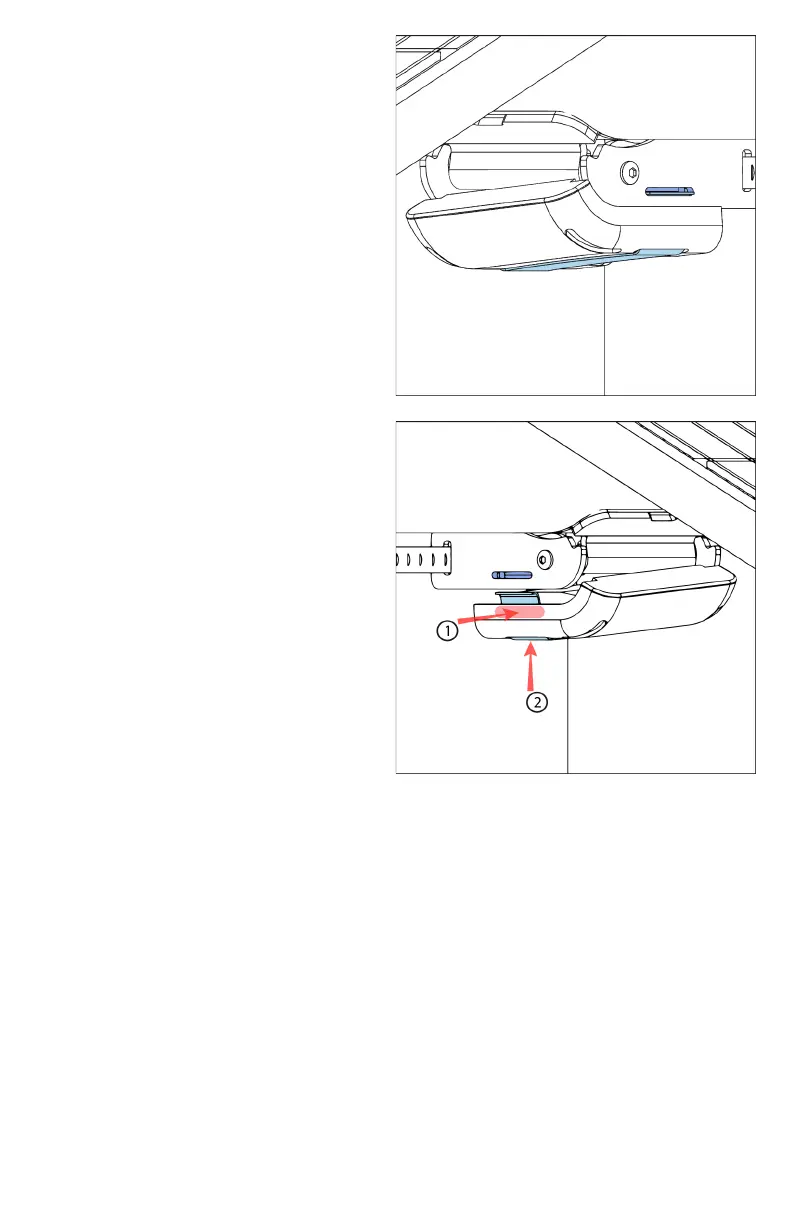
vii. Install the USB Hub onto
the mount with all its
cables connected to it.
1. Make sure that the
half-circle feature on
the hub surrounds the
silver clamp knob
under the mount. The
metal hub clip should
have its flat side
towards ground level.
2. Once aligned, push
one side of the hub in
a 45-degree angle (1)
so that one of the hub
clip’s edges catches on
the interior side of the
long horizontal slot on
the bottom of the
mount. Please note
that these slots are the
longer ones compared
to the slots used to
install the mount via
hose clamps.
3. Place your thumb on the side that has not been pushed
in yet and use your hand to squeeze the hub. When
compressed, push the other hub clip edge up into the
mount (2) . A clicking noise may be heard as the clip
settles into the second horizontal slot. Verify that the USB
Hub was installed correctly by lightly pulling on it to
ensure that it does not come off the mount.
viii. If the other side of the USB-C data transfer was
disconnected while installing the USB Hub, reconnect it into
the node while ensuring that the blue dot faces upwards.



 To Next Page