MI 3125 InstaltestCOMBO Front panel
12
3 Instrument description
3.1 Front panel
8
9
10
11
12
7
6
5
4
3
2
1
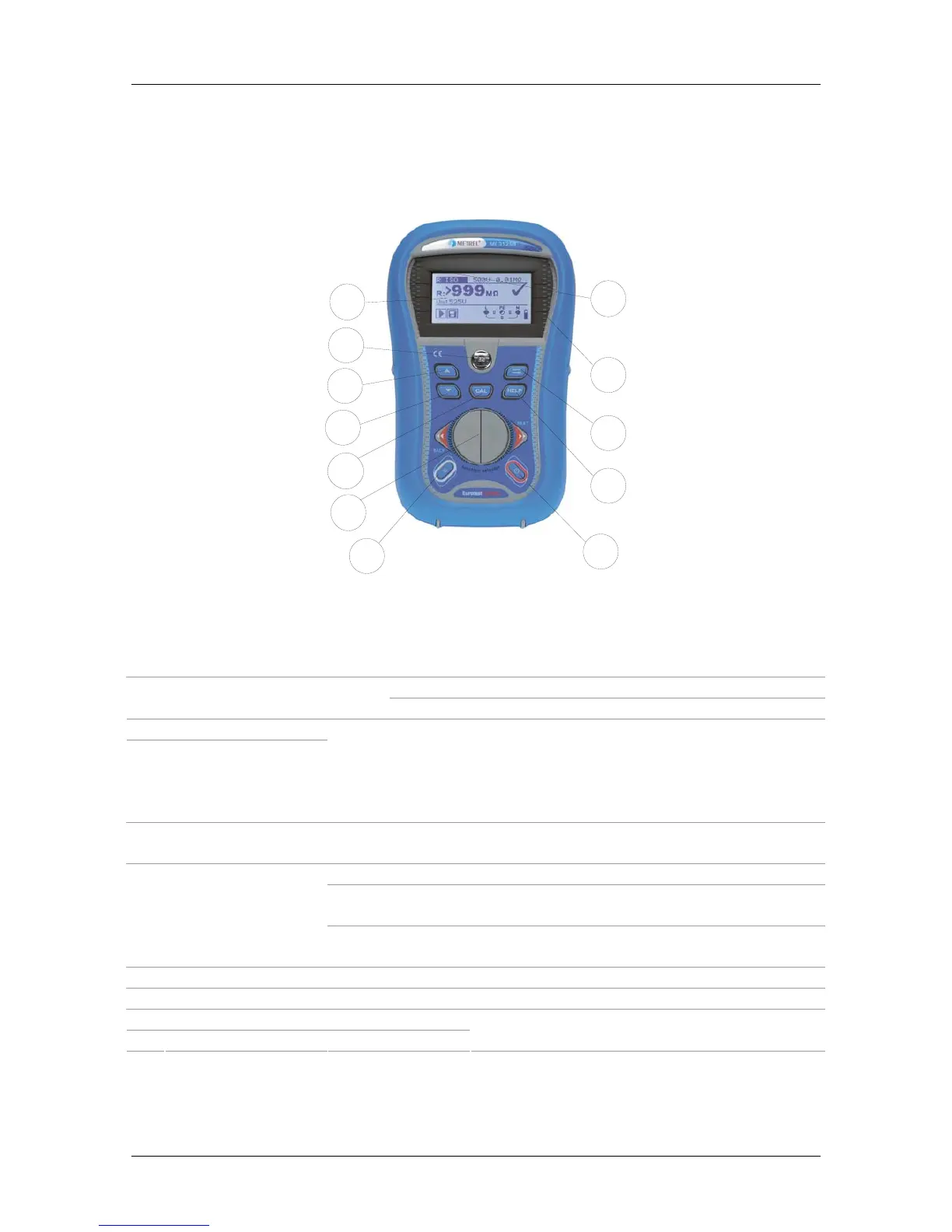
Figure 3.1: Front panel
Legend:
1 LCD 128 x 64 dots matrix display with backlight.
Starts measurements. 2 TEST
TEST
Acts also as the PE touching electrode.
3 UP
4 DOWN
Modifies selected parameter.
5 CAL Calibrates test leads in Continuity functions.
6 Function selectors Selects test function.
7
Backlight,
Contrast
Changes backlight level and contrast.
Switches the instrument power on or off.
The instrument automatically turns off 15 minutes after the
last key was pressed.
8 ON / OFF
In RCD Auto toggles between top and bottom parts of results
field.
9 HELP Accesses help menus.
10 TAB Selects the parameters in selected function.
11 PASS Green indicator
12 FAIL Red indicator
Indicates PASS/ FAIL of result.



 To Next Page
 Loading...