4040DCT EM-9538-B Rev.5
MG CO., LTD. www.mgco.jp
5-2-55 Minamitsumori, Nishinari-ku, Osaka 557-0063 JAPAN
7.1 OPERATING PROCEDURE
1
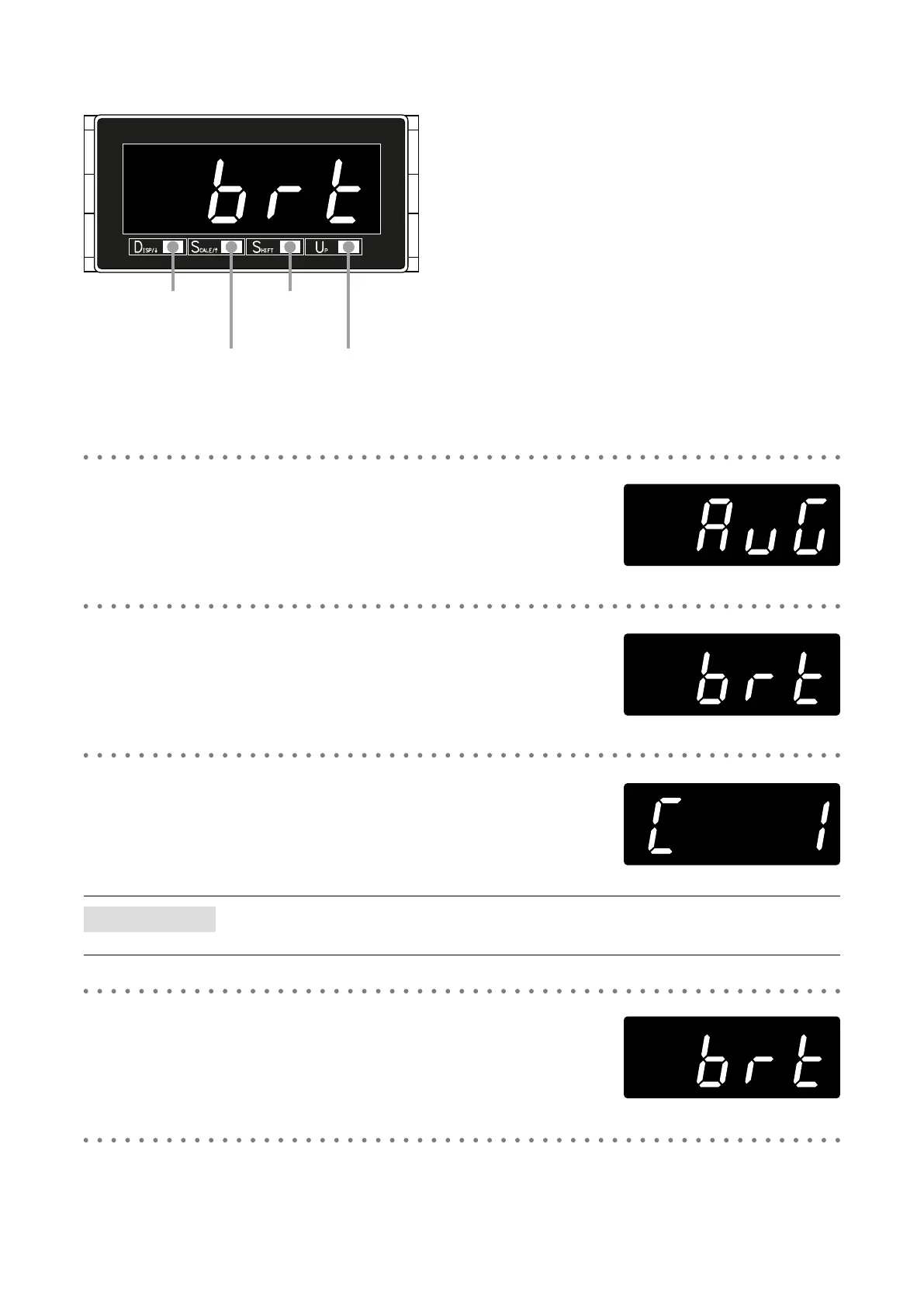
Hold down DISP/↑ button for 3 seconds or more to move on to
Display Setting Mode.
• The setting item ‘AVG’ (moving average sampling No.) is indicated.
2
Press DISP/↓ or SCALE/↑ button to go to the brightness setting.
• The setting item ‘BRT’ (brightness) is indicated.
3
Press SHIFT button to show the setting and UP button to select the
brightness.
• Select one among ‘C 0’, ‘C 1’, ‘C 2’, ‘C 3’, ‘C 4’ and ‘C 5’.
NOTE
‘C 0’, ‘C 1’, ‘C 2’, ‘C 3’, ‘C 4’ or ‘C 5’ is indicated depending on the setting.
4
Press SHIFT button to apply the new setting.
• And the setting item is indicated.
5
Hold down DISP/↓ or SCALE/↑ button for 1 second or more to return to Measuring Mode.
1,2,
5
2,5
3,4
3


 To Next Page