AirConditioningandAudioSystems
USBMode
1 2 3 4 5 6
M P 3 W M A
S C A N A S T S T
S R C
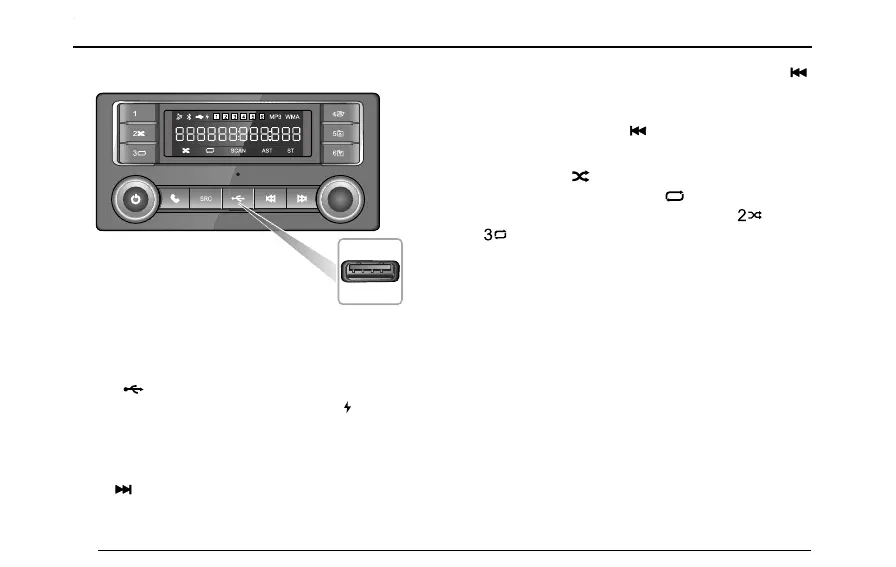
ConnectaUSB,andinsertUSBmemoryintotheUSB
socket.
When[]appearsinthedisplay,itindicatesthatthe
USBmemoryhasbeenconnected.When[]appears,it
indicatesthattheexternaldeviceisrecharging.
USBPlayback
Press[]buttononcetoselectthenexttrack.
Ifthetrackelapsedtimeismorethan3seconds,press[]
buttontoreturntothebeginningofthecurrenttrackand
pressitagaintostarttheprevioustrack.Ifelapsedtimeis
lessthan3seconds,press[]buttononcetoreturnto
theprevioustrack.
Duringplayback,[]inthedisplayindicatesthattracks
areplayedinrandommode,and[
]standsforthecycle
mode.T oselectthemodebyshortpressing[]button
or[]button.
Note:Thesystemcanplaymp3andwmalesonly.
RemovingUSB
RemovetheUSBmode,thenotheraudiosourceisplayed
viatheinteriorspeaker.DonotremoveUdiskdirectly
whenitisplayingthelesintheUdisk,itwilldamagethe
les.
BluetoohConnection
Thedefaultdevicenamedisplayedonthesystemis
SAIC-BT .
T urnonBluetoothfunctionofthemobilephoneandsearch
theplayerBluetoothtopair,thenthedisplaywillindicate
80



 To Next Page