16
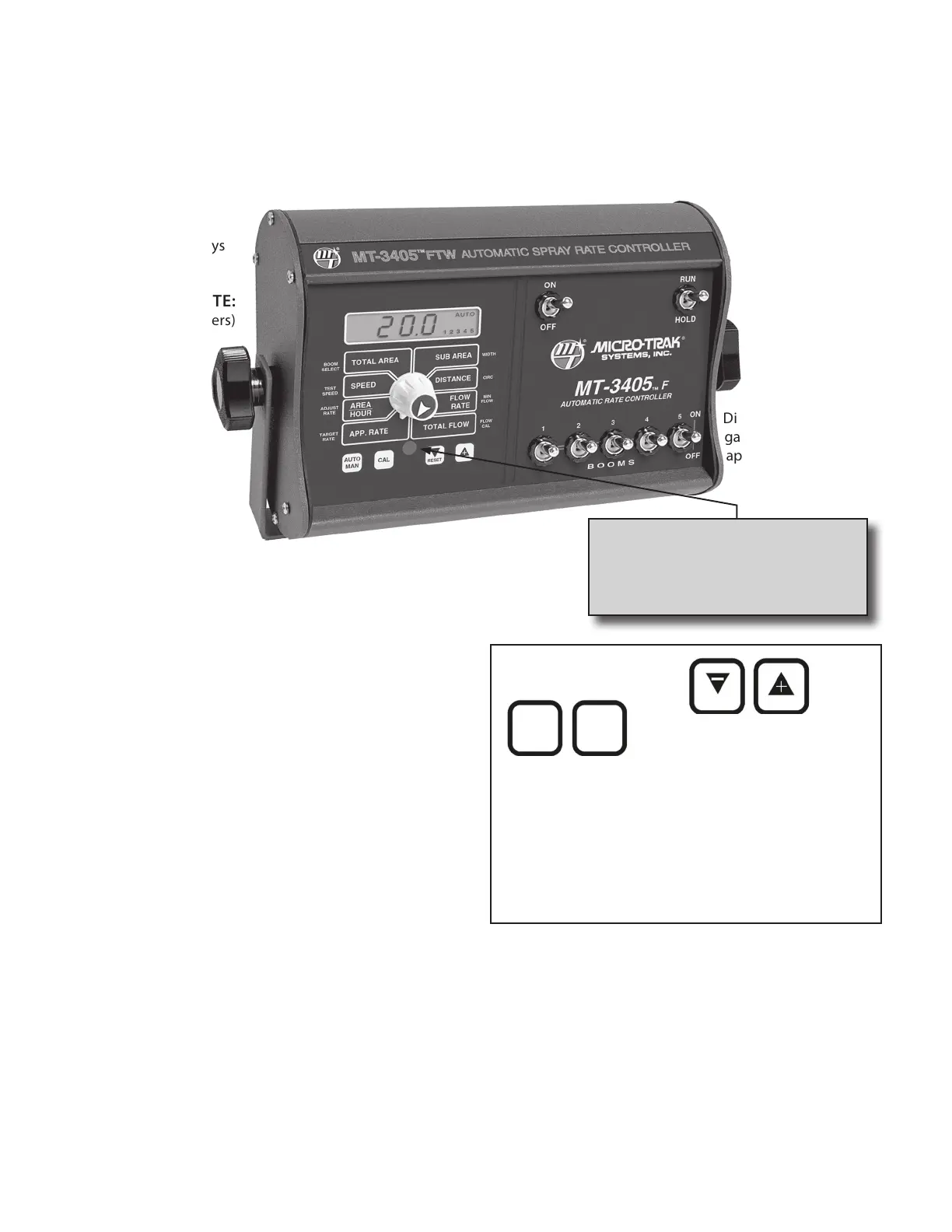
MT-3405 FTW Console Func tions
The MT-3405 FTW features a large, easy-to-read liquid crystal display, lighted Brite-Knob
™
rotary dial
and lighted panel for night use.
TOTAL AREA: Keeps a running count of the total acres
(hectares) worked. May be reset.
SPEED: Displays ground speed in miles per hour (kilometers
per hour).
AREA/HOUR: Displays
current work rate.
APPLICATION RATE:
Displays gallons (liters)
of liquid applied per
acre (hectare).
TEST SPEED: Used in calibration mode to simulate ground
speed for pre-field checkout.
ADJUST RATE: Used in calibration mode to enter an amount
of change for on-the-go adjustments to the target rate.
TARGET RATE: Used in calibration mode to enter the target
application rate (GPA/LPH).
SUB AREA: Counts acres (hectares) worked. Can be used to
measure individual fields or to perform periodic checks. May
be reset.
DISTANCE: Displays
distance traveled in
feet (meters). May be
reset.
FLOW RATE:
Displays number of
gallons (liters) of liquid
applied per minute.
WIDTH: Used in calibration mode to enter the working
width of your sprayer booms or other equipment.
TOTAL FLOW:
Displays total number
of gallons (liters)
applied. May be
reset.
CIRC: Used in calibration mode to enter the circumference of
the wheel that is equipped with the magnetic speed sensor.
Also used to calibrate Trak-Star or radar speed sensors.
MIN FLOW: Used in the calibration mode to enter the
minimum flow rate (GPM/LPM) of the spray boom.
FLOW CAL: Used in calibration mode to enter the calibration
value assigned to your flowmeter (see flowmeter tag.)
AUTO/MAN: Key which
changes operation from
automatic to manual
control mode.
CAL: This key is used to
enter and exit the
calibration mode.
Key Functions:
PROGRAM KEYS: Used
to calibrate the system.
• RESET clears the
counters when held for
three sec onds and not in
CAL.
• The “+” key increases
the figure dis played in
the read out, while “-”
de creas es it when in CAL.
IMPORTANT: To reset the Distance, Total Flow or Area
counters, turn the BriteKnob
™
rotary dial to the appropriate
item, place the system in HOLD and depress “RESET” key for
approximately three seconds.
BOOM SELECT: Used in calibration mode to select an active
boom for calibrating boom width.
WARNING LIGHT: Indicates over or
under application of plus or minus
10% from the Target Rate. Also lit
when in CAL.
Calibration Positions
CAL
AUTO
MAN
RESET



 To Next Page