21
FLOW CAL: This po si tion is used to cal i brate the flow-
me ter for ac cu rate liquid mea sure ment. When this po si-
tion is se lect ed, the display will alternately show, every
three seconds, the flowmeter calibration value and the
total flow value. The flowmeter calibration
value is the number shown along with “CAL”
on the display. The total flow value is the
number shown when “CAL” IS NOT displayed.
The flowmeter calibration value is typical ly
selected when entering
the calibration number
from the tag attached
to the flowmeter. Enter
the calibration value stamped on the tag attached to the
flowmeter. The total flow value is typ i cal ly selected when
you are fine-tuning the flowmeter cal i bra tion (please refer to
Fine-Tuning Flow me ter Cal i bra tion). To select either one of
the values for calibration, simply press the “+” or “-” button
when the val ue you want to select is being displayed. Once
selected, the display will stop al ter nat ing between the two
figures for one minute to allow you to make the appropriate
ad just ment. After one minute fol low ing your last adjustment
to the value, or after you move the rotary selector away from
the FLOW CAL position, the display will alternate between
the two values.
Calibration (cont)
Entering Calibration Values (cont)
CAL
TOTAL FLOW
Every flowmeter is calibrated with water at the factory. If
your spray solution has a specific gravity or viscosity that is
different than water, flowmeter calibration should be done
for the specific solution (please refer to Fine-Tuning Flow me-
ter Calibration.)
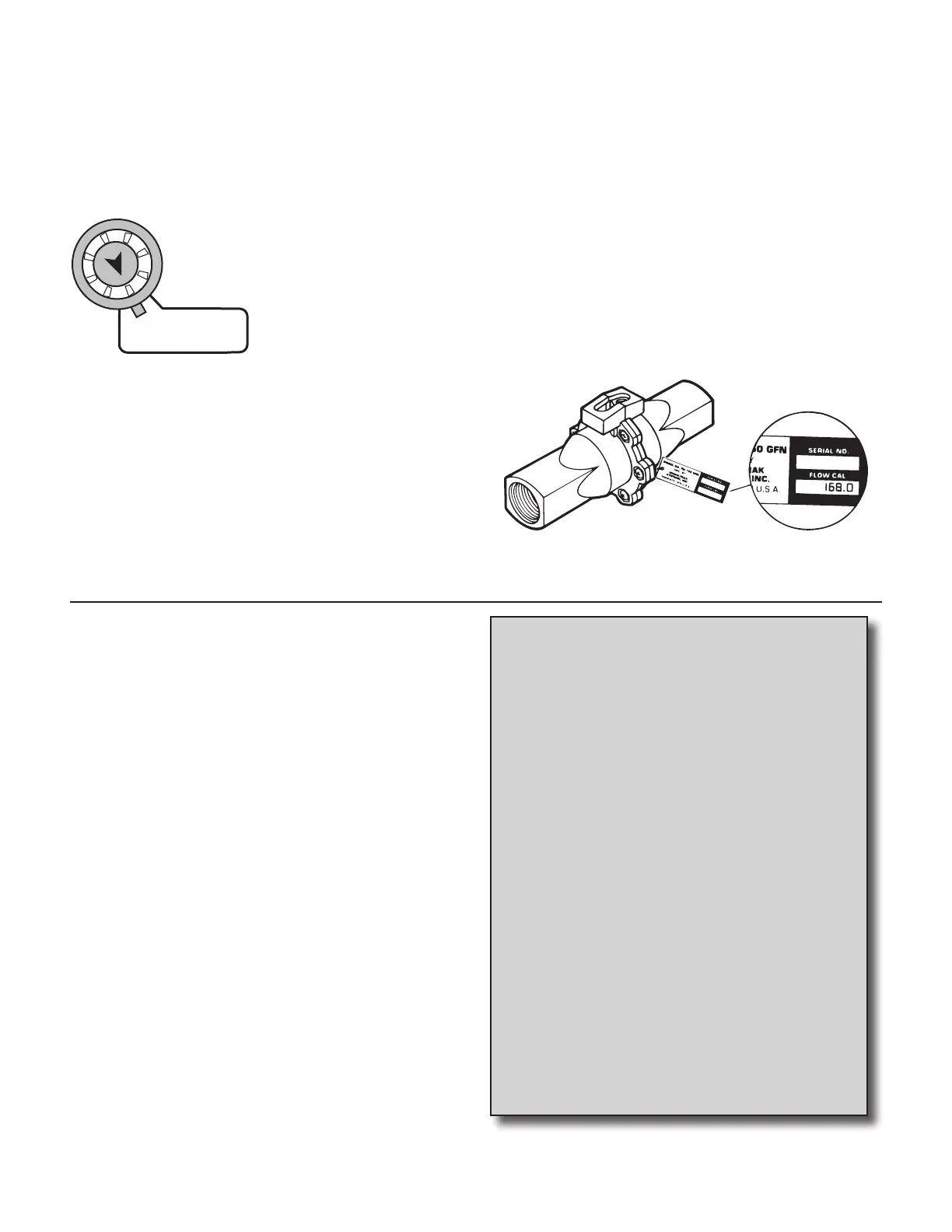
Your Micro-Trak flowmeter has been tested at the factory and
assigned a “FLOW CAL” value to make it operate properly
with the MT-3405 FTW console. This number is stamped on
the metal tag attached to the flowmeter. See Illustration 20.
This is a starting point only. The value must be fine tuned. See
Fine-Tuning Flowmeter Calibration on page 25.
Illustration 19
EXITING CALIBRATION: Upon completion of the cal i-
bration process, exit calibration by pressing and holding
the CAL button until the RED warning light turns off
(approxi mate ly three sec onds). Basic cal i bra tion is now
com plete. BEFORE beginning application, confirm
that the system is set up to do the job that you want
it to. Please refer to Pre-Field System Checkout on pages
26 and 27 to confirm cali bra tion settings, nozzle selec tion
and overall system per for mance.
Care and Maintenance
of your MT-3405 FTW
Console
Store the console in a cool dry location if it will not be
used for an extended period of time, such as during
the off-season.
As with any electronic equipment, use care in cleaning
so that water or other liquids do not enter the case.
Thoroughly rinse Flowmeter with clean water, install
plastic shipping plugs and keep from freezing.
Precautions
• The input pressure on the glass-filled nylon
flowmeter FM750 GFN should not exceed 150 PSI
(1034 kpa).
• Do not expose the flowmeter to liquid
temperatures exceeding 130 degrees F (55
degrees C).
• Some chemicals may damage the PPS turbine
or the nylon body of the flowmeter. If you are in
doubt, contact the chemical manufacturer.



 To Next Page