28
Operation (cont)
Rotary Switches
ROTARY SWITCH
During normal operation, you can view any one of eight
monitored functions by turning the rotary switch to the
appropriate position. The functions that are active during
normal operation are the blue boxes. When you are in
calibration mode, the functions that are active are in white
lettering outside of the blue boxes (please refer to Calibration
section for details).
APP. RATE
Displays the actual number of gallons per acre (liters per
hectare) being applied.
AREA/HOUR
Displays the acres (hectares) per hour that are being covered
for the current application.
SPEED
Displays the ground speed in miles (kilometers) per hour.
TOTAL AREA
Displays the acres (hectares) covered since the counter was
last reset to zero. This counter does not accumulate area
when the console is in HOLD or if all boom switches are
turned OFF. This counter may be reset to zero independent
of other system counters.
SUB AREA
Displays the acres (hectares) covered since the counter was
last reset to zero. This counter does not accumulate area
when the console is in HOLD or if all boom switches are
turned OFF. This counter may be reset to zero independent
of other system counters.
DISTANCE
Displays the feet (meters) driven since the counter was
last reset to zero. This counter does not accumulate when
the console is in HOLD. This counter may be reset to zero
independent of other system counters.
FLOW RATE
Displays the actual gallons (liters) per minute being applied.
TOTAL FLOW
Displays the total gallons (liters) applied since the counter
was last reset to zero. This counter may be reset to zero
independent of other system counters.
ONTHEGO “DELTA” RATE ADJUSTMENTS ADJUST RATE
The calibrated target rate in gallons (liters) per acre represents
the amount of solution that you typically want to apply.
However, under certain conditions, you may want to increase
or decrease this rate. This “DELTA” feature allows you to
easily make on-the-go rate adjustments by simply using
the “+” and “-” buttons. Each press of a button changes the
calibrated target rate by the amount of calibrated adjust
rate.
To use the “DELTA” feature, the console must have automatic
“AUTO” mode active and the rotary switch must be set to the
APP. RATE position.
Example: Adjust Rate = 1.0 and Target Rate = 10.0
With AUTO selected and the rotary selector turned to APP.
RATE, pressing the “+” key once will increase the target rate
from 10.0 to 11.0. The display will momentarily show the new
target rate of 11.0 and then show the actual application rate.
Pressing the “-” key once will decrease the target from 11.0 to
10.0. The display will momentarily show the new target rate
of 10.0 and then show the actual application rate.
NOTE: When you “DELTA” the target rate, the display will
momentarily show you the new target rate (approximately
two seconds) and then resume showing the actual
application rate. The new target rate is maintained until
further adjustments are made using the “DELTA” feature,
the console is turned off, or calibration changes occur.
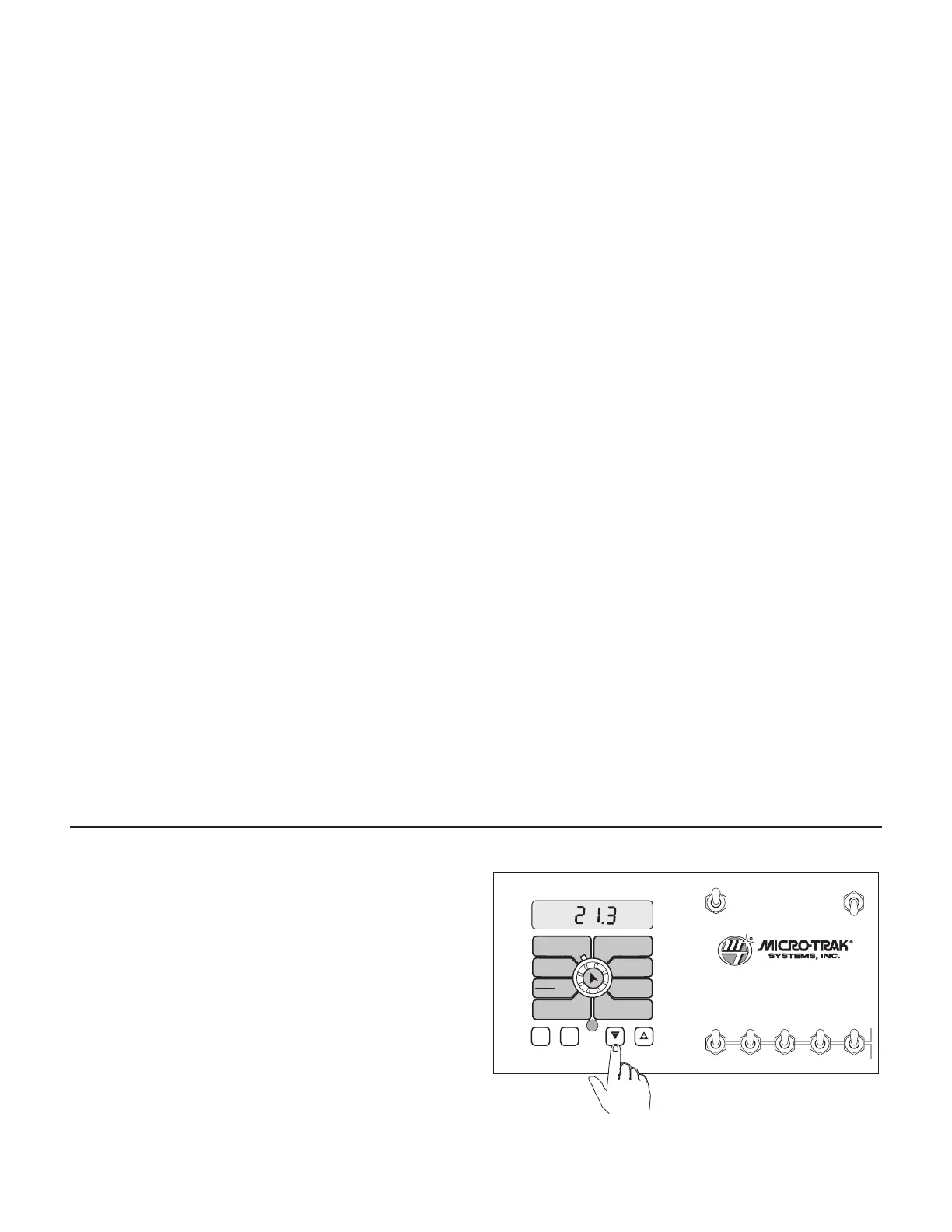
Resetting System Counters
The TOTAL AREA, SUB AREA, DISTANCE and TOTAL FLOW
counters maintain a running count during operation
regardless of the position of the rotary switch. When any of
these counters reach their maximum capacity, or when you
want to start a new count, the value in the register may be
reset to zero by performing the following routine. Counters
may be reset independently of each other.
1. Place the Run/Hold switch in the HOLD position.
2. Turn the rotary switch to the counter position to be
reset.
3. Press and hold the RESET button until the display reads
zero.
4. Release the RESET button and resume normal operation.
See Illustration 23.
Illustration 23
WIDTHBOOM
SELECT
TEST
SPEED
ADJUST
RATE
TARGET
RATE
CIRC
MIN
FLOW
FLOW
CAL
SPEED
DISTANCE
FLOW
RATE
TOTAL AREA
APP. RATE TOTAL FLOW
SUB AREA
ON
OFF
ON
OFF
12345
B O O M S
RUN
HOLD
AREA
HOUR
CAL
AUTO
MAN
RESET
MT-3405
™
F
AUTOMATIC RATE CONTROLLER
MANAUTO
V 1 2 3 4 5



 To Next Page