22 IP920 Operating Manual: Chapter 4 Configuration
4.3.5 SNMP Agent Config ...
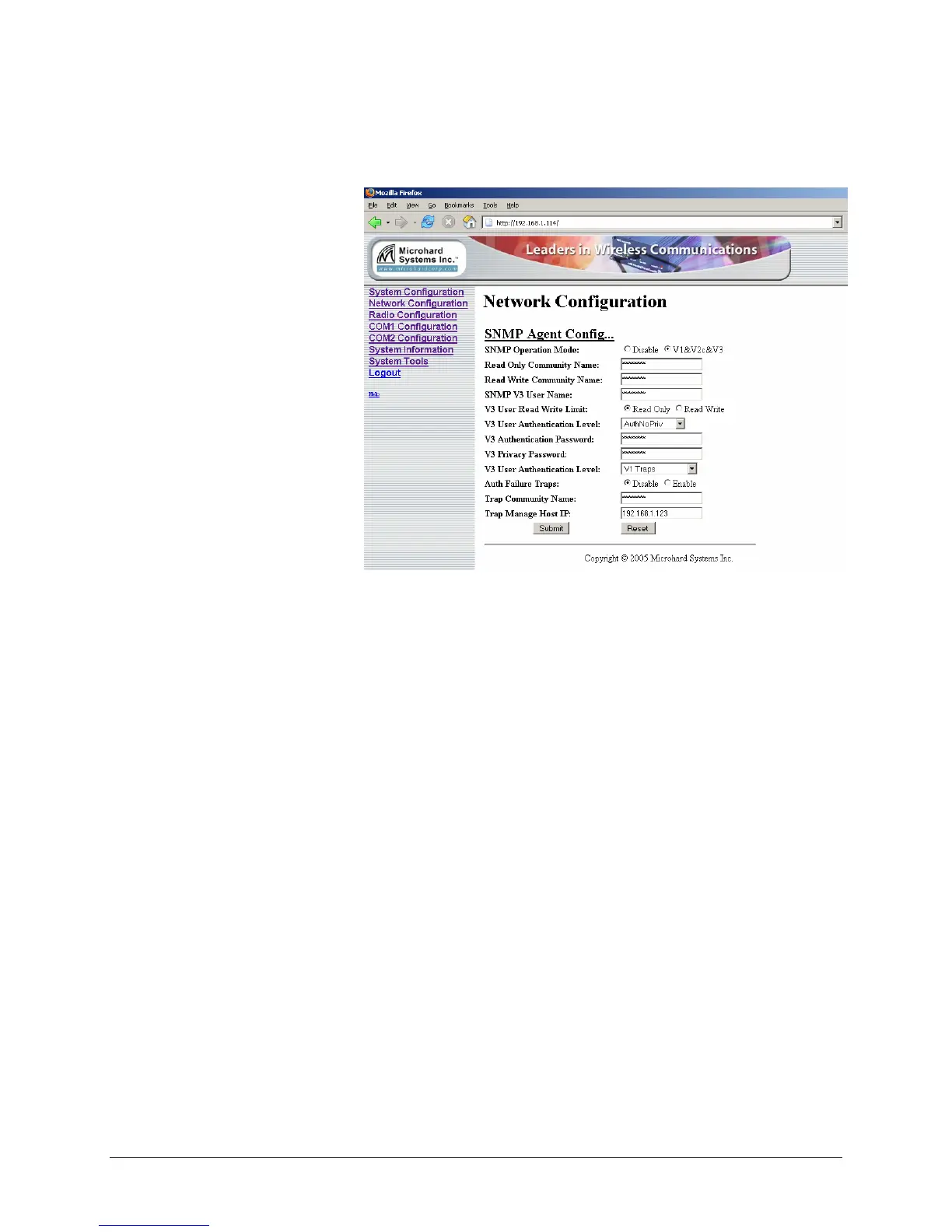
Figure 11 SNMP Agent Config
SNMP Operation Mode: SNMP agent can be disabled or enabled. If
disabled, no SNMP service is provided from the device. When enabled, this
SNMP agent can handle SNMPv1, SNMPv2c and SNMPv3.
Read Only Community Name: This gives the agent ability to handle
request from SNMPv1 and SNMPv2c clients. This community name has
only read priority
Read Write Community Name: This gives the agent ability to handle
request from SNMPv1 and SNMPv2c clients. This community name has
read/write priority.
SNMP V3 User Name: Defines user name for SNMPv3
V3 User Read Write Limit: Defines accessibility of SNMPv3, can choose
from read-only or read-write priority. If "read-only" is selected, the
SNMPv3 user only can read information; if "read-write" is selected, the
SNMPv3 user can read and write (set) variables.
V3 User Authentication Level: Defines SNMPv3 user's authentication
level. Choose from,
noAuthNoPriv: don’t need authentication and encryption.
AuthNoPriv: need authentication but don’t need encryption.
AuthPriv: need authentication but don’t need encryption.



 To Next Page