12
Cabinet, Continued
Validate
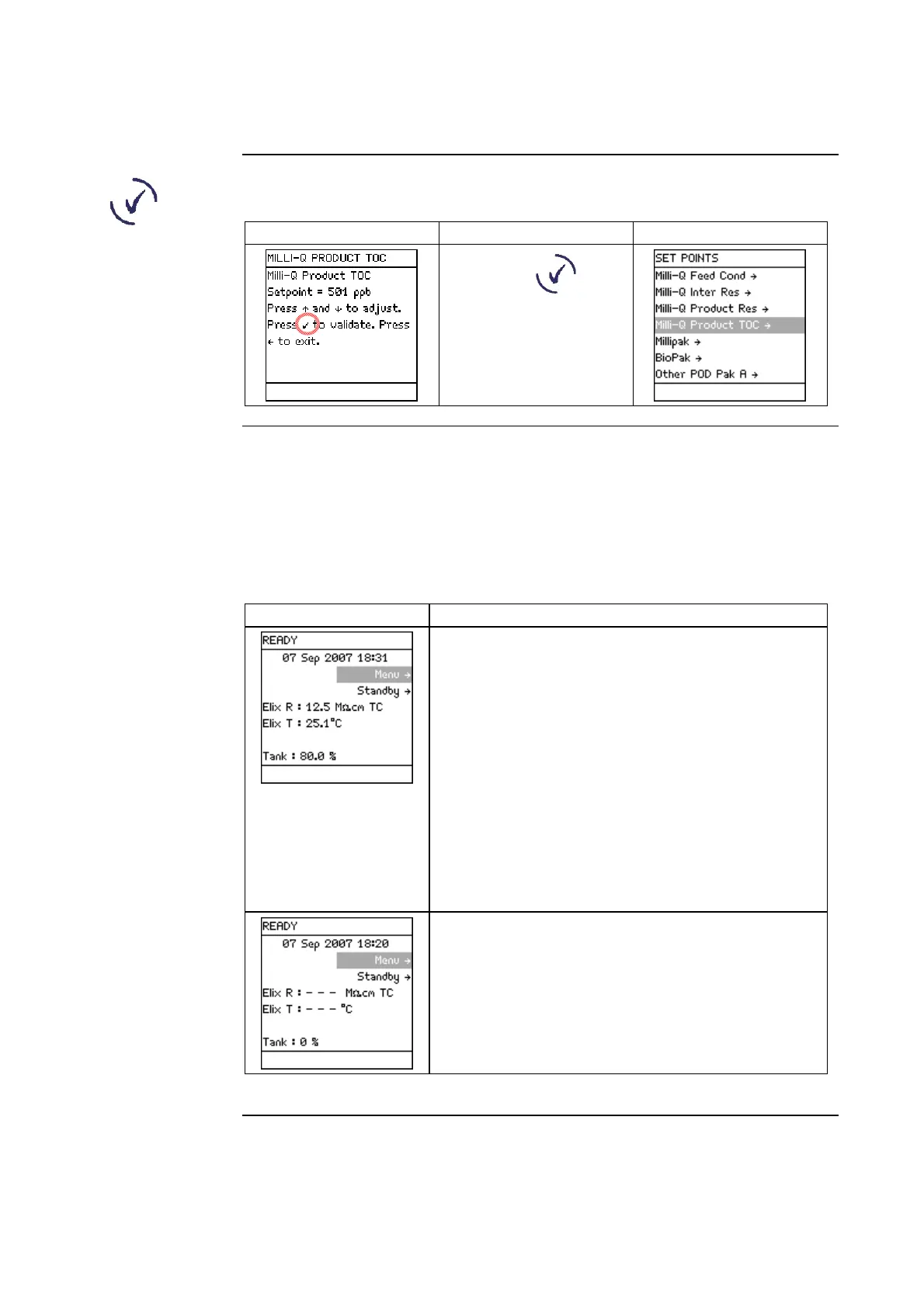
The use of the Validate Keypad button is shown below.
Diagram 1 Action Diagram 2
Press .
READY Mode
– water quality
values
• The READY Mode screen display is explained below.
• This screen display shows the resistivity and temperature of the water filling
the Reservoir.
• This water is further purified and is then dispensed from the Q-POD Unit.
The quality of the water from the Q-POD Unit is shown on the Q-POD
Display.
Diagram Explanation
In this example, the water filling the Reservoir
has:
• a resistivity of 12.5 MΩ.cm,
• is temperature compensated (TC),
• a temperature of 25.1°C, and
• the Reservoir is 80% full.
NOTE:
When the Milli-Q System stops filling the
Reservoir, the last measurements of water quality
are continuously displayed. New measurements
are displayed once the Reservoir starts to be
refilled.
• In this example, the Milli-Q System was
powered on but did not begin to fill the
Reservoir.
• In this case, there are no water quality
measurements to display.
Continued on next page







 To Next Page