32
Alarms generated during installation, Continued
MILLI-Q
RES < SP,
REPLACE
QUANTUM
message
• This alarm occurs because the Quantum Cartridge is not fully rinsed out or
there is air in the tubing near a resistivity sensor.
• This alarm goes away when a few litres of water are dispensed from the
Q-POD Unit.
• To cancel the text display of this alarm message, follow the instructions on
the LCD.
LOW FEED
PRESSURE
message
• This alarm occurs because there is air in the tubings and in the new Progard
Pack.
• When the air is gone and replaced with water, this alarm does not occur
anymore during installation.
• To cancel the text display of this alarm message, follow the instructions on
the LCD.
Eliminate LOW
FEED WATER
PRESSURE
message
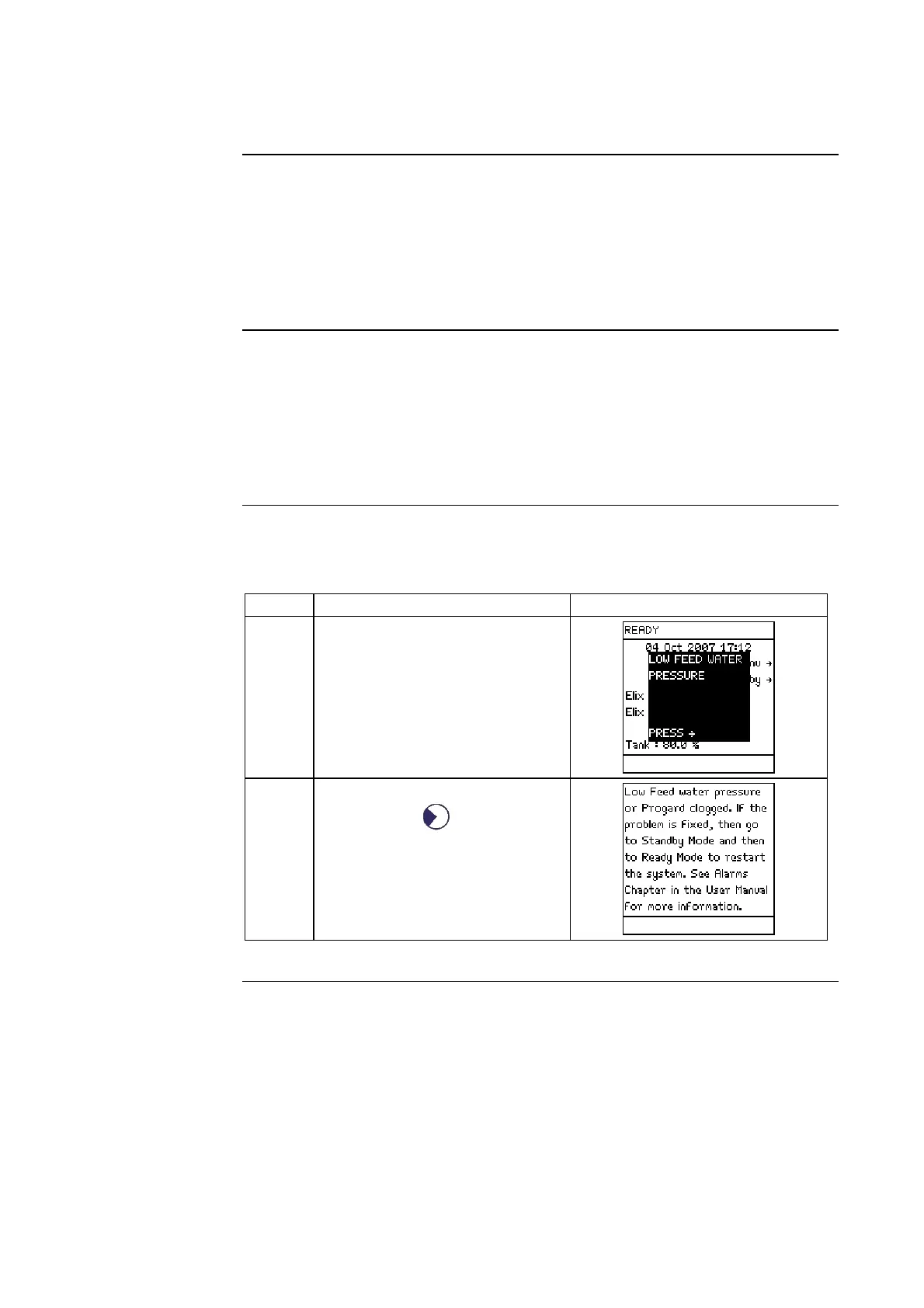
Follow the steps below to allow the Milli-Q System to function after the
LOW FEED WATER PRESSURE alarm message is displayed.
Step Action Diagram
1 When the feedwater pressure is
low, the Milli-Q System has an
Alarm.
2 Cancel the text display of this
alarm. Press
.
Continued on next page







 To Next Page