2-2 Power management
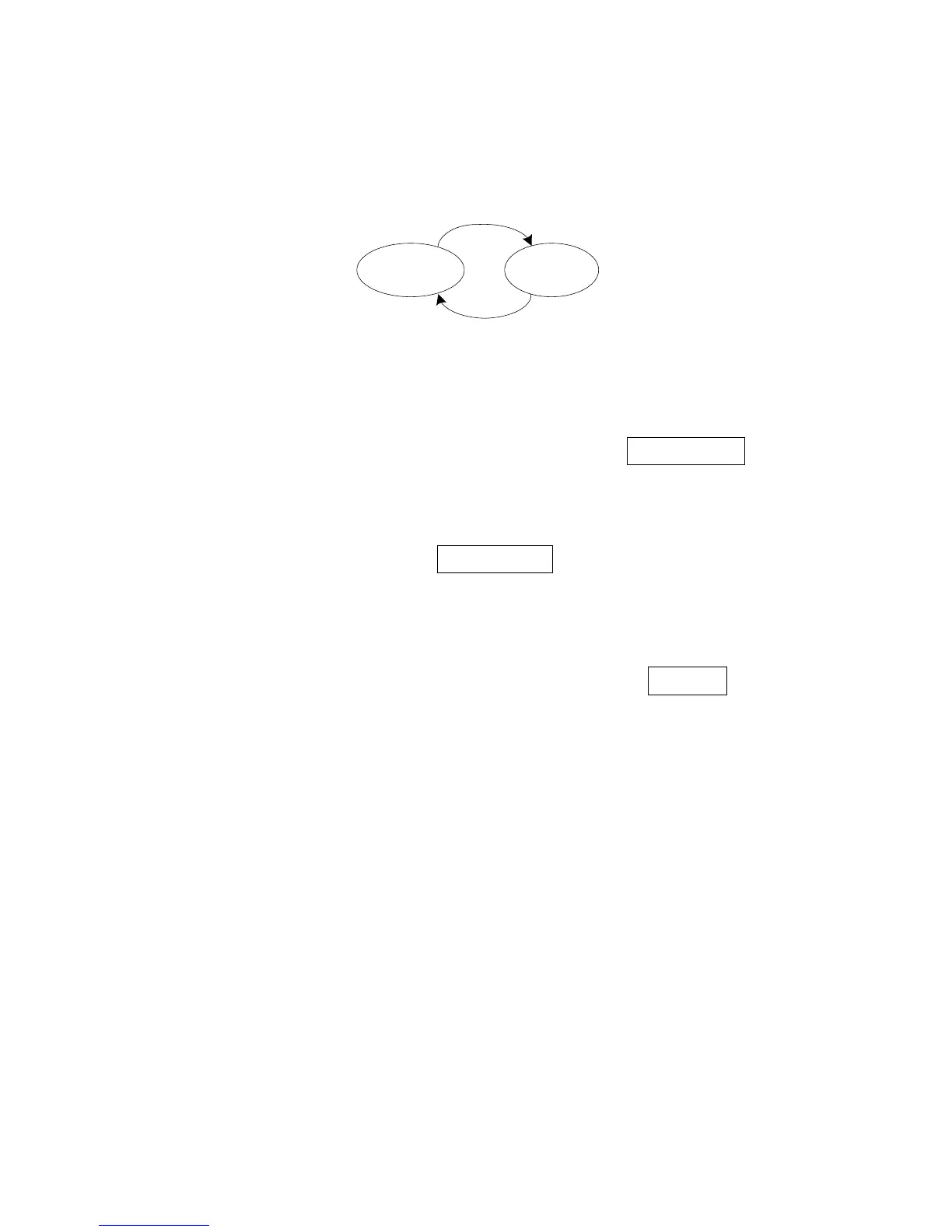
The scanner has two power states (Awake and Sleep).
Awake
State
Sleep(Deep)
State
①
②
Figure 2-2 State machine of power management
① After finishing all operation, scanner will go to Sleep state base on Auto-sleep delay(see
“4-5
Scan mode & some global settings”
), and turn off laser, swing-mirror etc.
② Interrupted event(SCAN button is pressed or falling-edge of signal RXD occurs) will make the
scanner go to Awake state.
Note: Once the scanner is awakened, at least Auto-sleep delay must elapse before it re-enters Sleep
state.
The scanner will automatically switch to the Sleep state whenever possible, so that the scanner can
consume as less current as possible. If RS232 cable is currently applied and Deep sleep(see
“4-5 Scan
mode & some global settings”
)is enabled, the scanner can enter Sleep State more deeply, and the
supply current can drop to be 0.9mA.
In other cases, the supply current in Sleep State is 25mA (RS232 cable) or 30mA (USB cable).


 To Next Page