EasyManua.ls Logo

Mindeo FS580 - Page 35

Mindeo FS580
114 pages
Print Icon
To Next Page IconTo Next Page
To Previous Page IconTo Previous Page
Loading...
29
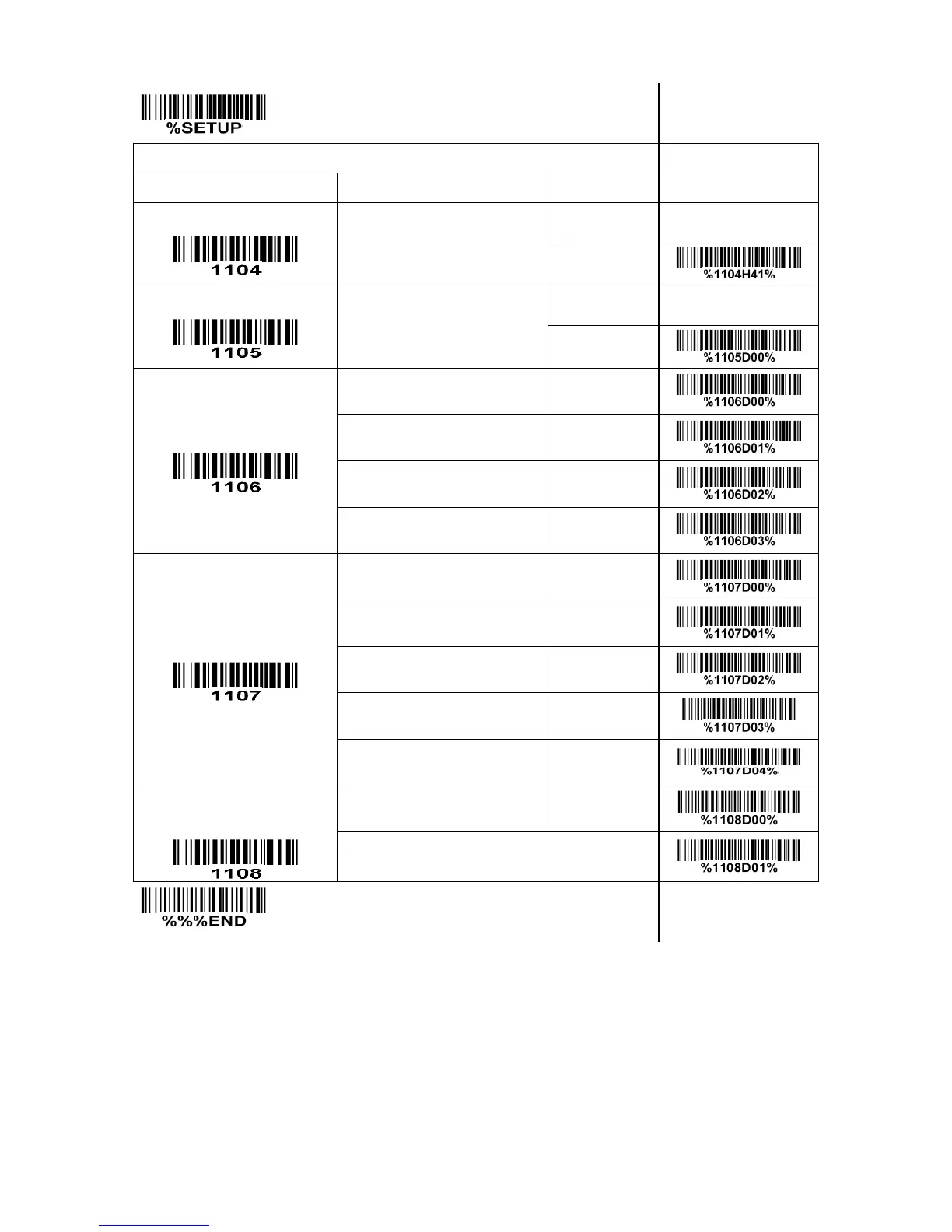
SETUP
Multiple-scan setting
Single-scan setting
Option barcode
Option
Alpha. value
Code ID setting
00-FF
16
(ASCII)
00-FF
16
<A>*
Insert group selection
00-44
(00:None)
00-44
00*
Supplement digits
None
00*
2 digits
01
5 digits
02
2 or 5 digits
03
Truncation/Expansion
None
00*
Truncate leading zeros
01
Expand to EAN-13
02
Truncate system character
03
Add country code
04
Ink Spreading
Canceling
Note 1
Disable
00*
Enable
01
END
Note 1: If enabled, the scanner can more easily read the UPC-A barcode printed with ink spreading. But
it may cause the scanner to decode some well-printed UPC-A barcode wrongly. Please ask the advice
from the support engineer of the manufacturer before applying this function.

Table of Contents

Related product manuals