Patient Data Management 9-5
9.2.8.1 To review images
You can review all images stored in an exam, and send, delete or analyze the stored images.
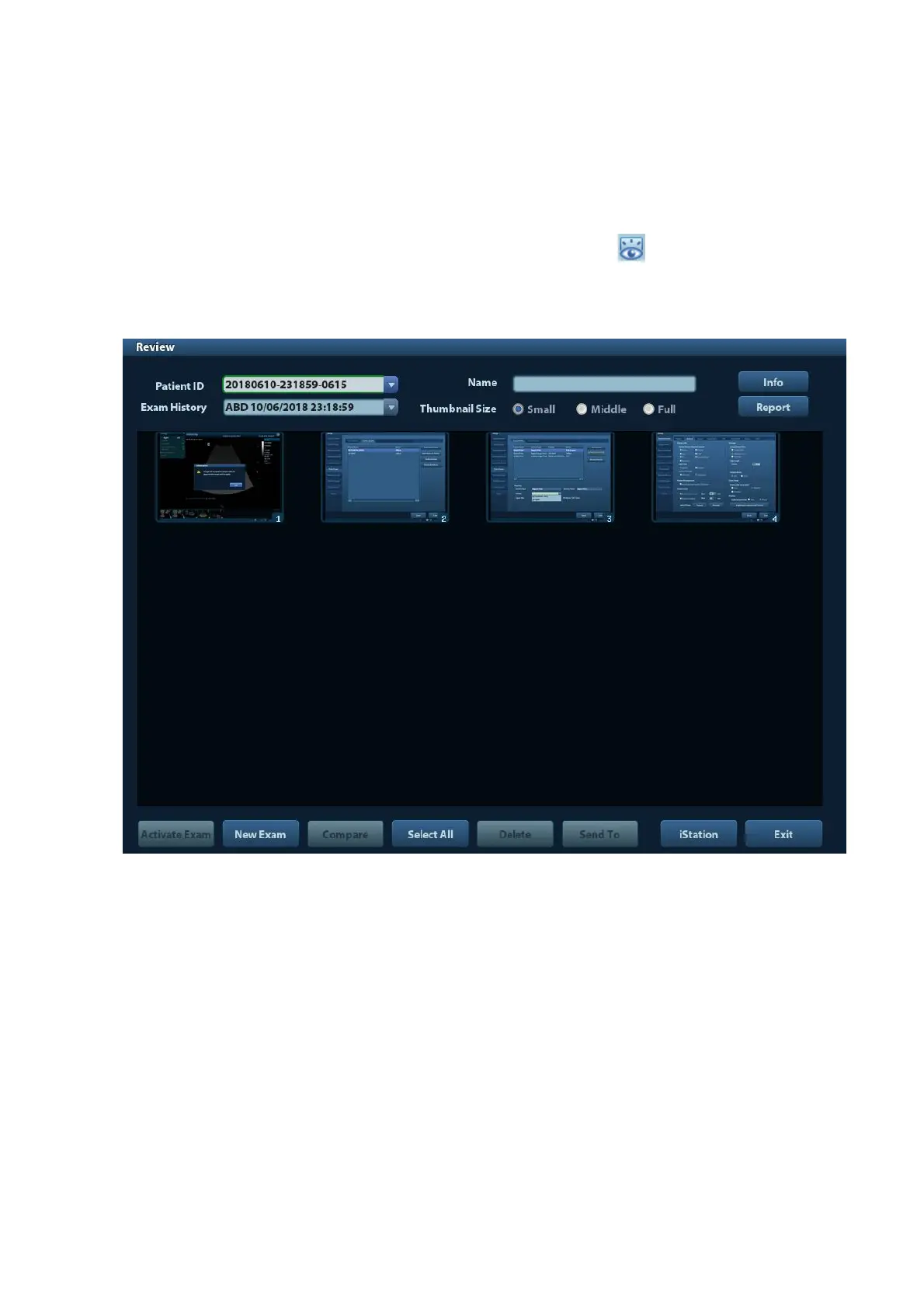
To enter Review:
Press <Review> to enter Review screen. The system display the images stored in
this exam of the current patient.
Select an exam of a patient in the iStation screen, and click to enter the Review
screen to review the images of the patient. You can also select more than one exam,
and the system will display images of the lately exam images in Review status.
The Review screen is shown as follows:
To exit Review:
Click [Exit] on the Review screen; or,
Press <ESC> or <Review> again.
Basic operations
Move the cursor onto an exam item in the Exam History area and press <Set>. The
selected item is highlighted. Click [Info] or [Report] to view patient information or report.
Double-click a thumbnail to view and analyze an image. Rotating the Multifunctional
knob will navigate through thumbnails.
The function buttons are described as follows:
Exam History:
You can select one certain exam from the exam directory to review the images.
If entered from iStation, the screen displays the record(s) selected in the iStation.
If no patient is selected when it was in iStation, then all the patients in the system
database will be displayed, and the current patient exam is listed.



 To Next Page