Chapter Five: Operation How To Calibrate the 670 Instrument
73
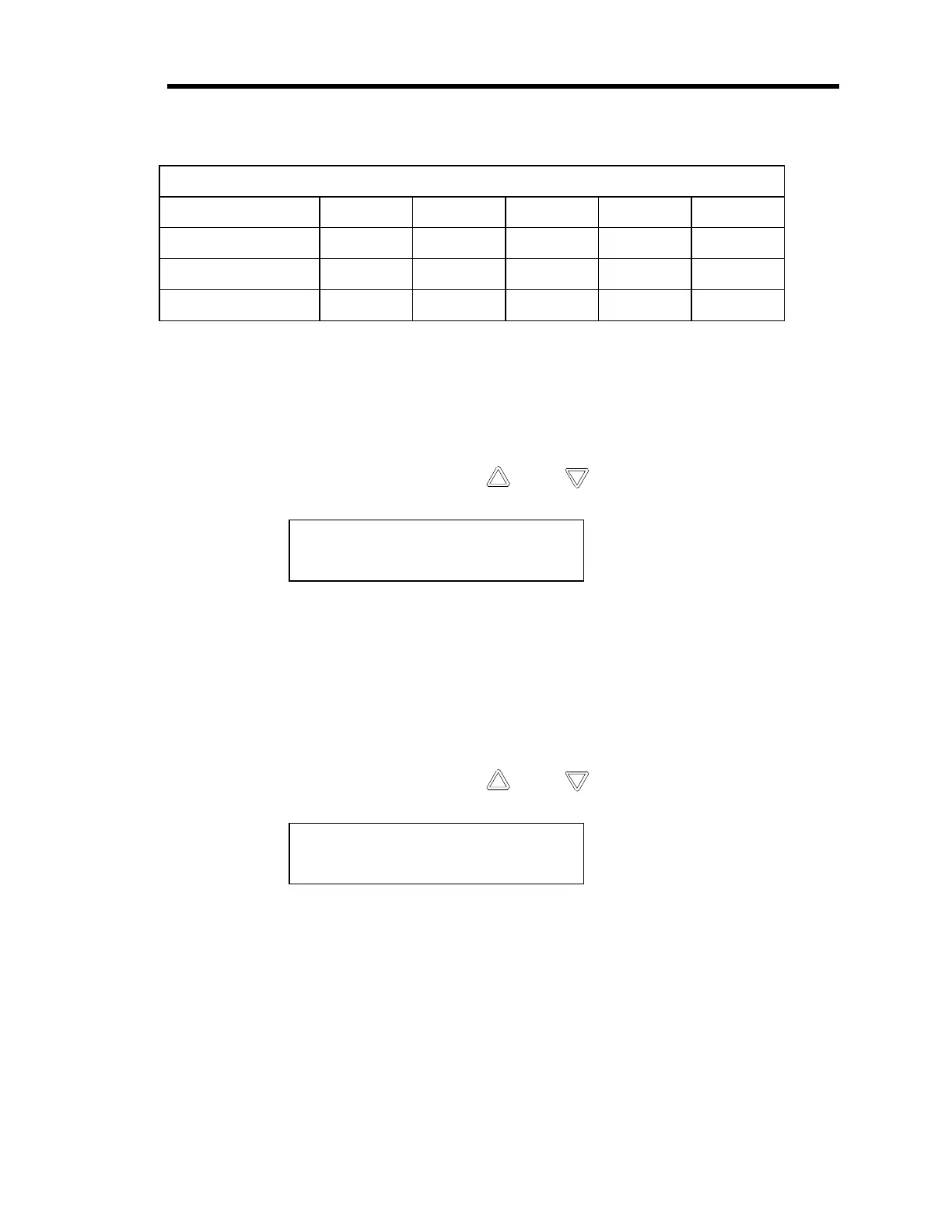
Relationship Between Averaging Entry and Calibration Times
Averaging Entry: 20 40 60 80 100
Null 17 sec. 24 sec. 32 sec. 40 sec. 49 sec.
F.S. 9 sec. 13 sec. 17 sec. 20 sec. 24 sec.
Zero 21 sec. 30 sec. 39 sec. 50 sec. 1 min.
Table 16: Relationship Between Averaging Entry and Calibration Times
Refer to
Averaging
, page 51, for more information.
6. Press the [
CAL
] key to enter the calibration menu.
7. Repeatedly press either arrow key ( [
] or
[ ] ) to scroll to the null screen.
NULL -0.0001 Volts
Press ENTER to cal
8. Press the [
ENTER
] key to initiate the null calibration routine.
This step may take several minutes to complete, depending upon the averaging entry.
Refer to Table 16 for an approximate time. The message “
CALIBRATING
” will flash
on the display until the calibration procedure is complete. The reading should go to
0.000
±
0.0005. If the reading does not approach 0.000, press the [
ENTER
] key again to
repeat the null calibration routine.
9. Repeatedly press either arrow key ( [
] or
[ ] ) to scroll to the full scale screen.
FS: 9.99998 Volts
Press ENTER to cal
10. Press the [
ENTER
] key to initiate the full scale (FS) calibration routine.
The message “
CALIBRATING
” will flash on the display during the calibration process.
The reading should go to 10.000
±
0.0005. If the reading does not approach 10.000, press
the [
ENTER
] key again to repeat the F.S. calibration routine.
11. Pump down the system to a pressure less than the resolution of the pressure transducer.
To achieve a proper zero, the pressure of the system must be
less
than
the resolution of
the pressure transducer used to measure the system pressure. The transducer will not be
Artisan Technology Group - Quality Instrumentation ... Guaranteed | (888) 88-SOURCE | www.artisantg.com


 To Next Page