4 Operation
24
Series 275 Mini-Convectron Module with DeviceNet
Instruction Manual - 275563
4.2 Panel Indicators and Adjustments
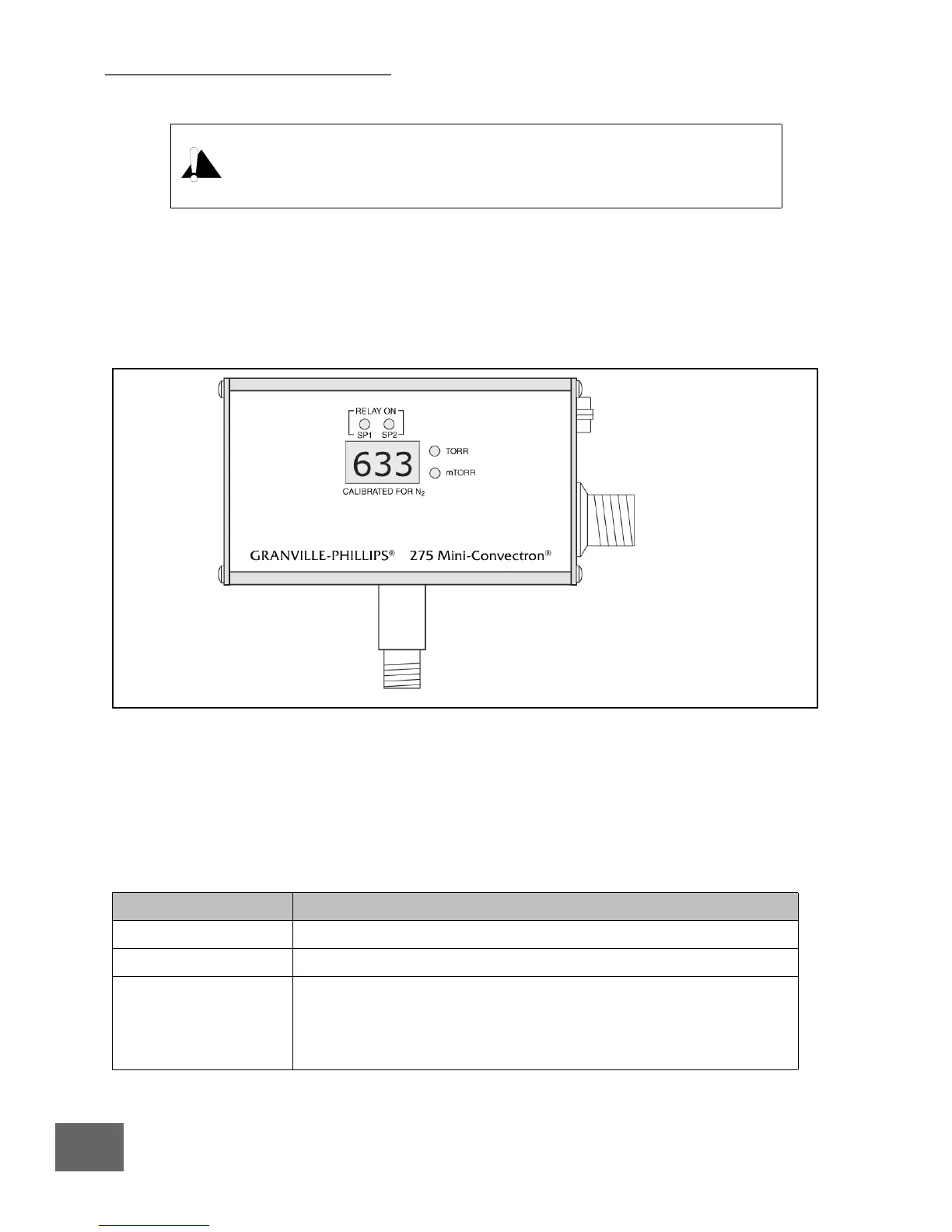
The two LEDs on the Display panel of the Mini-Convectron Module indicate whether the setpoint
relays are actuated, and two LEDs indicate whether the digital pressure display is in Torr or milliTorr.
See Table 4-1.
NOTE: The Series 275538 and 275553 Mini-Convectron Modules are available
to read/display Torr/mTorr, mbar/10
-3
mbar, or KPa/Pa. See page 4 of
this instruction manual.
Using the module to measure the pressure of flammable or explosive gases can
cause a fire or explosion resulting in severe property damage or personal
injury.
Do not use the module to measure the pressure of flammable or explosive gases.
Figure 4-2 Digital Display Panel on the Mini-Convectron Module
Table 4-1 Digital Display Panel on the Mini-Convectron Module
Feature Description
Relay ON The LEDs illuminate green when the programmed setpoint is activated.
Pressure value display Provides 3-digit indication of measured pressure.
Torr and mTorr LEDs
(See the NOTE, above.)
Torr is illuminated green when the 3-digit display indicates pressure in
Torr.
mTorr is illuminated green when the 3-digit display indicates pressure in
mTorr.



 To Next Page
 Loading...