53
Replacing the MicroSD Card
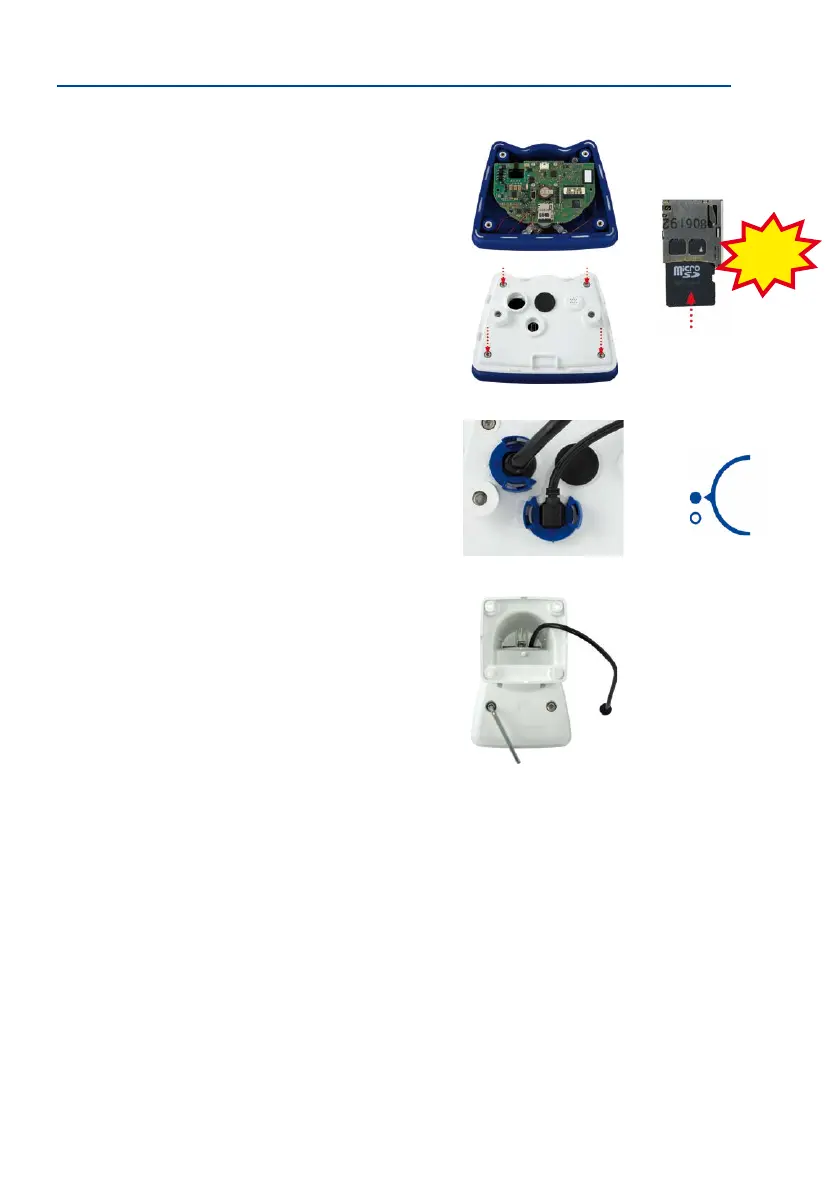
2.6.2 Inserting the MicroSD Card
1. Insert the MicroSD card: Push the MicroSD card into the
card slot as shown, until an audible and perceptible click
indicates it is in place.
2. Mount the back plate: Replace the back plate of the cam-
era housing, ensuring that the back plate screw holes are
correctly positioned above the thread inserts.
3. Screw the back plate tight and replace the connection
cables: Place the four Allen screws back into the back plate
and tighten the screws using the supplied 2.5 mm Allen
wrench. The previously removed cables must now be recon-
nected (see Section 2.7.5 and Section 2.7.6).
4. Attach the camera: Re-attach the camera to the weather
-
proof housing using the two lock screws. Make sure that
none of the cables are bent or squashed.
5. Activate recording: If you have inserted a MicroSD card that has already been MxFFS
formatted, you can activate recording under Admin Menu > Storage on External File
Server / Flash Device. Once the camera has been rebooted, it automatically activates
recording.
6. If you have inserted a new MicroSD card, it must rst be formatted as described in
Section 3.4, «MicroSD Card Recording».
Push-push operation:
insert the MicroSD card
and push it in gently
Click!
Bayonet catch closed



 To Next Page