59
Network and Power Connection
2.7.8 Variable PoE
The power consumption of the camera depends on the functions in use as well as any periph-
eral devices connected (see table). PoE classes 1, 2 or 3 may be selected in the browser-based
user interface in order to optimally adjust the camera to your system design (PoE switch in
use, emergency power concept, etc.).
PoE Power Level Classes (IEEE 802.3af Standard)
Class Max. power consumption Camera operating mode and peripheral devices
1 0.44 W–3.84 W
LowPower mode; no peripheral devices (available
soon)
2 3.84 W–6.49 W Normal mode; max. 1 W for MxBus peripheral devices
3 6.49 W–12.95 W
FullPower mode; max. 2.5 W for MxBus peripheral
devices (for example, MX-GPS-Box and MX-232-IO-Box
to MxBus), max. 4 W for peripheral devices to MxBus
and USB interface
Caution
If the total power consumption of the camera and peripheral devices exceeds the power
provided by the PoE switch for the specied class, the switch can disconnect the camera
from the power supply.
In this case, the camera will only be accessible again once
the peripheral devices have been disconnected from the camera and the camera
has been restarted.
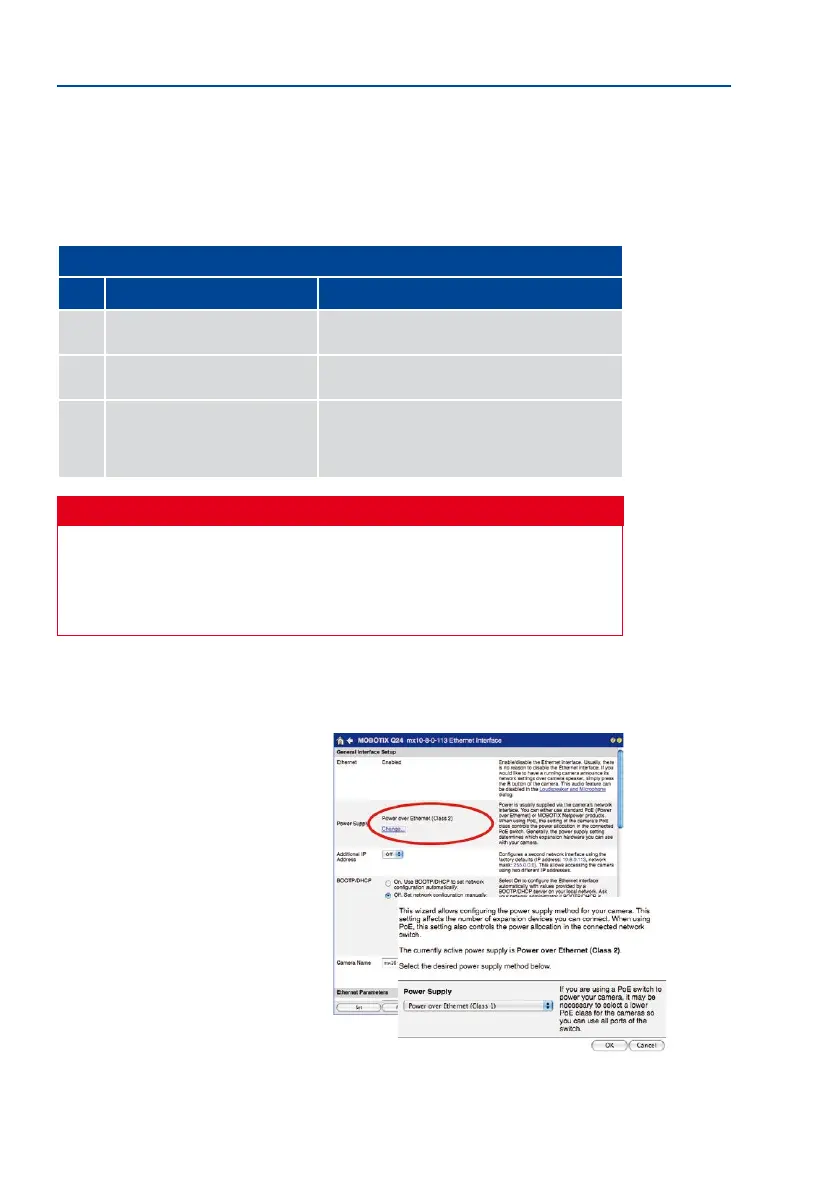
The default setting is usually ne, and nothing needs to be changed. However, the PoE power
class must be changed in the browser if a higher or a lower power class is required for your
application:
1.
Select Admin Menu > Network Setup >
Ethernet Interface (for experts).
2.
Click on Change under Power Supply.
3. A Power Wizard will appear to guide
you through the PoE conguration
steps.
4.
Next, restart the camera: Disconnect
the camera from the power supply.
Then reconnect it, for example, by
disconnecting and ten reconnecting
the Ethernet cable at the PoE switch.
Variable PoE: Multiple
cameras can be oper-
ated simultaneously
from the same switch



 To Next Page