58
M26 Camera Manual: Installation
2.7.7 Connecting a Two-Wire MxBus Cable
You can use such a cable to connect additional MOBOTIX mod-
ules (e.g., the MX-GPS-Box or the MX-232-IO-Box) to the M26.
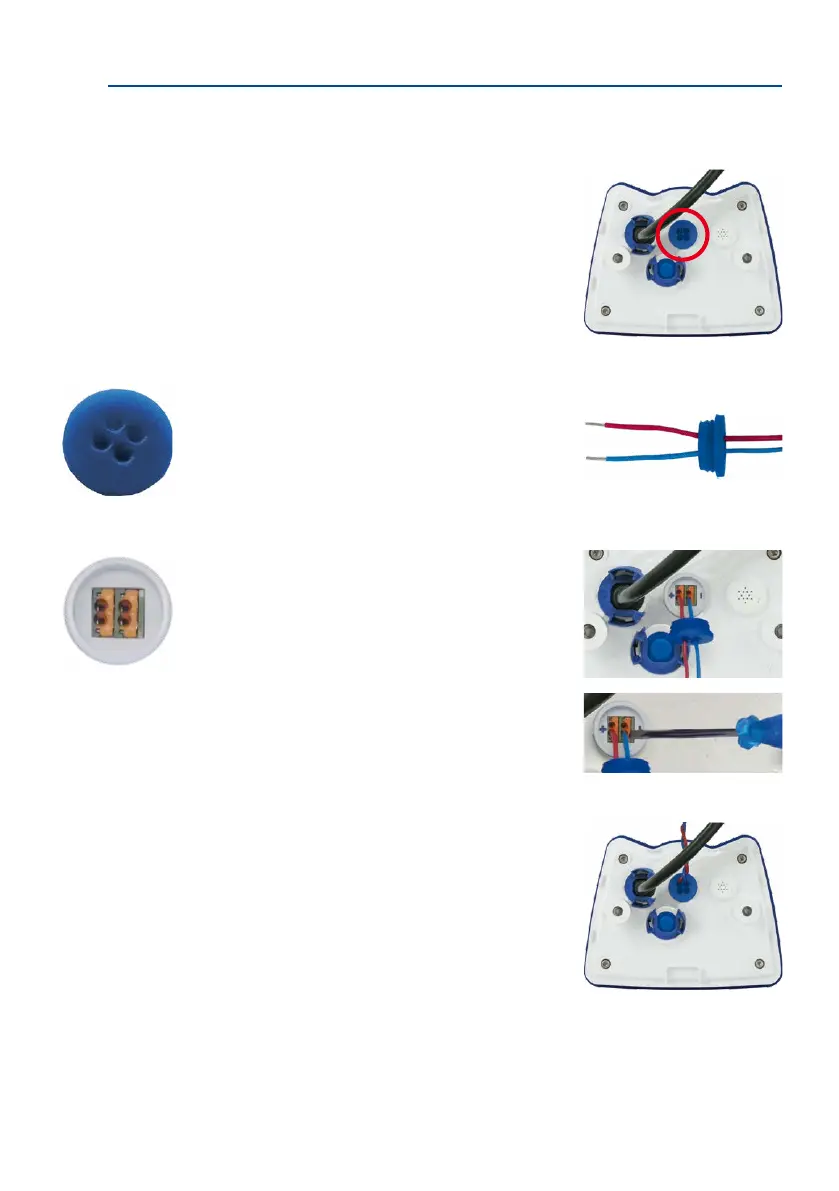
Note that you can attach two MxBus cables (each having
two wires) to the MxBus connector (red circle in gure).
Take care not to switch the polarity of the wires. It is rec
-
ommended to use the same wire color for +/– for the entire
MxBus system (e.g., red = +, blue = –).
Procedure
1. In case the camera had already been installed, remove the camera so you can access
the connectors on the back.
2.
Prepare MxBus cable
: Remove the blue single wire
plug. Strip 5 mm (1/5 in) of insulation from the wire
ends of the MxBus cable, then push each wire into one
of the four holes in the single wire plug (this prevents
humidity from entering the camera).
3.
Connect MxBus cable
:
Push back the blue single wire
plug so that you can easily attach the MxBus cable.
Attach the MxBus wires by rmly pushing the wires
into the corresponding connectors.
If you need to remove one of the wires, unlock the
connector by pressing on the orange-colored area
using a small screwdriver, then pull out the wire.
4.
Close the MxBus connector
: Carefully press the single
wire plug into the connector socket and twist the
MxBus wire pairs.
The length of the entire
MxBus wiring must not
exceed 50 m/55 yd.
Single-wire plug
MxBus connector



 To Next Page