73
Virtual PTZ and Full Image Recording
OperationUsingUSBJoystick
A standard USB joystick can drastically improve vPTZ operation for the user – in the browser
and in MxManagementCenter. Please rst install the joystick on the PC according to the
manufacturer’s instructions.
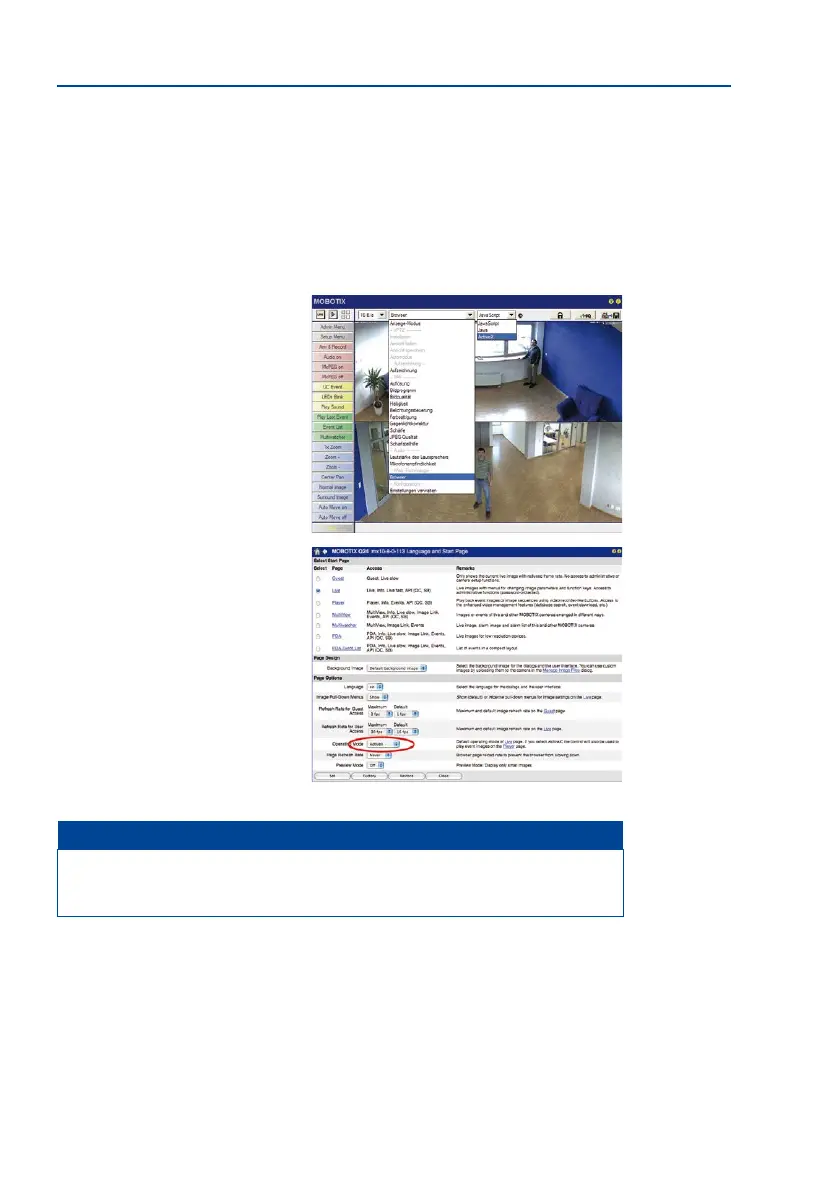
In order to use a USB joystick in the browser, make sure that you have a PC with a Windows
operating system and the latest version of Internet Explorer and that the
”ActiveX” mode
in the camera soware (browser) is activated:
• Switch to Browser in the Quick
Control.
•
Under Browser, select the option
ActiveX in the eld to the right. The
USB joystick can then be used until
the browser is closed.
•
To store the setting permanently,
ActiveX must be activated in
the Admin Menu. To do so, use
Language and Start Page in the
Admin Menu.
•
Under the page options, select the
ActiveX operating mode.
• Store the settings permanently
in the camera by clicking on Set
and Close.
• The joystick can now be used.
Notes
You will nd more information and details on vPTZ in the camera’s online help topic
«vPTZ Settings».



 To Next Page