19
EN
TECHNICAL MANUAL - B CLASSIC / B FUTURA / S CLASSIC
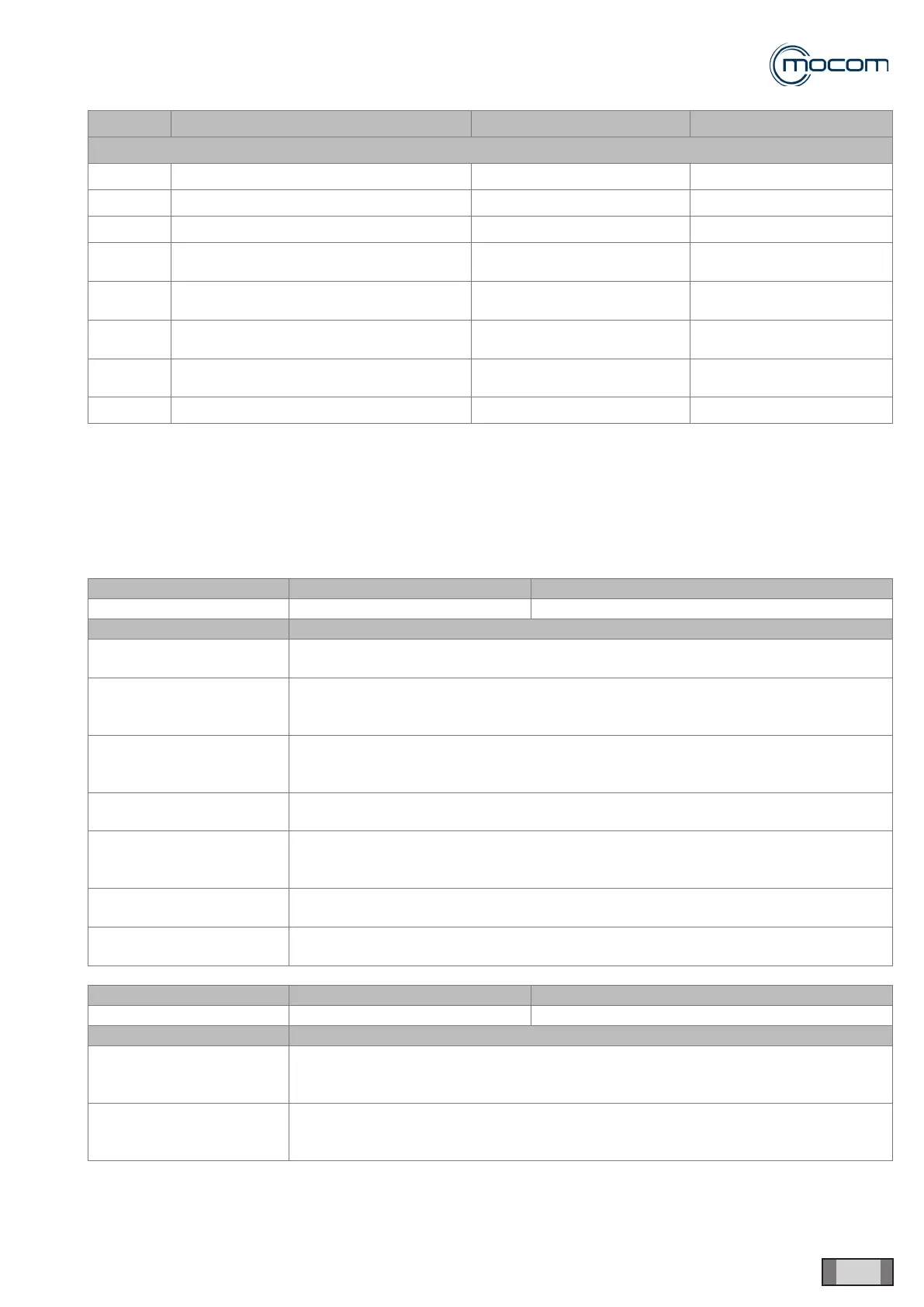
ALARMS
CODE ALARM DESCRIPTION INDICATION ON LCD MODE
ACCESSORIES (category S)
S 011 Closed printer door PRINTER: DOOR OPEN 2
S 012 Printer set-up error PRINTER NOT READY 2
S 020 Report backup request after 250 cycles CARRY OUT BACKUP 1 - Download NEW cycles
S 021
Overwriting alarm after 500 cycles
(Classic only)
OVERWRITING 1 - Download NEW cycles
S 030
Check through watchdog that one of the
main tasks has not crashed
SYSTEM ERROR 2
S 031
Check through hardware watchdog that
one peripheral device is not blocked
SYSTEM ERROR 2
S 032
Check through watchdog that one of the
main tasks is not blocked (e.g. innite loop)
SYSTEM ERROR 2
S 040 Check log saving in the ash memory LOG ERROR 2
1 = OK (warning) - Tap OK on pop-up window.
2
= OK + door unlock / RESET - Keep OK pressed for 3 seconds on the pop-up window and the autoclave will start the
procedure to open the door in full safety. When the RESET key appears in the left area of the LCD, hold it pressed for
3 seconds.
2.5 LCD E INDICATIONS
LCD E 000 Indication Alarm description Effect / Symptom
BLACKOUT Blackout. 24Vdc < 15V in cycle.
Possible causes / Checks Solution
Power supply voltage failed
suddenly.
When power supply is back, observe the indications that appear on the LCD to open
the door. Reset the alarm to repeat the sterilization cycle.
The autoclave was
switched off accidentally
from the main switch.
Power on the autoclave and observe the indications that appear on the LCD to open
the door. Reset the alarm to repeat the sterilization cycle.
The autoclave switched off
when the power plug was
pulled from the socket.
Reconnect the power cord and observe the indications that appear on the LCD to
open the door. Reset the alarm to repeat the sterilization cycle.
The alarm appears at each
power-on.
Ensure that the operator has reset the alarm properly and provide advice as to proper
operation
There is a problem with the
fuse holders.
Test the 16-a mains fuses for continuity using a tester Replace blown fuse with an
equally rated fuse. Power on the autoclave and observe the indications that appear on
the LCD to open the door.
Check the fuse holder plug.
Check to ensure that plug is not overtight.
Loosen plug a bit to achieve proper tightening.
Problem with power cord –
check power cord.
If damage is found, replace the complete power cord.
LCD E 001 Indication Alarm description Effect / Symptom
OVERVOLTAGE Overvoltage. 24Vdc < 34V in cycle.
Possible causes / Checks Solution
Power supply voltage
outside limits – check
power supply voltage.
Disconnect the power cord and check mains voltage. Value must be within nominal
voltage limits +/- 10%.
If outside limits, do not connect the autoclave and check the power mains.
Transformer output voltage
too high – check output
voltage.
Disconnect transformer output cable and check voltage. Value should not exceed 34V.
Change transformer.



 To Next Page