EasyManua.ls Logo

Mohr CT100 - Page 104

Default Icon
121 pages
Print Icon
To Next Page IconTo Next Page
To Previous Page IconTo Previous Page
Loading...
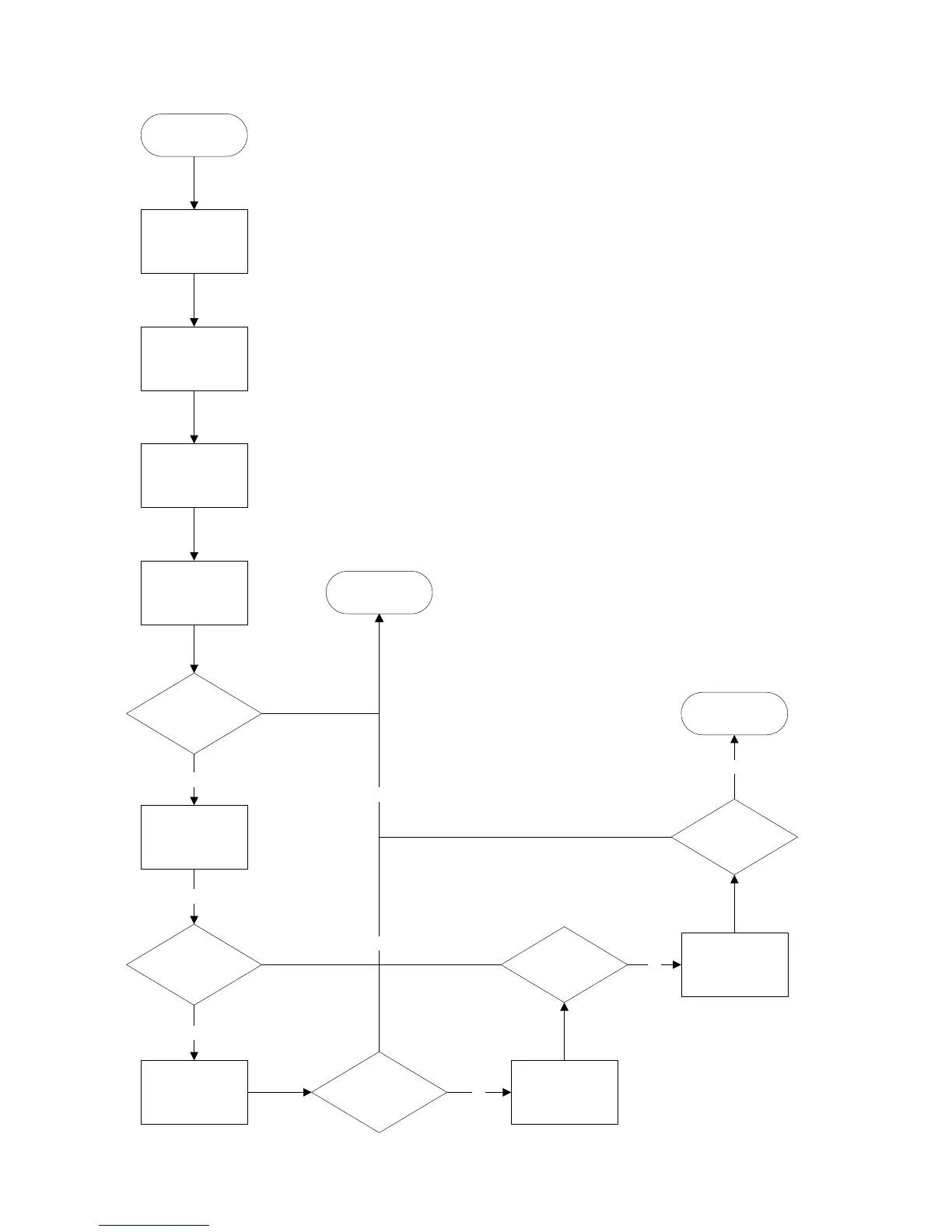
Appendix E: Operator Troubleshooting
98 Mohr CT100 / CT100HF Operator's Manual
Start Main Board
Diagnostics
Press the Main
Menu button until
the Main Menu
appears
Choose the
“Diagnostics”
menu item
Choose the “Main
Board” menu item
Choose “Mem
Test” menu option.
Were there any
failures?
Choose the GPIO
test menu option
Were there any
failures?
Choose the
Peripheral Menu
Option
Were there any
failures?
Download a test
via USB (see
CTViewer manual)
no
no
no
no
Did the
trace transfer
fail?
Download a trace
via Ethernet (See
CTViewer manual)
no
Did the
trace transfer
fail?
Analog Board
Diagnostics
no
yes
yes
Main Board
CT100 Requires
Servicing

Table of Contents

Related product manuals